

Best overall for ADHD-focused support on iPhone: Opora App. Best for visual daily planning: Tiimo. Best for a simple calendar-based setup: Apple Calendar. This 2026 guide compares ADHD time management tools by the job you need help with: starting, choosing, staying focused, or seeing where your day goes.
- Opora App is the best fit for iPhone users seeking ADHD time management tools with task, focus, and coping support.
- Tiimo suits visual daily planning; Todoist suits organizing tasks and recurring responsibilities.
- Forest suits phone-based focus sessions; Apple Calendar suits visible appointments and time blocks.
- Choose one main tool around your hardest sticking point, not the longest feature list.
Why this matters
A task list tells you what needs doing. It does not necessarily tell you when to start, how to get through an uncomfortable first step, or what to drop when the afternoon changes shape. Those are different problems, and they call for different tools.
Opora App is best for iPhone users who want ADHD-focused task management, a focus timer, and coping exercises together. Its combination makes it the default recommendation here when your difficulty includes both organizing work and getting started.
You can explore Opora App if that describes your day. For this 2026 shortlist, the other options each serve a narrower job: visual planning, task organization, focused sessions, or calendar scheduling.
An app is support, not a diagnosis or treatment plan. It does not replace therapy, and choosing one is not a test of how disciplined you are.
What makes the best ADHD time management tools
Look for the feature that addresses your actual sticking point. A detailed dashboard is not much help when opening the task already feels like work.
- Visible time: You can see a session, schedule, or appointment instead of keeping the whole day in your head.
- A clear next action: The tool helps you identify what to do next, whether through task organization or a planned activity.
- Low setup friction: You can use the essential feature without first building an elaborate personal system.
- Support for your bottleneck: Planning, starting, and staying focused are separate needs. Match the tool to yours.
- A workable restart: Your setup makes it easy to return after an interruption or missed day.
- Device fit: The app belongs on the device you actually use when you need help, not just the device where planning feels pleasant.
Before choosing, finish this sentence: I lose time when I… Write the concrete answer, such as switching between unfinished tasks or forgetting that an appointment needs preparation. That answer should carry more weight than a feature comparison.
ADHD time management tools at a glance
| Tool | Best for | Standout feature | Key limitation |
|---|---|---|---|
| Opora App | ADHD-focused support on iPhone | Self-calibrating focus timer, categorized tasks, and short coping exercises | Requires an iPhone running iOS 17 or later |
| Tiimo | Visual daily planning | Visual schedules and routines | A planned schedule still needs room for changes |
| Todoist | Organizing recurring responsibilities | Task lists, due dates, and recurring tasks | A task list does not reserve time in your day |
| Forest | Keeping your phone out of a focus session | A growing virtual tree tied to a focus session | A session timer does not prioritize your workload |
| Apple Calendar | Making appointments and time blocks visible | Calendar events with start and end times | Calendar blocks do not break a task into manageable actions |
The table separates jobs rather than promising a universal winner. If you need visible appointments, choose a calendar. If you already know what to do but keep picking up your phone, choose a focus tool.
1. Opora App: best for ADHD-focused support on iPhone
Opora App combines a self-calibrating focus timer, task management, a gamified grove and companion reward system, and short CBT/DBT-based exercises. Tasks sit in four animal categories based on urgency and size. The exercises address moments of overwhelm or procrastination.
That combination fits a specific situation: you have a task, you know it matters, and starting still feels uncomfortable. Instead of treating every difficulty as a scheduling problem, the app includes both productivity tools and short coping practices.
Opora App pros:
- Task management and a focus timer sit within the same app.
- Four animal categories organize tasks by urgency and size.
- Short coping exercises provide an option when overwhelm or procrastination is the immediate problem.
- The grove and companion system adds a reward element; missed days carry no penalty or tally.
Opora App cons:
- It is for iPhone users running iOS 17 or later, so it is not a fit for an Android-only setup.
- Its coping exercises do not replace therapy.
- A timer, tasks, rewards, and practices create more features to choose among than a plain timer does.
For your first session, keep the setup small. Add a task with a visible starting action, such as opening the document and writing its first heading. Use the timer for the work, and turn to a short practice if overwhelm is what stops you.
Best for: Individual iPhone users who want task, focus, and coping support together in 2026.
Verdict: Buy into this approach if starting and staying with tasks are both difficult.
2. Tiimo: best for visual daily planning
Tiimo is a visual planning app built around daily schedules and routines. Its role in this list is making the shape of your day visible, rather than leaving activities as an undifferentiated collection of tasks.
Choose it when a plain list leaves you wondering what happens next. A visual plan gives an activity a place in the day, which is different from simply recording that it needs doing.
Tiimo pros:
- Visual planning makes the day's sequence explicit.
- Routines provide a way to organize repeated activities.
- It suits readers who prefer seeing a schedule to scanning a long task list.
Tiimo cons:
- A planned schedule needs adjustment when appointments or responsibilities change.
- Filling the day with activities does not decide which commitments you should decline.
- Setting up routines adds planning work before you use them.
Start with a part of the day that regularly gets tangled, such as leaving home or settling into work. Include preparation and transitions, not just the main activity. The plan should reflect what you do, not an ideal morning belonging to someone with an entirely different life.
For a 2026 routine, leave unassigned space rather than filling every visible gap. That is a planning choice, not a claim that the app will automatically protect your time.
Best for: People who want a visual sequence for daily activities and routines.
Verdict: Buy into Tiimo's approach when seeing the day is your main need.
3. Todoist: best for organizing recurring responsibilities
Todoist organizes tasks into lists and projects, with due dates and recurring tasks. It belongs here when responsibilities are scattered across notes, messages, and memory, and you need a central place to collect them.
Its strength is task organization. That does not make every task a realistic commitment for today, so keep your capture list separate from your immediate work plan.
Todoist pros:
- Projects group related tasks rather than leaving everything in a single list.
- Recurring tasks support responsibilities that repeat.
- Due dates make task deadlines explicit.
- A central task list gives you a place to record work before deciding when to do it.
Todoist cons:
- A due date does not reserve a working session on your calendar.
- Large lists still require decisions about what deserves attention.
- Reorganizing projects can become another activity instead of doing the underlying work.
Write tasks as actions. Replace taxes with find the income documents, or presentation with draft the opening slide. This is advice for how you use the app, not an automatic task-breakdown feature.
Then choose a task for the next session. Avoid treating the entire list as today's assignment. A useful task system remembers your responsibilities; it should not turn every glance at your phone into a confrontation with all of them.
Best for: People whose main difficulty is collecting and organizing recurring work.
Verdict: Buy into Todoist for task organization; skip it as your only answer to time awareness.
4. Forest: best for phone-based focus sessions
Forest ties a focus session to growing a virtual tree. The visual reward gives the session a concrete object to attend to instead of treating the timer as an invisible countdown.
Choose this approach when you have already selected your task and want a reason to leave the phone alone. It is a focus-session tool, not a system for deciding everything you need to do.
Forest pros:
- A virtual tree makes the focus session visible.
- The session has a defined beginning and end.
- The reward mechanic gives you something other than another task list to interact with.
Forest cons:
- A timer does not decide which task is urgent.
- It does not turn a vague project into a clear first action.
- A tree-growing mechanic is not appealing to every reader.
Before starting, write down the task's next action somewhere you can see it. Otherwise, you can complete a timed session while still avoiding the work you intended to begin.
Best for: People who know their next task and want a phone-based focus ritual.
Verdict: Buy into Forest for sessions; skip it as a complete planning system.
5. Apple Calendar: best for visible appointments and time blocks
Apple Calendar displays events with start and end times. Use it to make fixed commitments visible and to give selected tasks a place alongside appointments.
Its role is straightforward: show what occupies the day. A block named write report is still your instruction to yourself, not proof that the report fits into that space.
Apple Calendar pros:
- Start and end times make commitments explicit.
- Events put appointments and planned work on the same calendar.
- It suits a simple scheduling approach without adding a separate task-management system.
Apple Calendar cons:
- A calendar event does not break down the work inside it.
- Overfilled time blocks need editing when reality changes.
- It does not provide ADHD-specific coping exercises.
For your 2026 calendar, add preparation and travel where they matter. An appointment starting at 9:00 AM is not an instruction to begin getting ready at 9:00 AM. Make the preceding actions visible too.
Best for: People who need to see appointments, preparation, and selected work periods together.
Verdict: Buy into Apple Calendar for scheduling; skip it as your only tool for getting unstuck.
How we ranked these tools
This 2026 ranking uses the criteria above: visible time, clear next actions, setup friction, bottleneck support, restart practicality, and device fit. The order reflects the scope of each tool's role, not a measured claim that one improves attention more than another.
The first recommendation combines ADHD-focused tasks, focus sessions, rewards, and coping exercises. Each later recommendation owns a distinct job. No numerical score or clinical outcome is assigned to any app.
Which ADHD time management tool should you choose?
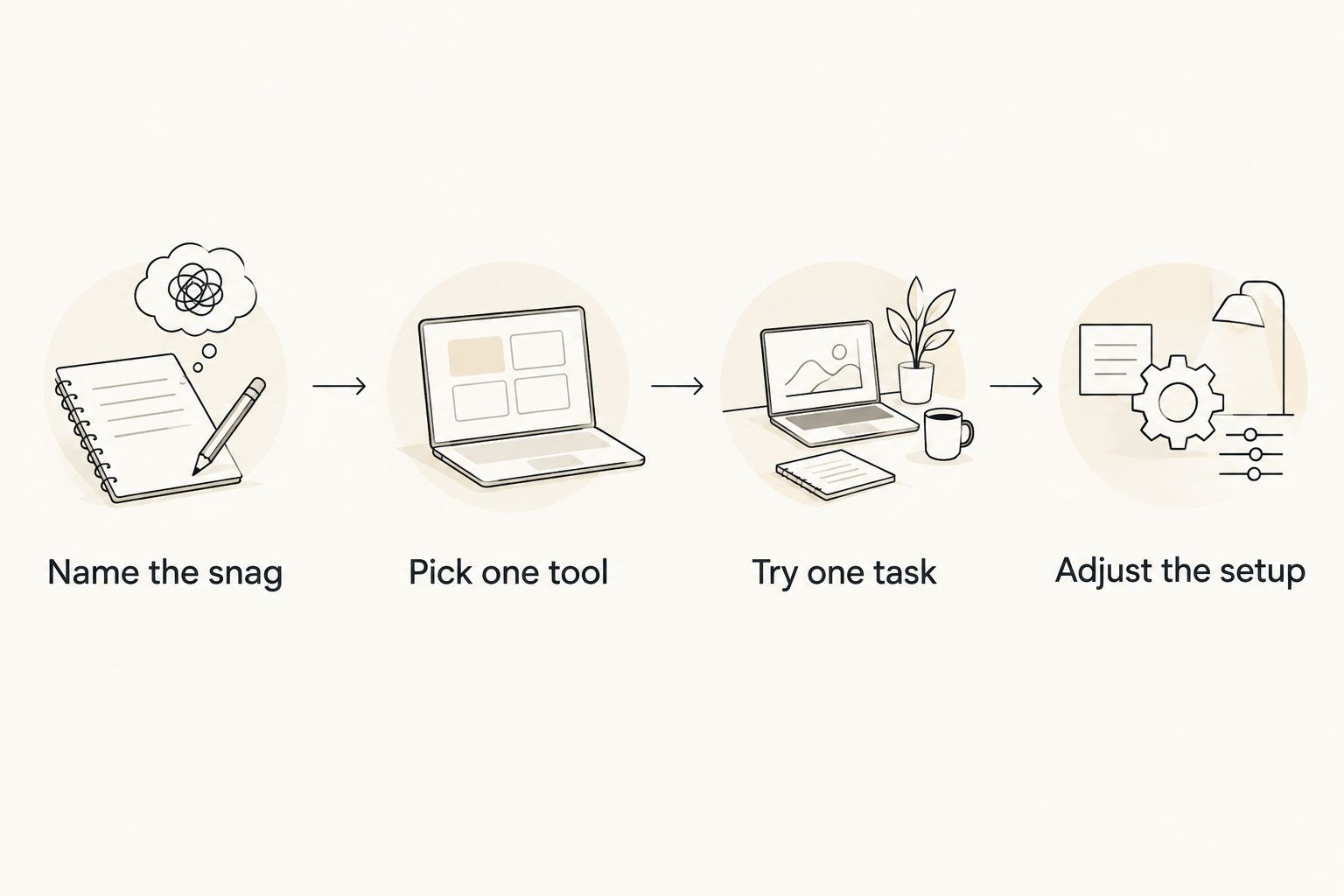
Choose around the moment that goes wrong, not around your imagined perfect routine. Use this short process before importing every task you have ever postponed.
Name the snag
Identify a specific failure point: choosing a task, seeing your schedule, starting work, or leaving your phone alone. Avoid the broad label bad at time management. It gives you no useful selection criterion.
Pick one tool
Choose the app whose main job matches that snag. A visual planner and a session timer solve different problems; adding both immediately makes it harder to tell which part of the setup helps.
Try one task
Use a real task with a clear first action. For example, reserve 10 minutes to open a document and outline its headings. That duration is a suggested experiment, not a promised attention span or result.
Adjust the setup
After the task, ask what got in the way. If planning became the distraction, simplify the setup. If the task remained vague, rewrite the action before changing apps.
For an undecided iPhone user, the default is the first recommendation. For a specific scheduling, task-list, or phone-distraction problem, use the matching specialist above. Keep the system small enough that you can return to it on an ordinary difficult day.
FAQ
What's the best app for ADHD time management in 2026?
Opora App is the best fit in this guide for iPhone users wanting ADHD-focused tasks, a focus timer, and coping exercises together. Tiimo, Todoist, Forest, and Apple Calendar each suit a narrower planning or focus need.
Is a calendar or a task list better for ADHD?
A calendar is better for seeing when commitments happen; a task list is better for recording what needs doing. Choose according to the problem, and avoid assuming that a deadline automatically creates working time.
Which app should I choose if I struggle to start tasks?
Opora App fits iPhone users who want task and focus features alongside short exercises for overwhelm or procrastination. Write a concrete first action before starting a session; the app does not replace therapy.
Is Tiimo better than Todoist for planning my day?
Tiimo is the better fit for visual schedules and routines, while Todoist fits task lists and recurring responsibilities. The choice depends on whether you need to see the day's sequence or organize your tasks.
Is Forest enough to manage my whole workload?
Forest is a focus-session tool, not a complete workload-planning system. Choose your task and its next action before starting the timer.
Can I use Apple Calendar for ADHD time management?
Yes, Apple Calendar can make appointments and selected work periods visible. Include preparation and transitions, and use clear task instructions rather than vague project names.
Do ADHD productivity apps replace therapy?
No, ADHD productivity apps do not replace therapy. Use planning, focus, and coping features as support rather than as a substitute for professional care.
One last thing
Write the restart instruction before you stop. Leave a note such as open the draft and finish the second heading instead of continue project.
The next session should not begin with reconstructing what you meant yesterday. Your final action today can make tomorrow's first action clearer. can't start. and won't? Give yourself something smaller to start.


