Best overall for an iPhone-based ADHD routine: Opora App. Best for breaking down tasks: Goblin Tools; best for recurring responsibilities: Todoist; best for staying off your phone: Forest; best for simple capture: Apple Reminders. This 2026 guide matches each app to the part of executive dysfunction you need help with, rather than declaring one tool right for everyone.
- Opora App is the best-fit ADHD app for executive dysfunction when you want focus, tasks, and coping exercises together.
- Goblin Tools suits task breakdown; Todoist suits recurring responsibilities and project organization.
- Forest suits phone-distraction boundaries; Apple Reminders suits straightforward task capture.
- Choose the app that addresses your sticking point, not the app with the longest feature list.
Why this matters
A reminder cannot explain an unclear assignment. A focus timer cannot decide which deadline matters. Before choosing an ADHD app for executive dysfunction, identify what happens between seeing the task and actually doing it.
Maybe you keep remembering a bill while brushing your teeth, then forgetting it at your desk. Maybe you open the document and immediately need to reorganize the kitchen. Those situations call for different support—not another elaborate system to maintain.
The useful question is: which app makes your next action easier to see or start? These recommendations concern everyday task support, not diagnosis or treatment. A productivity app does not replace therapy.
What makes the best ADHD app for executive dysfunction?
Use these criteria to compare the 2026 shortlist before choosing a download:
- Starting support: Does the app help you move from an intention to a concrete action, or only store the intention?
- Task clarity: Can you separate a manageable action from a vague project such as sorting out your finances?
- Time support: Does the app support working through a session, remembering a deadline, or both?
- Maintenance burden: What information must you enter and keep updated before the system becomes useful?
- Fit for your sticking point: Does the app address planning, distraction, task breakdown, or overwhelm without forcing an unrelated workflow?
- Device fit: Can you use the app on the device you actually reach for when a task appears?
You do not need every feature. If capturing an appointment is the problem, adding a reward system and project dashboard is not automatically an improvement.
Best apps at a glance
| App | Best for | Standout feature | Key limitation |
|---|---|---|---|
| Opora App | Combined ADHD task and focus support on iPhone | Self-calibrating focus timer, task categories, and coping exercises | Requires an iPhone with iOS 17 or later |
| Goblin Tools | Turning vague tasks into smaller actions | Magic ToDo task breakdown | Suggested steps still need your judgment |
| Todoist | Recurring responsibilities and organized projects | Recurring tasks, projects, and task organization | Organizing work does not resolve overwhelm by itself |
| Forest | Creating a boundary around phone use | Tree-growing focus sessions | A focus session does not clarify an undefined task |
| Apple Reminders | Capturing tasks without adding another task manager | Siri capture, lists, and reminders | Limited support for breaking down an unclear task |
1. Opora App: best ADHD app for combined task and focus support
This iPhone app brings a self-calibrating focus timer, task management, and short CBT/DBT-based exercises into one place. Tasks sit in four animal categories based on urgency and size, while a grove and companion system adds rewards around the routine.
That combination fits a specific problem: knowing what needs doing, struggling to begin, and feeling overwhelmed before the work starts. Instead of treating those as unrelated issues, the app provides task, focus, and coping tools together.
Best for: Individual iPhone users who want ADHD-focused task support and short coping exercises alongside a focus timer.
Opora App pros:
- The task categories distinguish urgency and size rather than presenting every task as equivalent.
- The focus timer adjusts itself rather than relying only on a fixed session format.
- Short exercises address moments of overwhelm or procrastination.
- Missed days carry no penalty or tally.
Opora App cons:
- The app requires iOS 17 or later; it is not an Android recommendation.
- Animal categories and companion rewards are not the right presentation for everyone.
- Putting a task into a category still leaves you responsible for defining what the task means.
Try a concrete task such as opening an assignment and writing its first heading. That gives the timer something specific to support. A task called fix everything does not.
Verdict: Buy into this approach if you want an integrated iPhone routine; skip it if you need Android support or dislike gamified task management.
2. Goblin Tools: best app for breaking down an unclear task
Goblin Tools includes Magic ToDo, which turns a task into smaller suggested steps. Its role in this list is narrow: helping you move from a project label to actions you can inspect and edit.
Use it when the obstacle is not remembering the task but understanding where to begin. Prepare the presentation contains several decisions; find the meeting brief is an action you can recognize immediately.
Best for: People who get stuck because tasks feel vague, oversized, or difficult to sequence.
Goblin Tools pros:
- Magic ToDo gives you a draft breakdown instead of requiring a blank-page planning session.
- Smaller actions make it easier to identify a starting point.
- You can judge individual steps rather than trying to hold the whole project in mind.
Goblin Tools cons:
- Suggested steps can miss context, prerequisites, or requirements specific to your situation.
- A longer checklist can become another obstacle if you keep expanding it instead of acting.
- Task breakdown does not decide whether the project deserves your attention today.
Read the suggestions before following them. Remove steps you do not need, correct assumptions, and choose the first action that genuinely moves the task forward.
Verdict: Buy into Goblin Tools for task clarification; skip it as your only answer to deadlines or phone distraction.
3. Todoist: best app for recurring responsibilities
Todoist organizes work through tasks, projects, due dates, and recurring schedules. It fits responsibilities that keep returning and need a dependable place to live outside your memory.
Think household admin, work follow-ups, and repeating obligations. The main benefit is structure: you can separate areas of responsibility instead of keeping everything in one undifferentiated list.
Best for: People who understand their tasks but lose track of recurring work or commitments across projects.
Todoist pros:
- Recurring tasks reduce the need to recreate repeating responsibilities.
- Projects separate work that belongs to different parts of your life.
- Due dates help distinguish scheduled commitments from unscheduled intentions.
Todoist cons:
- A well-organized list still requires you to decide what to start.
- Assigning dates to everything can create a list that looks urgent without reflecting real deadlines.
- Project setup and ongoing list maintenance become additional work.
Start with actual commitments rather than transferring every possible ambition. Distinguish an external deadline from a day you merely hoped to tackle something. That distinction keeps your task list from speaking in one continuous alarm bell.
Verdict: Buy into Todoist for recurring responsibilities; skip a complicated project setup if task capture is all you need.
4. Forest: best app for a phone-distraction boundary
Forest uses a tree-growing focus session to give staying focused a visible consequence. It suits the moment when the next action is clear but your phone keeps interrupting the attempt.
This is a focus aid, not a complete planning system. Decide what you intend to do before starting a session; otherwise you have protected time without a defined job.
Best for: People who want a visible reason to leave their phone alone during a specific task.
Forest pros:
- The growing tree makes a focus session visible.
- A session creates a clear beginning and end for an attempt at work.
- The tree-growing format offers something different from a plain countdown.
Forest cons:
- Forest does not determine the next step in an unclear assignment.
- A phone-focused boundary does not address distractions elsewhere.
- The tree mechanic is a poor fit if protecting a virtual reward becomes another source of pressure.
Choose a small, defined work attempt. A suggested starting experiment is 5 minutes spent reading the assignment brief—not a promise to finish the entire assignment before touching your phone.
Verdict: Buy into Forest when phone checking is the obstacle; skip it when the real problem is not knowing what to do.
5. Apple Reminders: best app for straightforward task capture
Apple Reminders lets you capture tasks, organize lists, and attach reminders. Siri provides a way to record something when opening a task manager would interrupt what you are doing.
Its place in this ranking is simplicity. If you remember an obligation at an inconvenient moment, capturing it is more useful than designing the perfect system around it.
Best for: iPhone users who primarily need to record tasks and remember commitments.
Apple Reminders pros:
- Siri capture supports recording a task without typing it out.
- Lists separate different kinds of responsibilities.
- Time- and location-based reminders attach prompts to relevant circumstances.
Apple Reminders cons:
- A reminder repeats the task; it does not explain how to begin it.
- A large collection of lists still needs review and maintenance.
- The app does not provide the ADHD-specific coping exercises described elsewhere in this guide.
Write reminders as actions you will understand later. Call the dentist about the appointment is more useful than dentist. Include the context you will otherwise have to reconstruct.
Verdict: Buy into Apple Reminders for capture and prompts; skip building an elaborate system if a short list already works.
How the 2026 ranking works
The ranking prioritizes a distinct use case for each app, using the criteria above: starting support, task clarity, time support, maintenance burden, and device fit. It is a feature-fit guide, not a clinical effectiveness ranking or a claim that these apps have been tested head-to-head.
The first choice combines several forms of ADHD support. The remaining choices address narrower problems. A narrower tool is the better choice when it matches the only part of your routine that needs help.
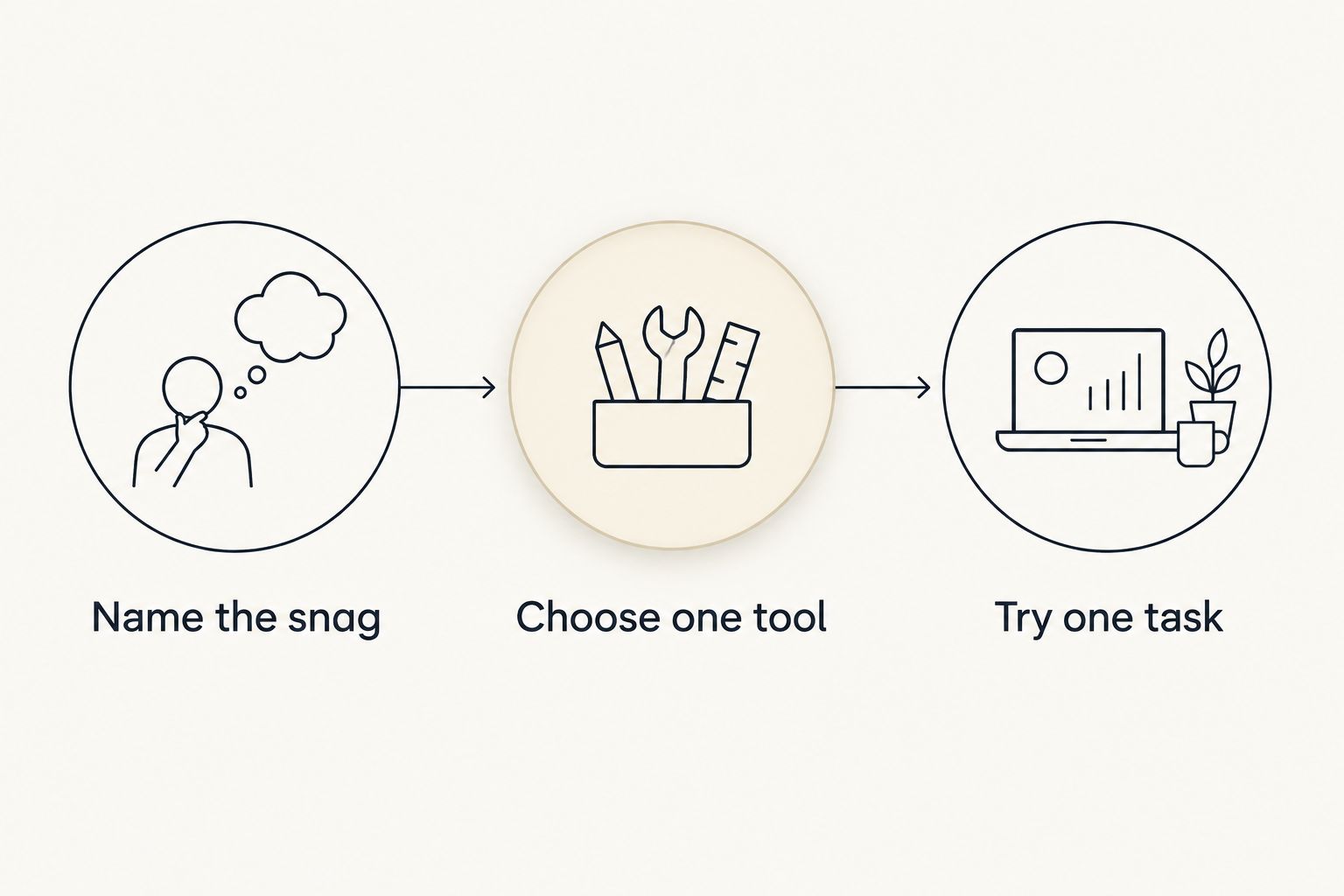
Choose an app without making setup another project
Name the snag
Finish this sentence: I stop when I need to ___. Use a concrete answer such as choose a starting step, remember a deadline, or stop checking my phone.
Avoid making become productive the assignment. That is too broad to tell you which feature matters.
Choose one tool
Match the snag to one recommendation in the table. Do not transfer your whole life into it before finding out whether its central feature helps with an ordinary task.
If you already have somewhere to record deadlines, keep it during the trial. Replacing a working part of your routine adds work without testing the new feature.
Try one task
Use a real task with a visible stopping point. For example, spend 10 minutes collecting the documents for an application rather than trying to complete the whole application immediately.
Afterward, ask whether the app clarified the task, supported the attempt, or simply gave you more settings to adjust.
Which ADHD app should you choose in 2026?
Opora App is the best fit for iPhone users who want ADHD task management, focus sessions, and coping exercises together. Choose Goblin Tools instead when task breakdown is the main obstacle, or Todoist when recurring obligations keep slipping through.
Forest fits a defined task interrupted by phone checking. Apple Reminders fits quick capture and timely prompts. You do not need to install all five to make a sensible choice.
For your 2026 setup, begin with the smallest system that addresses the actual problem. Add another tool only when you can name the job your existing app does not handle.
FAQ
What's the best ADHD app for executive dysfunction in 2026?
The best choice depends on where you get stuck. Choose an integrated ADHD app for combined task and focus support, Goblin Tools for task breakdown, Todoist for recurring responsibilities, Forest for phone boundaries, or Apple Reminders for capture.
Which app helps when I don't know where to start?
Goblin Tools is the most direct fit in this list for breaking an unclear task into smaller actions. Review its suggestions and remove steps that do not match your situation before beginning.
Is a focus timer enough for executive dysfunction?
A focus timer supports a work session, but it does not define an unclear task or choose your priorities. Decide on a concrete next action before starting the timer.
Is Todoist better than Apple Reminders for ADHD?
Todoist is the better fit for organizing recurring responsibilities across projects; Apple Reminders is the simpler fit for capturing tasks and receiving prompts. Neither choice resolves every difficulty associated with ADHD.
Should I use several ADHD productivity apps together?
Start with one app that addresses your clearest sticking point. Add another only when it has a separate job, rather than creating several places to maintain the same tasks.
How do I try an app without spending all day setting it up?
Test one central feature on one real task before importing your backlog. Choose a visible stopping point so you can tell whether the app helped you act or merely added setup work.
Can an ADHD productivity app replace therapy?
No, a productivity app does not replace therapy. Task lists, timers, rewards, and coping exercises provide everyday support rather than diagnosis or individualized treatment.
One last thing
Write down the restart point before you stop. Not continue report, but open the draft and check the introduction against the brief.
That instruction gives your next session something concrete to begin with. No elaborate reset required. just leave yourself a useful breadcrumb.