

Best overall for ADHD-specific task and focus support: Opora App. Best for straightforward checklists: Microsoft To Do. Best for visual task tracking: Trello. This 2026 guide helps you choose a task management app for ADHD by the point where your work gets stuck: choosing, starting, organizing, or returning.
- Opora App is the best task management app for ADHD users who want task sorting, a focus timer, and coping exercises together.
- Choose Microsoft To Do for simple checklists, Todoist for recurring responsibilities, Trello for visual boards, or Things for Apple-centered planning.
- Choose around your hardest moment: deciding what matters, starting a task, or remembering where you stopped.
- Use one real task to compare apps before moving your entire task list.
Why this matters
A task list records what you need to do. It does not automatically make the next action clear, make an uncomfortable task easier to face, or help you return after an interruption.
That distinction drives this 2026 ranking. The strongest choice depends on whether you need ADHD-specific support around the task or a cleaner place to organize it. Choose the tool that addresses your sticking point, not the one with the longest feature list.
No productivity app replaces therapy. Treat these tools as practical support for everyday tasks, not as treatment or evidence that you should be able to push through every difficult day.
What makes the best task management app for ADHD?
Use these criteria before comparing features:
- A clear next action: Can you identify something you can physically do, rather than another vague project name?
- Low setup friction: Can you capture a task without first designing a system of labels, boards, and rules?
- Support for starting: Does the app offer focus support, or will you need a separate method to begin?
- Visible priorities: Can you distinguish urgent work from large work without treating everything as equally important?
- An easy return: Can you reopen the app after a missed day and find your place without rebuilding your plan?
- The right device fit: Does the app work on the devices you actually use when tasks arrive?
These criteria separate task organization from task initiation. An app can be excellent at storing projects and still leave you staring at a task called “sort everything out.”
Best ADHD task management apps at a glance
| App | Best for | Standout feature | Key limitation |
|---|---|---|---|
| Opora App | ADHD-specific task and focus support | Task sorting, self-calibrating focus timer, and short coping exercises | Requires an iPhone running iOS 17 or later |
| Microsoft To Do | Straightforward personal checklists | My Day provides a daily task view | A checklist does not provide a guided response to overwhelm |
| Todoist | Recurring responsibilities | Recurring tasks, projects, and natural-language task entry | Projects, labels, and filters add choices to maintain |
| Trello | Visual project stages | Cards move between lists on a board | A card still needs a concrete next action |
| Things | Structured planning on Apple devices | Areas, projects, and daily planning views | Not a fit when you need an Android or Windows app |
The table is a decision guide, not a clinical effectiveness ranking. Each recommendation below serves a different use case; none earns its place by promising to fix ADHD.
1. Opora App: best task management app for ADHD-specific support
This iPhone app brings task management, a self-calibrating focus timer, and short CBT/DBT-based exercises into one place. Tasks sort into four animal categories by urgency and size, while a grove and companion reward system adds a playful element.
Best for: You know what needs doing, but choosing a starting point or getting through the first uncomfortable moment is the harder part.
Opora App pros:
- Task sorting distinguishes urgency from size rather than presenting one undifferentiated list.
- The focus timer sits alongside tasks instead of requiring another app.
- Short exercises address moments of overwhelm or procrastination.
- Missed days carry no penalty or tally.
Opora App cons:
- The iPhone and iOS 17-or-later requirement rules out other device setups.
- Animal categories and companion rewards will not suit someone who wants a plain checklist.
- The app does not replace therapy.
For your 2026 shortlist, this is the clearest fit when you want support around doing the task, not just recording it. The important question is whether the sorting and playful elements help you act or become another thing to attend to.
Verdict: Buy into this approach if task initiation is your main obstacle; skip it if you need a cross-platform checklist.
2. Microsoft To Do: best for straightforward personal checklists
Microsoft To Do organizes tasks into lists and includes a My Day view for daily planning. You can add reminders, repeat tasks, and break a task into steps without turning each responsibility into a project board.
Best for: You want somewhere clear to put errands, appointments to arrange, and ordinary personal responsibilities.
Microsoft To Do pros:
- My Day separates today's selections from your other lists.
- Steps let you divide a larger task into smaller actions.
- Repeating tasks suit responsibilities that return regularly.
- The list-based format does not require a board structure.
Microsoft To Do cons:
- A reminder tells you to act; it does not explain how to get past resistance.
- Daily selection still requires you to decide what deserves attention.
- Lists do not show project stages as directly as a board.
Try it with an ordinary task such as returning a form. Give that task a first step—“find the email with the attachment”—rather than expecting the task title to do all the work.
This is the simpler starting point when elaborate organization has become its own distraction. Keep the initial setup small enough that you can understand it at a glance.
Verdict: Buy into Microsoft To Do for plain personal lists; skip it if you specifically need guided focus or coping exercises.
3. Todoist: best for recurring responsibilities
Todoist combines tasks, projects, recurring schedules, and natural-language task entry. It suits responsibilities that need to appear again, such as sending a weekly update or handling a regular household task.
Best for: You need a structured home for repeated commitments across different parts of your life.
Todoist pros:
- Recurring tasks reduce the need to recreate repeated responsibilities.
- Natural-language entry lets you include scheduling information while capturing a task.
- Projects separate different areas of work.
- Labels and filters offer additional ways to organize tasks.
Todoist cons:
- Labels, filters, and projects introduce more organizational decisions.
- A carefully organized task can still be too vague to begin.
- Repeatedly moving dates does not resolve an unrealistic workload.
For a 2026 setup, start with the recurring responsibilities you genuinely need to remember. Do not build a label for every possible mood, energy level, and room before you have completed an actual task.
A useful distinction: a deadline describes when something matters; a next action describes what to do. Put both in your system when they serve different purposes.
Verdict: Buy into Todoist for recurring commitments; skip elaborate configuration if maintaining the system becomes another responsibility.
4. Trello: best for seeing project stages
Trello organizes work as cards inside lists on a board. You can move a card between stages, which makes it useful when a task's status matters as much as its due date.
Best for: You need to see which work is waiting, active, or finished.
Trello pros:
- Boards make project stages visible together.
- Cards keep task details attached to the work they describe.
- Checklists break a card into smaller actions.
- Moving cards makes a change in status explicit.
Trello cons:
- Designing boards creates setup work before the actual work begins.
- A crowded board requires decisions about what deserves attention.
- Moving a card is not the same as completing its next action.
Use stage names that describe reality, not aspiration. “Waiting for reply” tells you something different from “working on it,” and prevents you from treating a blocked task as immediately actionable.
Trello is less compelling when all you need is a short errands list. Its distinctive value is the board: choose it because seeing stages helps you decide what happens next.
Verdict: Buy into Trello for visible project stages; skip it for tasks that do not need a workflow.
5. Things: best for structured planning on Apple devices
Things organizes tasks through areas, projects, and planning views such as Today and Upcoming. It suits someone who wants a personal planning structure across supported Apple devices rather than a shared project board.
Best for: Your planning happens on Apple devices, and you want to distinguish ongoing responsibilities from finishable projects.
Things pros:
- Areas separate ongoing parts of your life.
- Projects group work with a defined outcome.
- Today provides a place for work selected for the day.
- Upcoming makes scheduled work visible beyond today.
Things cons:
- It is not a fit when you need an Android or Windows app.
- Areas and projects still require organizational decisions.
- A planning view does not remove the need to define an approachable first step.
Choose Things because its organization matches how you already think, not because you hope a new structure will make every commitment manageable. An area such as home administration can contain a project such as renewing a document; those are different kinds of responsibility.
Verdict: Buy into Things for Apple-centered personal planning; skip it if your device requirements extend beyond that setup.
How this ranking works
This ranking matches each app's established functions to a distinct problem: starting, keeping simple lists, remembering recurring work, seeing stages, or organizing personal projects. It is not based on a hands-on trial, proprietary performance measurements, or evidence that one app improves ADHD symptoms more than another.
For this 2026 guide, ADHD-specific support earns the default recommendation. Simplicity, recurring schedules, visual status, and Apple-centered organization earn separate recommendations because they answer different needs.
Feature fit is the basis of the ranking—not a claim about medical outcomes.
Try one real task before moving everything
Give your first comparison 10 minutes. That is a suggested decision limit, not a claim about how quickly an app will work for you.
- Pick a task: Choose something real that you have been avoiding, not a demonstration task.
- Shrink the start: Write an action you can attempt for 2 minutes, such as opening the document and finding the relevant paragraph.
- Start the timer: Use a 5-minute work period if a longer session feels like too much. Use a separate timer when needed.
- Leave a cue: Before stopping, write the next physical action so you have somewhere to return.
Compare the experience, not the number of settings you discovered. Notice whether you spent your time doing the task, choosing a category, or rearranging the system.
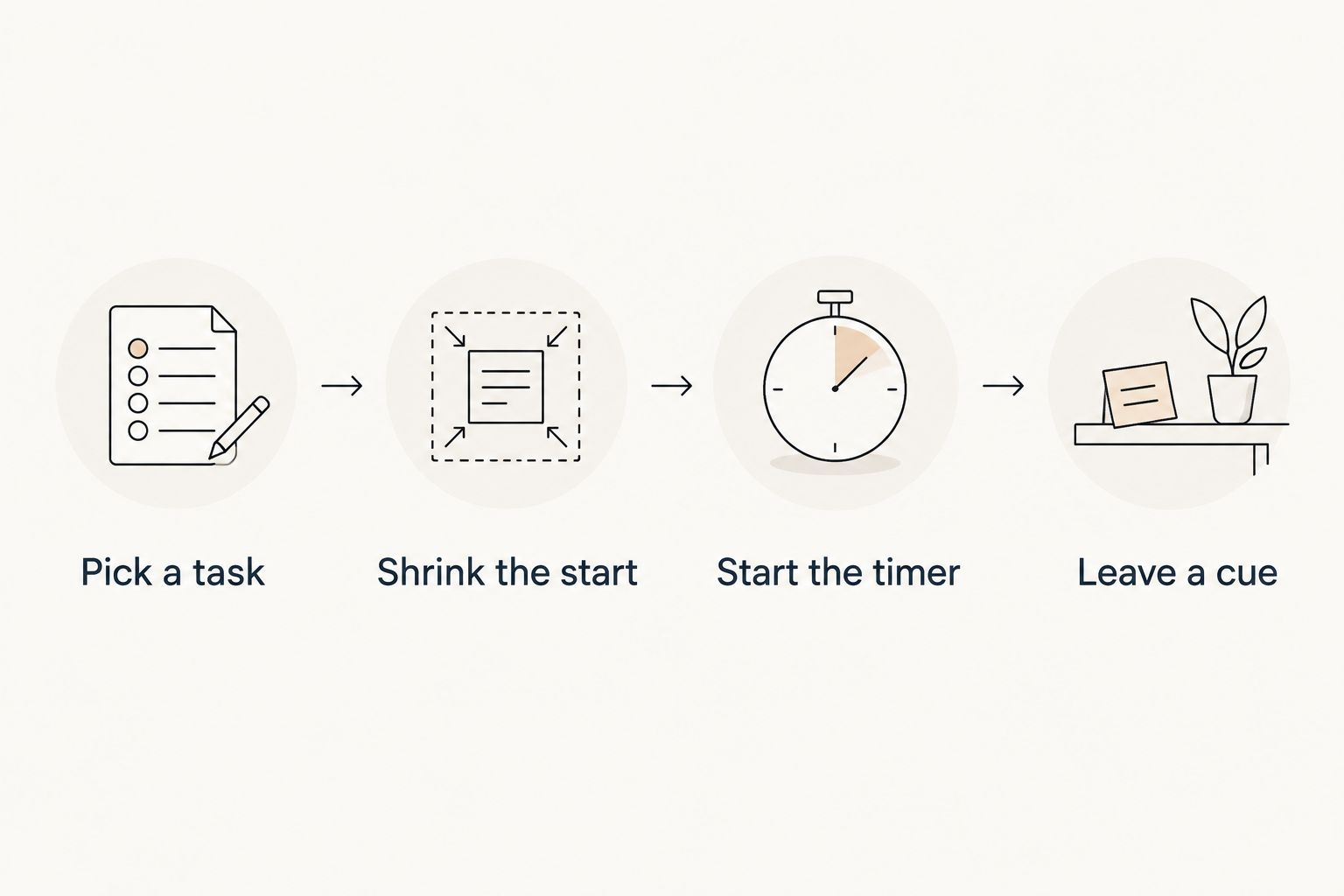
If the task remains untouched, change the task wording before rebuilding the entire system. “Deal with paperwork” is a category of work; “put the unopened envelopes on the desk” is an action.
Which task management app should you choose?
Opora App is the best task management app for ADHD users who want task sorting, focus support, and coping exercises together. That is the default recommendation when starting is the main obstacle and an iPhone fits your setup.
Choose Microsoft To Do for straightforward lists, Todoist for recurring responsibilities, Trello for visible stages, or Things for Apple-centered personal planning. For your 2026 decision, choose the smallest system that addresses the problem you actually face.
Keep one trusted place for tasks while you decide. Copying every responsibility across several apps makes the comparison harder because you must also remember which version is current.
FAQ
What's the best task management app for ADHD if I struggle to start?
Choose an app that supports starting, not only storing tasks. Look for an approachable next action, focus support, and a way to return after stopping; a longer feature list does not answer those needs by itself.
Is Todoist or Microsoft To Do better for ADHD?
Microsoft To Do is the stronger fit for straightforward checklists; Todoist is the stronger fit for recurring responsibilities and additional organization. Choose according to the structure you need, not an assumption that more settings produce better follow-through.
Is Trello good for ADHD task management?
Trello is a useful fit when seeing project stages helps you decide what to do next. Keep each card actionable, because a board can show where work sits without explaining how to start it.
Should I use Things if I also use Windows?
Things is not the right fit if you need a Windows app as part of your task-management setup. Check device requirements before committing your task list to any app.
Do I need a focus timer inside my task app?
You do not need an integrated focus timer. Keeping tasks and timing together suits some workflows, while a separate timer is a practical choice when you prefer your existing task list.
Can a task management app replace ADHD therapy?
A task management app does not replace therapy. Use it to support everyday organization and task routines, not as a substitute for professional care.
What should I do when I stop using my task app?
Restart with one current task rather than reorganizing the entire backlog. Write the next physical action, then decide which older tasks still deserve your attention.
One last thing
Your stopping point deserves as much attention as your starting point. Before closing a task, leave a sentence such as “next: attach the document to the draft email.”
That sentence gives your next session a starting place. You do not have to finish everything today to leave tomorrow something useful.


