

Best overall for getting started: Opora App. Best for role-playing rewards: Habitica. Best for straightforward Android tracking: Loop Habit Tracker. Best for Apple-centered routines: Streaks. This 2026 guide compares each habit tracker app for ADHD by what happens when you need to begin—and when you miss a day.
- Opora App is the best habit tracker app for ADHD when starting tasks matters more than maintaining a streak.
- Habitica suits people who enjoy role-playing rewards, but missed Dailies can reduce character health.
- Loop Habit Tracker suits Android users who want habit history without a game layer.
- Streaks suits Apple-centered routines; choose it only if visible streaks encourage rather than pressure you.
Why this matters
A habit tracker records what happened. That is different from helping you do the thing while the laundry basket quietly becomes furniture.
For ADHD-related task struggles, separate the obstacle from the tracking method. Forgetting a routine, struggling to begin it, and avoiding it after a missed day call for different support. A calendar full of checkmarks does not solve all three.
The best choice for 2026 is the app whose main mechanism fits your actual sticking point. Choose task-starting support for initiation, a game for rewards, or a dedicated habit log for reviewing repetition. Do not buy a tracking system to solve a starting problem without checking how it helps you begin.
These apps support organization and routines. They do not replace therapy or individualized ADHD care.
What makes the best habit tracker app for ADHD?
Use these criteria before comparing features. A longer feature list is not automatically a better fit.
- Starting support: Does the app help you act, or only ask whether you already acted? Timers, smaller tasks, and coping exercises address a different need from completion records.
- Missed-day experience: Look at what happens after a lapse. A broken streak or game consequence needs to feel useful to you, not like another overdue obligation.
- Reward style: Choose between a quiet checkmark, a growing companion system, and a role-playing game. You have to want the reward for it to matter.
- Tracking depth: Decide whether you need a recurring habit history, a daily task list, or both. These are related tools, not interchangeable ones.
- Device fit: Start with your phone. An appealing app on the wrong operating system is not a practical recommendation.
- Setup burden: Check how much configuring happens before the first useful action. Keep only the settings that support the routine you are trying to build.
In 2026, use these criteria to narrow the list before installing anything. Your goal is a repeatable action, not a new app-maintenance hobby.
Best ADHD habit apps at a glance
| App | Best for | Standout approach | Key limitation |
|---|---|---|---|
| Opora App | Starting tasks when you feel stuck | Self-calibrating focus timer, task categories, and short coping exercises | iPhone-focused; not the same proposition as a dedicated recurring-habit log |
| Habitica | Making routines feel like a role-playing game | Habits, Dailies, and To-Dos tied to character progress | Missed Dailies can reduce character health |
| Loop Habit Tracker | Reviewing habits on Android without game mechanics | Habit history, reminders, and an offline, account-free approach | Android-focused; not a task-starting or coping-exercise app |
| Streaks | Keeping routines close to Apple devices | Streak-based tasks and Apple Health integration | The streak itself can become an unhelpful target |
The table separates different jobs rather than declaring one app universally better. Keep that distinction in mind: the first option addresses getting underway, while the others put more emphasis on recording repetition or rewarding completion.
1. Opora App: best ADHD habit app for getting unstuck
This iPhone app combines a self-calibrating focus timer, task management, and short CBT/DBT-based exercises for moments of overwhelm or procrastination. Tasks sort into four animal categories by urgency and size. A grove and companion system adds rewards around the work.
Best for: You know what needs doing, but turning that intention into a first action is the difficult part.
Where the focus-first approach helps
Think of a routine such as opening your coursework after breakfast. A conventional tracker asks whether you did it; this approach gives you a task, a focus session, and exercises to use when beginning feels difficult.
The important distinction is the job you are hiring the app to do. Choose it for task initiation and focus support, rather than assuming that every productivity app provides the same recurring-habit records.
Pros:
- Combines task management and a focus timer in one place.
- Includes short exercises aimed at overwhelm and procrastination.
- Offers a companion-and-grove reward system without a missed-day penalty or tally.
- Uses urgency and size to organize tasks into four animal categories.
Cons:
- Requires a compatible iPhone running iOS 17 or later.
- Its task-and-focus approach is a different fit from a dedicated habit-history tool.
- Coping exercises do not replace therapy.
How to use it for a routine
Write the action you can physically begin: open the document, put the shoes beside the door, or place the first dish in the sink. Then use a focus session for that action instead of treating the entire project as the entry requirement.
Keep the routine attached to something recognizable in your day. The timer supports the action; it should not become another task you must complete perfectly.
Verdict: Buy for task-starting support; skip if your main requirement is a dedicated recurring-habit log.
2. Habitica: best habit tracker for role-playing rewards
Habitica turns tasks into a role-playing game. You organize activity through Habits, Dailies, and To-Dos, and task completion contributes to character progress.
Best for: You enjoy game systems enough that character rewards make everyday actions more interesting.
Where Habitica helps
Habitica distinguishes between behaviors you repeat, scheduled routines, and tasks you finish once. That distinction helps you avoid treating every item as an identical daily checkbox.
The game is the central trade-off. Equipment, character progression, and social play give you reasons to return, but they also introduce decisions beyond the habit itself. Choose Habitica because you want that layer—not because you hope you will eventually learn to enjoy it.
Habitica pros:
- Separates Habits, Dailies, and To-Dos.
- Connects task completion to character progression and rewards.
- Includes social features for people who want a shared game experience.
Habitica cons:
- Missed Dailies can reduce character health, which conflicts with a strictly penalty-free approach.
- Game systems add setup and attention demands beyond marking a habit complete.
Check your reaction to consequences
Before adding your whole life, consider one ordinary missed routine. Would a character consequence make you want to return, or make you avoid opening the app?
Neither answer is a character judgment. It is a buying criterion. If the consequence feels like a reprimand, pick a different reward model instead of trying to become someone who enjoys it.
Verdict: Buy for role-playing motivation; skip if missed-task consequences make returning harder.
3. Loop Habit Tracker: best habit tracker for simple Android logging
Loop Habit Tracker is an open-source Android app built around recurring habits, reminders, and habit history. It works offline without requiring an account.
Best for: You want to record routines and review consistency without maintaining a character, companion, or game economy.
Where Loop Habit Tracker helps
Loop keeps the central question close to the surface: did you do the habit? Its history and habit-strength approach give you a way to review repetition beyond a single day's result.
That makes it a clearer choice when tracking is the job. If you already know how to begin and want a record of what happens, a dedicated log avoids adding unrelated task-management machinery.
Loop Habit Tracker pros:
- Works offline without an account.
- Keeps recurring habits and their history central.
- Includes reminders without requiring a game layer.
Loop Habit Tracker cons:
- Its Android focus rules it out as the equivalent choice for an iPhone user.
- Logging and reminders do not provide the same support as guided coping exercises or task-starting tools.
Keep the habit observable
Enter an action you can recognize as complete. Read a page is easier to mark honestly than become a reader; put clothes in the basket is clearer than be organized.
A clear entry also makes the record more interpretable. When you look back, you want to know which action happened—not whether the day felt productive enough to deserve a checkmark.
Verdict: Buy for straightforward Android habit records; skip if you need help with the moment before starting.
4. Streaks: best habit tracker for Apple-centered routines
Streaks organizes recurring tasks around maintaining completion streaks. It also integrates with Apple Health for supported health-related tasks.
Best for: You use Apple devices and find a visible run of completed routines genuinely encouraging.
Where Streaks helps
Streaks makes repetition the point. You choose recurring tasks and return to a clear completion pattern, rather than managing a broader role-playing system.
Apple Health integration also makes it relevant when a supported health activity is already recorded there. Check that the specific activity you want to track is supported before making automation the reason you choose it.
Streaks pros:
- Keeps recurring tasks and completion patterns prominent.
- Fits an Apple-centered device setup.
- Integrates with Apple Health for supported activities.
Streaks cons:
- A broken streak can become more emotionally prominent than the action you completed today.
- Health integration does not mean every personal routine can be tracked automatically.
Separate the streak from the habit
Decide what you will do after a missed day before you build a long run. The useful next action is returning to the routine, not finding a way to make the record look uninterrupted.
If you start doing an irrelevant substitute just to preserve a checkmark, revisit the task definition. The app should reflect the behavior you care about, not quietly replace it.
Verdict: Buy for visible Apple-centered routines; skip if streak maintenance turns into pressure.
How we ranked these apps
This 2026 ranking prioritizes the fit between an app's main mechanism and a reader's stated obstacle. The criteria are starting support, missed-day experience, reward style, tracking depth, device fit, and setup burden.
The order is not a clinical effectiveness ranking. It separates task initiation, role-playing rewards, straightforward Android logging, and Apple-centered streak tracking so you can choose by need rather than feature count.
Which habit tracker app for ADHD should you choose?
Opora App is best for iPhone users who need help starting tasks, not just recording completed habits. That is the default recommendation when overwhelm or procrastination is the reason you are searching.
Choose Habitica when the game is part of the appeal. Choose Loop Habit Tracker when you want an Android habit record without the game. Choose Streaks when you want Apple-centered repetition tracking and respond well to visible streaks.
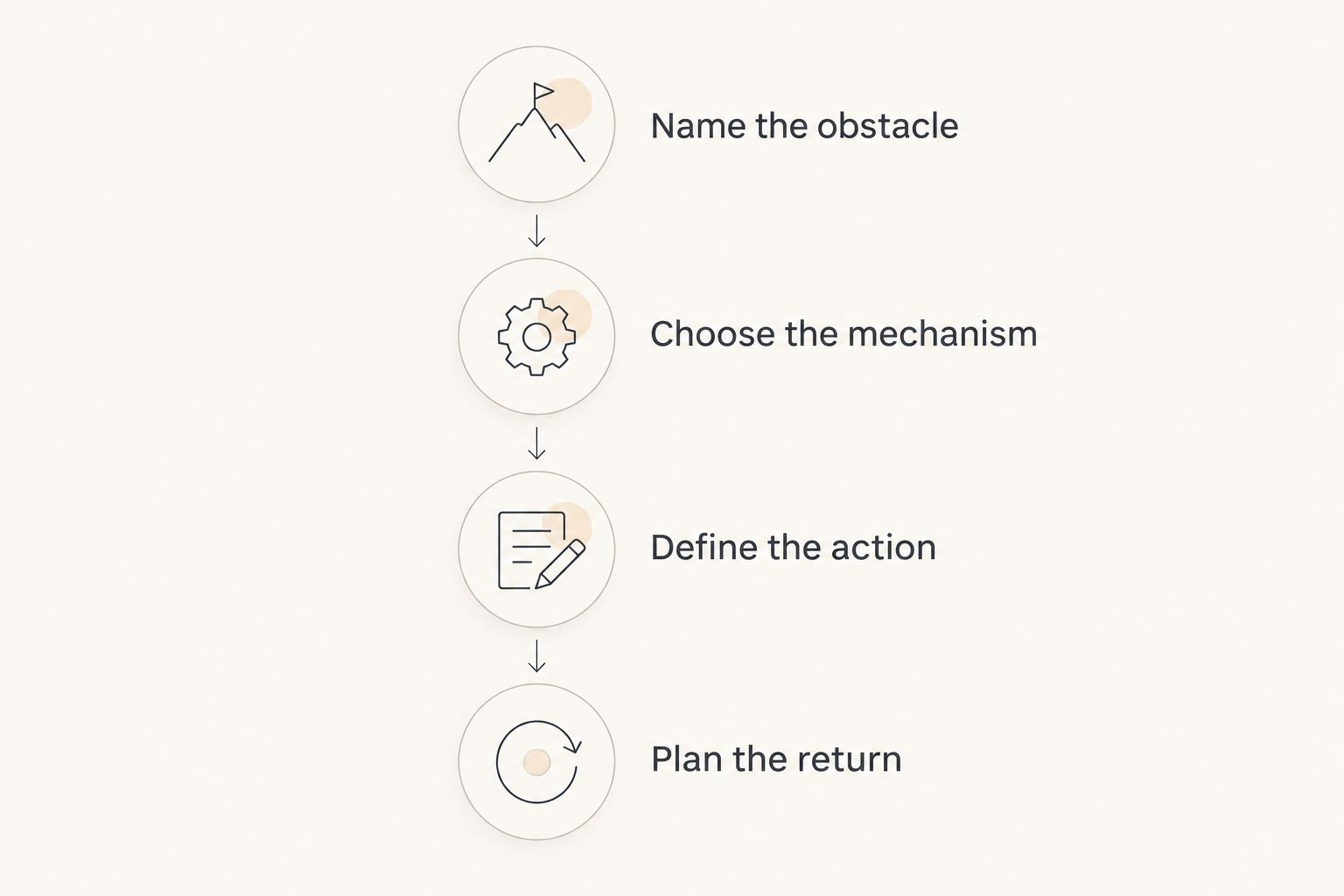
Before committing to a 2026 setup, use this short selection process:
- Name the obstacle. Write down whether you forget, cannot start, or avoid returning after a lapse.
- Choose the mechanism. Match that obstacle to reminders, starting support, rewards, or habit history.
- Define the action. Replace a broad goal with something you can clearly mark complete.
- Plan the return. Decide what happens after a missed day before judging the app by an uninterrupted run.
You do not need to transfer every routine immediately. Start with one action that matters to you and observe whether the app makes the next attempt clearer. A smaller setup gives you less to untangle if the mechanism is wrong.
FAQ
What's the best habit tracker app for ADHD in 2026?
Opora App is the strongest fit here for iPhone users whose main difficulty is starting tasks. Habitica suits role-playing rewards, Loop Habit Tracker suits Android habit logging, and Streaks suits Apple-centered routines.
Are habit trackers a treatment for ADHD?
Habit trackers are organization tools, not a replacement for ADHD treatment or therapy. Use them to support specific routines rather than expecting them to address every difficulty.
Is Habitica a good choice if missed days make me feel guilty?
Habitica is a poor fit if game consequences make returning harder for you. Missed Dailies can reduce character health, so choose it only if that mechanic feels motivating rather than punishing.
Which option works for straightforward habit tracking on Android?
Loop Habit Tracker is the clearest Android choice in this list for recurring habits and habit history without a game layer. It works offline without requiring an account.
Should I choose a focus timer or a habit tracker?
Choose a focus timer when beginning and staying with an action is the main problem; choose a habit tracker when recording repetition is the main problem. Some routines need both kinds of support.
How small should my first habit be?
Make the first habit a clearly observable action, such as opening a document or putting shoes beside the door. You can use a suggested two-minute attempt as a starting boundary, not as a performance target.
What should I do after missing a day?
Return at the next suitable opportunity without turning the missed day into extra work. If the app's response makes you avoid it, reconsider the tracking or reward mechanism.
One last thing
Before adding a reminder, write what you will do when it appears. A notification saying exercise still leaves the next action undecided; put on walking shoes gives you something concrete.
For your 2026 routine, try a suggested five-minute attempt with a clear stopping point. The aim is not to prove you can maintain a perfect record. Choose the app that makes returning easier than explaining why you stopped.


