

Best overall for combined focus and task support: Opora App. Best for role-playing rewards: Habitica. Best for a simple focus ritual: Forest. Best for self-care motivation: Finch. This 2026 guide compares each gamified productivity app for ADHD by what you actually need help doing: starting, staying with a task, or taking care of yourself.
- Opora App is the best fit for iPhone users wanting a focus timer, task management, and coping exercises together.
- Habitica suits people who want tasks and habits connected to role-playing rewards.
- Forest suits focused work sessions; Finch suits self-care routines and virtual-pet motivation.
- Choose a gamified productivity app for ADHD by its friction, not the size of its reward system.
Why this matters
A reward system adds something to look forward to. It also adds something to manage. If entering a task turns into choosing equipment, arranging a dashboard, and reorganizing your entire life, the game has become the task.
For your 2026 shortlist, separate the problem from the decoration. Trouble starting an email is different from forgetting a recurring chore. Neither is quite the same as feeling too overwhelmed to open the list.
The right app makes your next useful action easier to identify. It does not need to become your calendar, journal, habit tracker, and personality. These apps are tools for organizing actions and routines, not treatments for ADHD, and they do not replace therapy.
What makes the best gamified productivity app for ADHD?
Use these criteria before comparing characters or reward screens:
- Starting friction: Can you capture a task and begin without configuring a whole system? Look at the path to action, not the onboarding tour.
- Reward fit: Choose a reward you enjoy: a growing tree, a companion, or role-playing progress. Elaborate is not automatically better.
- Task fit: A focus timer supports a work session. A recurring checklist supports repeated actions. Choose around the work you need done.
- Recovery after a gap: Check what happens when you miss a day. Decide whether consequences motivate you or make reopening the app unpleasant.
- Setup burden: Every category, reminder, and custom rule needs attention. Keep only the structure you will actually use.
- Device requirements: Confirm that the app works on your device before moving tasks into it. A good concept on the wrong device is not a useful choice.
The 2026 shortlist at a glance
| App | Best for | Standout feature | Key limitation |
|---|---|---|---|
| Opora App | Focus, tasks, and overwhelm support together | Self-calibrating timer, animal task categories, and short coping exercises | Requires an iPhone running iOS 17 or later |
| Habitica | Role-playing motivation for habits and tasks | Tasks connect to a character, rewards, and game progress | Game systems add another layer to manage |
| Forest | A visible focus-session ritual | A virtual tree grows during a focus session | A session timer does not decide what deserves your attention |
| Finch | Self-care routines with a companion | Caring for yourself supports a virtual pet | Self-care progress is not the same as managing project work |
The table separates four different jobs. Treating every entry as an interchangeable task manager hides the most important buying decision: whether you need help choosing work, sustaining attention, repeating habits, or looking after yourself.
1. Opora App: best for combined focus and task support
Opora App combines a self-calibrating focus timer, task management, a grove and companion reward system, and short CBT/DBT-based exercises. Tasks sit in four animal categories organized around urgency and size. The combination suits iPhone users who want task organization, focus sessions, and support during overwhelm in one place.
The practical distinction is the range of actions available. You can organize something you need to do, use the timer for a work session, or turn to a short exercise when procrastination or overwhelm is the immediate problem. You are not limited to treating every stuck moment as a timer problem.
Opora App pros:
- Combines a focus timer and task management rather than making you choose between them.
- Uses animal categories to represent task urgency and size.
- Includes a grove and companion reward system alongside the work tools.
- Gives you short coping exercises, with no penalty or tally for missed days.
Opora App cons:
- Requires an iPhone with iOS 17 or later, which rules it out for incompatible devices.
- Combines several tools; someone who wants only a plain countdown has less to evaluate with a narrower app.
Best for: Individual iPhone users managing ADHD-related focus and task struggles who want practical tools alongside game rewards.
Before committing your entire list, try one real task. Give it a clear finish line, such as opening a document and writing its first sentence. Notice whether the categories help you choose an action or whether you are still rewriting the task instead of starting it.
Verdict: Buy into this approach when focus, task choice, and overwhelm all belong in the same workflow.
2. Habitica: best for role-playing rewards
Habitica turns habits, recurring daily tasks, and to-dos into parts of a role-playing game. Completing real-world actions connects to character progress and rewards. It suits people who genuinely enjoy that game structure, rather than people who merely like the idea of becoming more organized.
The distinction between task types is useful. A one-off administrative chore belongs in a different bucket from something you want to repeat. That structure gives you a place for both without pretending that every action needs the same schedule.
Habitica pros:
- Separates habits, recurring daily tasks, and one-off to-dos.
- Connects completed actions to role-playing rewards.
- Gives game-minded users a character to develop alongside their routines.
- Makes repeated actions part of the system rather than treating everything as an isolated task.
Habitica cons:
- Character systems and task configuration create additional decisions beyond doing the work.
- Missed daily tasks can affect character health; that consequence is a poor match if penalties make you avoid returning.
Best for: People who enjoy role-playing mechanics and want habits and everyday tasks inside the same game.
Start with a small task list, not an ambitious reconstruction of your life. If you enjoy configuring characters, decide in advance which real-world action comes before the next round of customization. Otherwise, the reward loop has an easy escape route around the work.
Habitica is not the default recommendation for someone already exhausted by managing systems. Its appeal is the game itself. If that appeal is absent, the extra structure has little reason to stay.
Verdict: Buy into Habitica if role-playing progress motivates you; skip it if game upkeep feels like another obligation.
3. Forest: best for a simple focus ritual
Forest centers a focus session on growing a virtual tree. Instead of building a character or maintaining a detailed habit system, you connect time spent focusing with a visible growing object. The concept is easy to understand before you begin.
Forest fits the moment when you already know what to do but want a clear boundary around doing it. It is a narrower choice than a combined task-and-coping tool. That narrowness is useful when extra features become places to wander.
Forest pros:
- Connects a focus session to a visible virtual tree.
- Offers a concrete ritual around beginning focused work.
- Does not require you to enjoy role-playing characters to understand the reward.
- Keeps the central decision focused on a work session rather than an entire productivity system.
Forest cons:
- Growing a tree does not resolve an unclear task or competing priorities.
- A timer-centered approach does not, by itself, address what to do when overwhelm prevents you from beginning.
Best for: People who have chosen their task and want a visual reason to stay with a focus session.
Before starting Forest, write the action outside the timer: read the opening section, sort the receipts, or draft the reply. A session without an action attached is just a container. Make the contents obvious.
For example, try a 10-minute work session as an experiment, not a prescribed ADHD interval. If that feels too large, shrink the action before treating a longer countdown as the answer. The tree is the reward; the useful work still needs a definition.
Verdict: Buy into Forest for a bounded focus ritual; skip it when choosing the task is your bigger problem.
4. Finch: best for self-care motivation
Finch connects self-care activities with caring for a virtual pet. Its center of gravity is looking after yourself, with goals and reflections supporting that experience. It belongs on this list because productivity struggles do not always begin at the task list.
Choose Finch when you want encouragement around everyday self-care rather than a game built primarily around work output. That is a distinct use case, not a lesser version of a project manager. The important boundary is knowing which job you are asking it to do.
Finch pros:
- Connects self-care actions to a virtual companion.
- Supports goals and reflection within the pet-centered experience.
- Gives you a reason to recognize care activities, not only completed work.
- Offers a different reward style from role-playing equipment or a focus-session tree.
Finch cons:
- Completing self-care goals does not organize a complicated work project for you.
- A virtual pet is only useful as motivation if you enjoy returning to that kind of companion.
Best for: People who want a companion-centered way to support self-care routines and notice small actions.
Keep the distinction between care and output visible. Drinking water, taking a break, and writing a report can all matter without belonging to the same category. You do not need to turn every act of care into proof that you earned the right to work.
If you already have a task system, give Finch a separate, specific role instead of duplicating every item. Two competing lists make it harder to know which one to trust.
Verdict: Buy into Finch for self-care encouragement; skip it as your main answer to project planning.
How to choose without building another abandoned system
For your 2026 trial, use an ordinary task rather than a fresh-start fantasy. Pick something you already need to do and follow this sequence:
- Name the blocker. Are you unable to choose, unable to start, drifting away, or neglecting basic care? Answer with a situation, not a judgment about yourself.
- Pick one action. Replace an outcome such as finishing paperwork with a visible action such as opening the form.
- Try the loop. Enter the action, use the relevant tool, and notice whether the reward makes returning appealing.
- Check the friction. Look at what you had to configure, remember, or maintain before reaching the useful part.
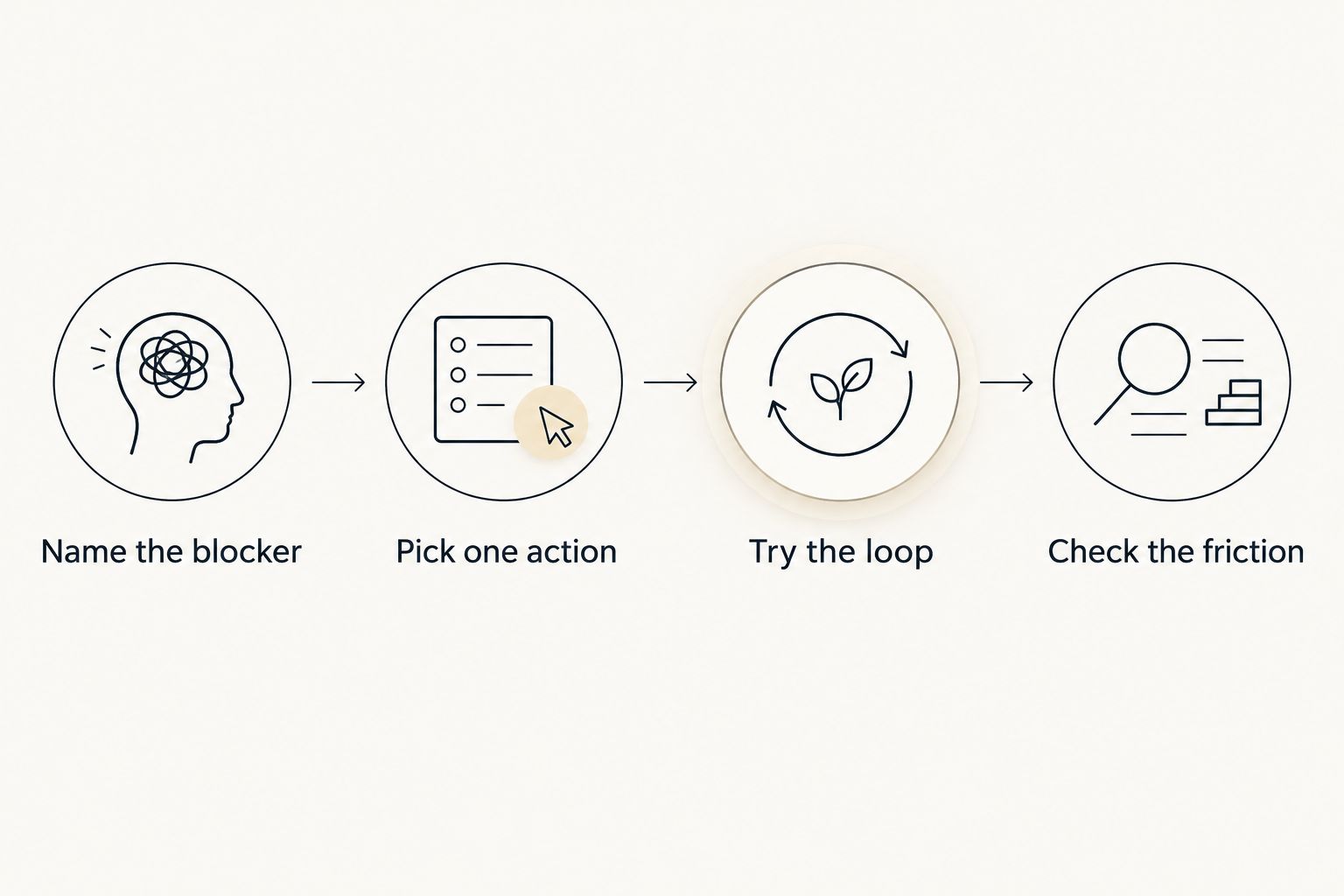
A 2-minute setup limit is a useful experiment, not a clinical rule. If setup consumes the attention you meant to spend on the task, simplify the trial. You are evaluating whether the system helps you act, not whether you can become excellent at maintaining it.
How this 2026 ranking works
The ranking prioritizes the fit between each app's core mechanics and a specific job: combined task support, role-playing motivation, focused sessions, or self-care. Starting friction, reward fit, recovery after a gap, and device requirements matter more here than the number of features.
This is a feature-and-fit comparison, not a claim that one app treats ADHD better than another. A longer list of tools does not establish better outcomes. The useful question is narrower: does the app support the action you are struggling to take?
Which app should you choose?
Start with the combined focus-and-task option if you want one iPhone workflow for choosing work, timing it, and handling overwhelm. Choose Habitica instead when role-playing is the attraction, Forest when you already know the task, and Finch when self-care is the actual priority.
For a 2026 decision, avoid installing the whole shortlist at once. Multiple systems create multiple places to capture the same intention. Try one app with one real task, then decide whether the reward helped you return to the action or merely gave you another screen to check.
FAQ
What's the best gamified productivity app for ADHD on iPhone?
Opora App is the best fit in this shortlist for iPhone users wanting a focus timer, task management, and short coping exercises together. It requires iOS 17 or later and includes a grove and companion reward system.
Is Habitica better than Forest for ADHD?
Habitica fits habits and tasks connected to role-playing rewards; Forest fits a visual focus-session ritual. Choose based on whether you need an ongoing task system or a boundary around work you have already selected.
Is Finch a productivity app or a self-care app?
Finch centers on self-care through a virtual-pet experience. Choose it for care routines and reflection rather than expecting it to organize a complex work project.
What if game rewards distract me from doing the task?
Choose a simpler reward loop and define the real-world action before opening the app. If customization becomes the main activity, reduce the setup or choose a narrower tool.
Do I need to use a 25-minute focus timer?
No fixed session length is required for the trial described here. Choose a manageable action and a duration you want to try; a timer setting is not a test of your effort.
Can a gamified app replace ADHD therapy?
No. A gamified productivity app can organize tasks, focus sessions, or self-care routines, but it does not replace therapy or individualized care.
How should I compare these apps in 2026?
Use one real task to compare setup, clarity, reward fit, and willingness to return. Check device requirements before transferring your task list, and avoid testing several competing systems at once.
One last thing
Test the return, not just the start. After a missed day, open the app and see whether your next action is obvious or buried under cleanup. That tells you something a cheerful onboarding screen cannot.
You do not owe a virtual tree, character, or companion a perfect attendance record. Keep the system that lets you resume useful action without first repairing your relationship with the system. can't start. and won't? Make the next action smaller before making the game bigger.


