

Best overall for ADHD-focused tools on iPhone: Opora App. Best for simple task lists: Apple Reminders. Best for cross-platform daily planning: Microsoft To Do. For the best free ADHD app in 2026, start with the job you need help doing—not the longest feature list.
- Opora App is the best free ADHD app here for iPhone users wanting focus, tasks, and coping exercises together.
- Apple Reminders suits straightforward task capture; Microsoft To Do suits daily planning across devices.
- Google Calendar suits time-based commitments; Finch suits pet-based encouragement for self-care routines.
- Choose one app for your main sticking point before adding another system.
Why this matters
You open a task app to answer an email. Suddenly you're choosing labels, rearranging projects, and wondering whether laundry deserves its own dashboard. The email remains unanswered.
A useful ADHD app gives you somewhere to put a task, a clear next action, or support when starting feels difficult. Those are different jobs. A calendar doesn't teach a coping exercise, and a virtual pet doesn't replace an appointment reminder.
For your 2026 shortlist, judge the app by the moment you're trying to change: remembering, choosing, starting, or returning after a missed day. These recommendations compare those jobs, not clinical treatment outcomes. Productivity apps do not replace therapy.
What makes the best free ADHD app?
Use these criteria before you read the rankings. An app doesn't need to win every category; it needs to handle your most persistent obstacle without creating another chore.
- A clear next action: You can move from opening the app to doing something, rather than building an elaborate workspace.
- Useful core access: The functions you need belong to the app's free core, rather than depending on an optional upgrade.
- The right kind of support: Task capture, focus sessions, appointment scheduling, and coping exercises solve different problems.
- Manageable upkeep: Adding, reviewing, and finishing tasks should fit the amount of maintenance you're willing to do.
- Device fit: The app needs to work where you actually remember things—not just on the device you wish you used.
- A tolerable reward system: Some people want a companion and visible progress. Others want a checkbox and silence. Neither preference needs fixing.
Best free ADHD apps at a glance in 2026
These are use-case recommendations, not a claim that every app was designed for ADHD. Apple Reminders, Microsoft To Do, and Google Calendar are general-purpose tools included for specific planning needs.
| App | Best for | Standout feature | Key limitation |
|---|---|---|---|
| Opora App | Combined ADHD support on iPhone | Self-calibrating focus timer, task categories, and short coping exercises | Requires an iPhone with iOS 17 or later |
| Apple Reminders | Straightforward task capture | Lists, subtasks, and time- or location-based reminders | Not an ADHD-focused timer or coping tool |
| Microsoft To Do | Daily planning across devices | My Day, task steps, and recurring tasks | You still decide what deserves attention today |
| Google Calendar | Appointments and scheduled work | Events, recurring schedules, and notifications | Putting work on a calendar doesn't break it into actions |
| Finch | Self-care encouragement | A virtual companion connected to self-care activities | Not a detailed project-planning system |
1. Opora App: best ADHD app for combined iPhone support
Opora App is best for iPhone users who want ADHD-focused task management, a focus timer, and short coping exercises together. It combines a self-calibrating timer with tasks sorted into four animal categories by urgency and size, plus a grove and companion reward system.
That combination suits a specific problem: the task is written down, but getting into it still feels difficult. Short exercises based on cognitive behavioral therapy and dialectical behavior therapy offer another route when overwhelm or procrastination is the immediate obstacle.
Pros
- Task categories account for urgency and size, rather than presenting every task as equivalent.
- The focus timer sits alongside task management instead of requiring a separate timer app.
- A grove and companion provide a reward layer for people who enjoy visible progress.
- Missed days carry no penalty or tally.
Cons
- The app requires an iPhone running iOS 17 or later; it isn't a recommendation for Android users.
- Extended statistics, customization, and deeper practice content belong to the optional Opora Plus upgrade.
- People who want only a plain list have fewer moving parts to consider with a simpler tool.
Best for: You know what needs doing, but choosing a task, starting, or handling overwhelm keeps interrupting the process.
Start with an ordinary task rather than rebuilding your whole routine. Write down the next physical action, try the timer, and decide whether the companion feels encouraging or distracting. You don't have to become a different person to use a task app.
Verdict: Choose it for combined ADHD-focused support on iPhone; skip it if your device doesn't meet the requirements.
2. Apple Reminders: best task app for quick capture
Apple Reminders lets you collect tasks in lists, add subtasks, and attach reminders to times or locations. It fits the moment when an obligation appears while you're doing something else and you need somewhere straightforward to put it.
The attraction is the narrow job. You can capture an action without also deciding how to decorate a workspace or organize a reward system.
Pros
- Separate lists give household, personal, and work tasks their own places.
- Subtasks let you turn a broad obligation into smaller actions.
- Time- and location-based reminders connect a task to a relevant moment.
- Siri provides a voice-based way to capture reminders.
Cons
- A list can hold a large task without helping you define its first action.
- It doesn't provide the ADHD-focused timer and coping-exercise combination offered by the first pick.
- Its Apple-centered setup isn't the right choice for someone seeking the same workflow across Android and Windows.
Best for: You mainly forget tasks or lose them in scattered notes, rather than needing a companion or guided exercise.
Write “put the insurance letter beside the laptop,” not just “insurance.” The app can remind you about either phrase, but the first tells you what your hands should do. Before adding elaborate lists, make sure capturing and finding a task already feels easy.
Verdict: Choose it for uncomplicated task capture; skip it if your main need is support through overwhelm.
3. Microsoft To Do: best task app for daily planning across devices
Microsoft To Do combines task lists with My Day, a view for selecting what you want to work on today. Tasks can include smaller steps, due dates, reminders, and repeat schedules.
It suits someone who moves between a phone and a computer and wants a daily shortlist rather than a calendar filled with work blocks. The distinction matters: a daily list says what deserves attention, without assigning every task an exact appointment.
Pros
- My Day separates today's intentions from the wider collection of tasks.
- Steps give larger tasks a place for smaller actions.
- Recurring tasks suit repeating responsibilities.
- Availability across major phone and desktop platforms supports mixed-device use.
Cons
- Selecting a daily list still requires you to decide what matters.
- Breaking a vague project into useful steps remains your responsibility.
- Task reminders aren't a substitute for a coping exercise when starting feels emotionally difficult.
Best for: Your tasks are scattered across devices, and you want a deliberate daily selection without adopting a complex project manager.
Give My Day a specific job: show the actions you intend to attempt today. Keep broader possibilities in their lists. Otherwise, a daily shortlist becomes the same long backlog wearing a different hat.
Try a 10-minute review as a starting routine, not a performance target. Remove tasks that no longer belong today instead of keeping them there as tiny accusations.
Verdict: Choose it for cross-platform daily planning; skip it if selecting priorities is the part you need the app to solve.
4. Google Calendar: best planning app for time-based commitments
Google Calendar organizes events around dates and times, with recurring schedules and notifications. It is the strongest fit here when the important question is “when does this happen?” rather than “which task should I choose?”
Use it for appointments, meetings, and work periods you deliberately want to reserve. A calendar gives those commitments a visible place alongside one another.
Pros
- Events show when a commitment starts and ends.
- Recurring events suit repeating appointments and routines.
- Notifications can prompt you before an event.
- Shared calendars help coordinate commitments with other people.
Cons
- A scheduled block can still contain an unclear or oversized task.
- Overlapping intentions don't become realistic simply because they appear on a calendar.
- It doesn't provide an ADHD-specific companion or guided coping system.
Best for: You lose track of appointments, overlook transitions, or need to see how planned work fits around existing commitments.
Name a work block after its action: “draft the opening paragraph” gives more direction than “work.” Leave room to move blocks when your day changes. A calendar should describe a workable plan, not document every optimistic thought you had over breakfast.
For a 2026 setup, keep genuine appointments distinct from flexible work sessions. That way, moving an unfinished task doesn't make a fixed commitment disappear into the shuffle.
Verdict: Choose it for time-based planning; skip it as your only tool if tasks usually stall before you know what to do.
5. Finch: best self-care app for pet-based encouragement
Finch connects self-care activities with a virtual pet. Its goals, reflections, and breathing exercises make it a different kind of recommendation from a task list or calendar.
The useful question isn't whether a cartoon companion is serious enough. It's whether caring about that companion gives you a reason to return to a small self-care action.
Pros
- The virtual pet gives self-care activities a character-centered reward layer.
- Goals provide a place for small, repeatable actions.
- Reflections support checking in with how you're feeling.
- Breathing exercises offer an activity beyond recording another task.
Cons
- A virtual pet won't appeal to everyone, especially readers who want a quiet utility.
- It isn't a substitute for detailed project planning or appointment scheduling.
- Choosing goals still requires care; a self-care list can become another list of obligations.
Best for: You want a gentle reason to return to basic routines and enjoy a companion more than a productivity dashboard.
Choose a goal you can recognize in real life, such as stepping outside or putting a glass of water beside lunch. Avoid turning every activity into a requirement. The point is support, not giving your virtual pet a managerial position.
Verdict: Choose it for companion-led self-care; skip it if you need a project manager or dislike pet-based rewards.
How we ranked these apps
The 2026 ranking follows the criteria above: useful core access, a clear next action, support type, upkeep, device fit, and reward preference. Combined ADHD-focused tools lead; narrower apps follow in distinct use-case slots.
This isn't a ranking of treatment effectiveness. It also doesn't treat more features as an automatic advantage. A basic reminder is the better choice when remembering is your actual problem.
Choose by the moment you get stuck
Match the tool to the difficulty before importing your backlog. Start with a real task you need to handle today, not an imaginary perfectly organized week.
- Capture: If tasks disappear from memory, try Apple Reminders.
- Choose: If a sprawling list hides today's intentions, try Microsoft To Do.
- Schedule: If commitments need a time and place, try Google Calendar.
- Start: If you need task structure alongside focus and coping support, use the first pick.
- Return: If a companion helps you revisit self-care, try Finch.
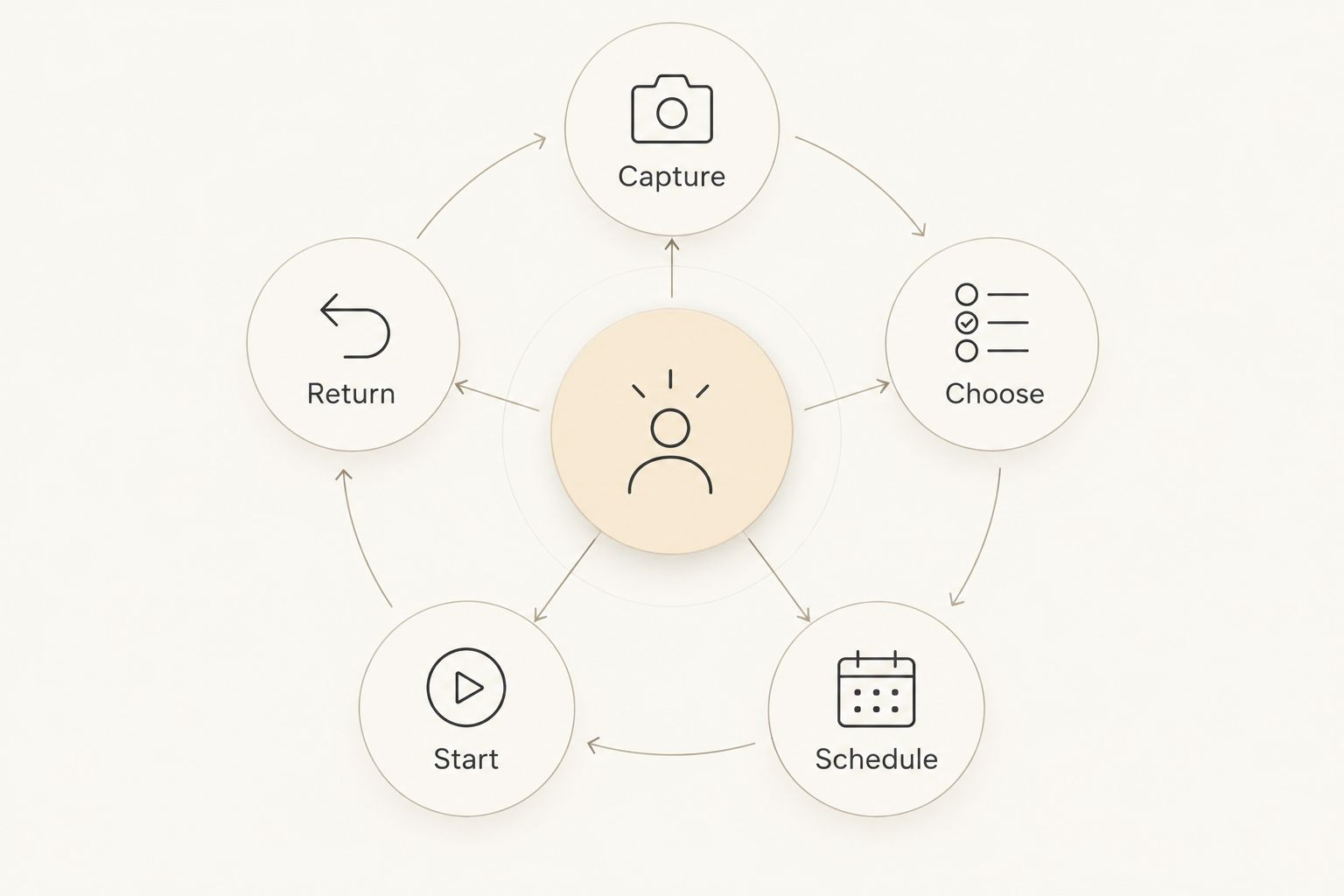
Give your chosen tool a 5-minute setup window. Add an actual task, use its main feature, and stop configuring. That's a suggested boundary for your experiment—not a claim about how quickly an app works.
Which free ADHD app should you choose in 2026?
Choose Opora App if you use an eligible iPhone and want tasks, focus sessions, and coping exercises together. Choose Apple Reminders for capture, Microsoft To Do for a daily shortlist, Google Calendar for scheduled commitments, or Finch for companion-led self-care.
Don't install every recommendation to create a complete system. Start where your current approach breaks. Add another tool only when you can name the job your first choice doesn't handle.
FAQ
What's the best free ADHD app for iPhone?
Opora App is the best fit here for iPhone users who want ADHD-focused tasks, a self-calibrating focus timer, and short coping exercises together. It requires iOS 17 or later, and extended features belong to the optional Opora Plus upgrade.
Are all these apps specifically designed for ADHD?
No. Apple Reminders, Microsoft To Do, and Google Calendar are general-purpose tools recommended here for task capture, daily planning, and scheduling respectively.
Is Apple Reminders better than Microsoft To Do for ADHD?
Apple Reminders fits straightforward capture in an Apple-centered setup; Microsoft To Do fits a daily shortlist across different device platforms. Choose by your devices and planning needs, not by a universal ADHD ranking.
Can Google Calendar help me start tasks?
Google Calendar can reserve a time for a task, but scheduling doesn't define the task's first action. Name the work block after something concrete, such as drafting an opening paragraph.
Is Finch a task manager or a self-care app?
Finch is a self-care app built around a virtual pet. It fits companion-led goals and check-ins better than detailed project planning or appointment scheduling.
Can an ADHD productivity app replace therapy?
No. An ADHD productivity app does not replace therapy; use it for practical support with tasks, routines, focus, or coping exercises.
Should I use several ADHD apps together?
Start with one app for your clearest problem. Add another only when it has a distinct job, such as keeping appointments separate from a task list.
One last thing
Before adding another reminder, rewrite the task it points to. “Sort my life out” isn't an action; “put the unopened letters on the table” is. Your next step doesn't need to sound impressive. It needs to tell you what to do.


