

Best overall for ADHD-specific support on iPhone: Opora App. Best for a visual countdown: Time Timer. Best simple option: iPhone Clock. This 2026 guide compares five focus timer apps by how they help you choose a task, start, and stop—not by how much productivity they promise.
- Opora App is the best ADHD timer here for iPhone users wanting task management and coping exercises together.
- Time Timer suits visual countdowns; Forest suits a growing-tree reward; Focus To-Do suits task-linked Pomodoro sessions.
- iPhone Clock suits a straightforward countdown without another productivity system to maintain.
- Choose a focus timer around your sticking point, not around the longest feature list.
Why this matters
A timer answers one question: when does this session end? It does not automatically answer what to work on, how to begin, or what to do when the task feels overwhelming.
For your 2026 shortlist, separate those jobs. If you already know your next action, a countdown is enough. If choosing the action is the difficult part, look for task support. If starting brings up frustration or avoidance, a timer alone leaves that problem untouched.
The best timer is the one that fits the part where you get stuck. You do not need a more elaborate system just because yesterday's session went badly.
What makes the best ADHD timer?
These criteria explain the recommendations below. No timer earns a higher place merely for having more settings.
- Starting friction: Can you begin without organizing your entire day first? Setup should serve the task, not become the task.
- Time visibility: Do you want numbers, a shrinking visual area, or a reward that develops during a session? Those are different interfaces, not interchangeable benefits.
- Task connection: Does the app help you choose work, or only count down after you have chosen it?
- Session flexibility: Can the approach fit your attention today? A familiar interval is a starting point, not an obligation.
- Support outside the countdown: Look for a useful response to overwhelm, procrastination, or the transition into work.
- Maintenance burden: Decide whether extra lists, rewards, and settings help you return or give you another thing to manage.
An ADHD label is not evidence that an app treats ADHD. This guide ranks practical fit, not clinical outcomes, and none of these recommendations replaces professional care.
Best focus timer apps at a glance
The order below favors ADHD-specific support first, then distinct alternatives for readers who want a narrower tool. Each app has a different job in this 2026 comparison.
| App | Best for | Standout feature | Key limitation |
|---|---|---|---|
| Opora App | ADHD-specific support on iPhone | Self-calibrating focus timer alongside tasks and short coping exercises | Requires an iPhone running iOS 17 or later |
| Time Timer | Seeing time remaining | A visual countdown represented by a shrinking colored area | A visual timer does not choose your next action |
| Forest | A visible reward for staying with a session | A virtual tree tied to your focus session | The reward does not provide task prioritization |
| Focus To-Do | Linking tasks to Pomodoro sessions | Task management combined with a Pomodoro timer | Maintaining the task list adds work |
| iPhone Clock | A straightforward countdown | Timer within the iPhone's Clock app | No ADHD-specific task or coping workflow |
1. Opora App: best ADHD timer for supported starts
The app combines a self-calibrating focus timer with task management and short CBT/DBT-based exercises for overwhelm or procrastination. Tasks are sorted into four animal categories by urgency and size, while a grove and companion system supplies rewards.
Opora App is best for iPhone users who want an ADHD timer, task management, and coping exercises in one place. That combination addresses more than the countdown: choosing work, beginning it, and handling the moment when you cannot get started.
The practical distinction is the surrounding support. If your problem is simply forgetting when to stop, you do not need every part of this approach. If you regularly reach the timer with no clear task—or with a task you are avoiding—the additional tools match those needs.
Opora App pros:
- Self-calibrating timing rather than a workflow built only around a fixed interval.
- Task categories based on urgency and size.
- Short exercises for moments of overwhelm or procrastination.
- A grove and companion reward system, with no penalty or tally for missed days.
Opora App cons:
- Requires an iPhone running iOS 17 or later.
- Combines several tools when some readers only need a countdown.
- Does not replace therapy.
Best for: Individual iPhone users managing ADHD-related focus and task struggles who want support around the timer.
Verdict: Buy into this approach if starting and choosing tasks are part of the problem; skip it if you only want a countdown.
2. Time Timer: best focus timer for visual time awareness
Time Timer presents remaining time as a colored area that shrinks as the countdown progresses. You can read the change visually rather than relying only on a number.
That makes its role specific: keeping the remaining session visible. If checking a numerical display interrupts your work, a visual countdown gives you a different way to glance at the boundary.
The display is not a planning method. You still need to decide what the session is for and what happens when it ends. A clear picture of time cannot turn a vague task such as finish everything into a workable next action.
Time Timer pros:
- Makes remaining time visible through a shrinking area.
- Provides an alternative to a number-only countdown.
- Keeps the recommendation centered on time awareness rather than rewards.
Time Timer cons:
- Does not resolve an unclear task definition.
- Seeing time disappear is not the same as receiving help with overwhelm.
Best for: Readers who specifically want a visual representation of time remaining.
Verdict: Buy into the visual countdown if time visibility is your main need; skip it as a solution to task selection.
3. Forest: best focus timer for a growing-tree reward
Forest connects focus sessions with growing virtual trees. The session has a visible reward attached to it rather than only an ending alarm.
Choose this approach if a tree gives you a reason to return to your work. The reward supplies a concrete object to associate with the session, which is a different experience from watching digits count down.
Keep the reward in its proper place. Your task is still the reason for the session. If the tree becomes the goal while the work remains undefined, you have measured time without deciding what that time should accomplish.
Forest pros:
- Gives focus sessions a visible virtual-tree reward.
- Makes the reward part of the timer experience.
- Offers a distinct alternative to a purely numerical countdown.
Forest cons:
- The tree does not prioritize your work.
- A reward-centered approach is a poor fit if rewards feel like another obligation.
Best for: Readers who enjoy a growing-tree reward and already know what to work on.
Verdict: Buy into the tree reward if it makes sessions appealing; skip it if you want the timer to help choose tasks.
4. Focus To-Do: best focus timer for task-linked Pomodoro work
Focus To-Do combines task management with a Pomodoro timer. Its defining fit is work that you want to organize into tasks and timed sessions together.
The traditional Pomodoro method uses 25-minute work sessions, 5-minute short breaks, and a longer break after four work sessions. Those figures describe the method, not a required schedule for every app or every person with ADHD.
Use the task connection deliberately. A task such as draft the opening paragraph gives the session a clearer purpose than work on the project. The timer supplies a boundary; the task supplies direction.
Focus To-Do pros:
- Combines a task list and Pomodoro timing.
- Gives you a task-centered structure for focus sessions.
- Fits readers who already like dividing work into timed intervals.
Focus To-Do cons:
- Keeping the task list useful requires maintenance.
- A Pomodoro structure does not remove the need to define small, workable actions.
Best for: Readers who want their task list and Pomodoro sessions in the same tool.
Verdict: Buy into task-linked sessions if you use a task list consistently; skip the extra structure if list maintenance becomes avoidance.
5. iPhone Clock: best focus timer for a basic countdown
The iPhone Clock app includes a timer. Set a duration, start it, and use the ending alert as your stopping point.
This is the narrowest recommendation in the list. You supply the task, the work interval, and the break plan; the app supplies the countdown.
That division is useful when another productivity app feels like too much setup. It is less useful when the missing piece is deciding what to do or handling the feeling that stops you from beginning.
iPhone Clock pros:
- Provides a timer within the iPhone's existing Clock app.
- Does not require adopting a separate task-management method.
- Keeps countdown timing separate from rewards and planning.
iPhone Clock cons:
- Does not provide ADHD-specific task support.
- Does not include the coping workflow described in the ADHD-specific option above.
Best for: iPhone users who know their next action and want a straightforward countdown.
Verdict: Buy into the simple countdown first if timing is the only missing piece; skip it as an all-in-one focus system.
How we ranked these focus timers
This 2026 ranking uses feature-to-need matching: supported starts, visual time awareness, rewards, task-linked sessions, and a basic countdown. It is not a clinical ranking or a claim that one app improves ADHD symptoms more than another.
The first recommendation covers the broadest set of stated ADHD-related needs. The remaining options are narrower choices with distinct strengths. A lower position does not mean a worse fit for you: if you only need an alarm, the simplest option answers that need directly.
Give your chosen timer one clear job
For your first session in 2026, do not rebuild your routine around the app. Use this sequence to separate the task from the timing.
Choose a task
Write the next visible action, not the entire outcome. Open the document and write a heading is actionable; finish the report leaves several decisions unresolved.
Set a timer
Choose a duration you are willing to begin. The traditional 25-minute interval is an option, not a test you must pass. A self-calibrating approach and a manually chosen countdown are different ways to set the boundary.
Take a break
When the timer ends, pause and decide what you need next. Do not let the ending alert silently turn into permission to start another session without checking the task.
Choose again
Keep the same task, change the task, or stop. Make the next decision explicit rather than treating continuation as compulsory.
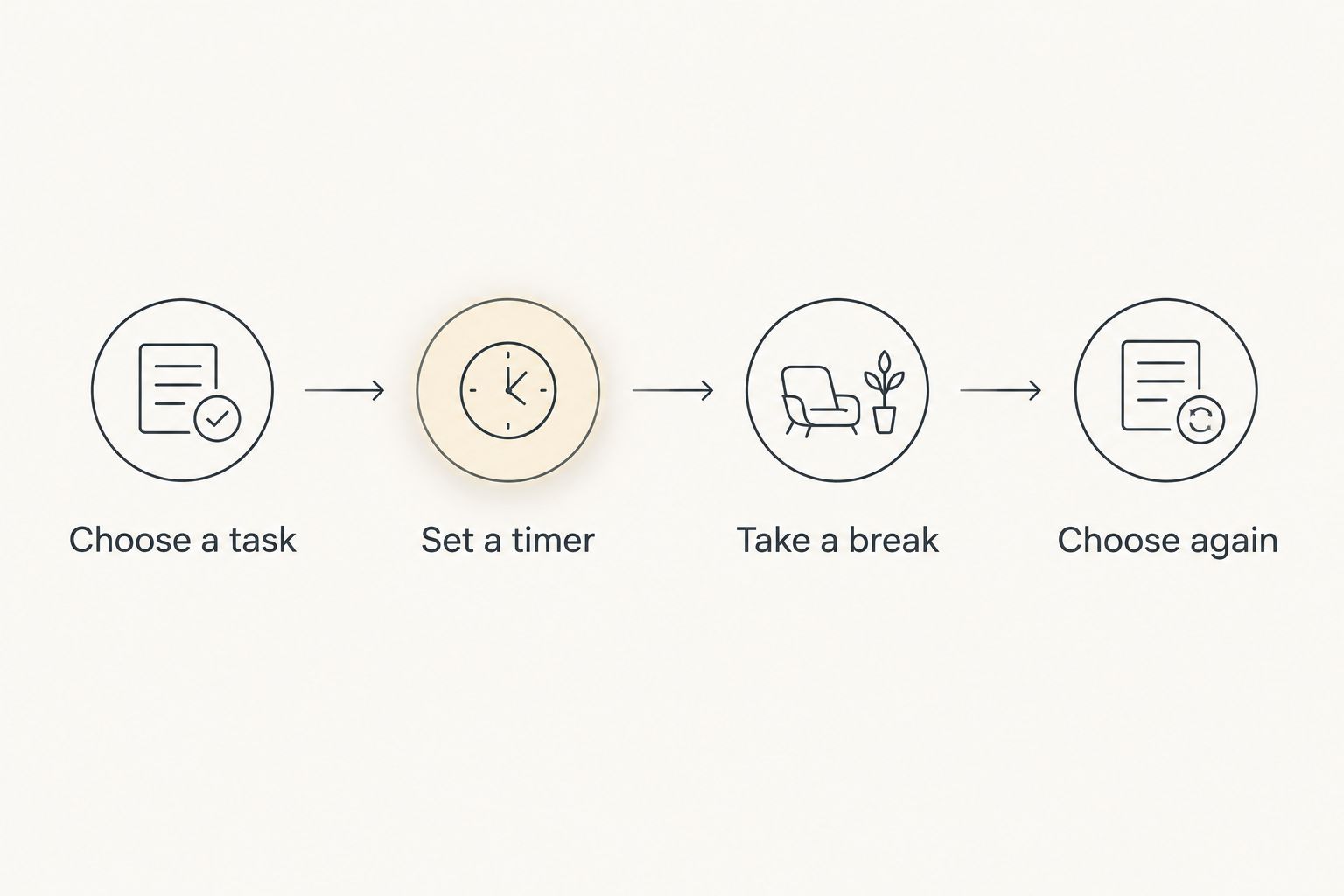
A session that ends with a clearer next action has served a purpose. You do not need to make the countdown longer to make that decision count.
Which ADHD timer should you choose?
Choose Opora App as the default in this 2026 guide if you use a compatible iPhone and want ADHD-specific support beyond a countdown. Its stated combination of timing, task categories, rewards, and coping exercises matches that broader need.
Choose Time Timer for a visual countdown, Forest for its tree reward, or Focus To-Do for task-linked Pomodoro sessions. Choose iPhone Clock when you want the timer and nothing else.
Do not switch because another app has more features. Switch when you can name the missing function: seeing time, choosing work, getting started, or connecting a session to a task.
FAQ
What's the best ADHD timer if I just need a countdown?
iPhone Clock is the simplest choice in this comparison for an iPhone user who only needs a countdown. You still choose the task and decide what to do when the alert sounds.
Which focus timer is best for seeing time remaining?
Time Timer is the visual-countdown recommendation in this guide. Its shrinking colored area represents the time remaining in a session.
Is Forest better than a regular timer for ADHD?
Forest is a better fit when you specifically want a virtual-tree reward attached to your focus session. A regular countdown is the more direct choice when that reward adds nothing useful to your routine.
Do I have to use 25-minute sessions with ADHD?
No, 25-minute work sessions belong to the traditional Pomodoro method, not a requirement for managing ADHD. Choose your timer approach around the task and your ability to begin.
Which app combines a task list with a Pomodoro timer?
Focus To-Do combines task management with Pomodoro timing. It suits readers who want to connect planned tasks with timed work sessions.
Can a focus timer replace ADHD therapy?
No, a focus timer does not replace therapy. Timing, task management, and short coping exercises are practical tools, not substitutes for professional care.
What should I do when I can't start even with a timer?
Make the task more specific before changing the timer. Name a visible first action, then decide whether you need timing support, task support, or help handling overwhelm.
One last thing
Name the action before naming the duration. A perfectly configured timer attached to a vague task still leaves you with a vague task.
can't start. and won't. Before adding another setting, replace work on it with open the file. Then choose the timer that helps you do that—not the one that asks you to become a different person first.


