

Best overall for ADHD-focused work support: Opora App. Best for project task lists: Todoist. Best for visual focus motivation: Forest. Best for blocking distractions: Freedom. Best for straightforward Apple reminders: Apple Reminders. This 2026 guide matches each option to the part of your workday that gets stuck.
- Opora App is the best ADHD app for work if you want a focus timer, task management, and coping exercises together.
- Choose Todoist for project organization or Apple Reminders for straightforward task capture and scheduled alerts.
- Choose Forest for a visible focus reward; choose Freedom when distracting websites and apps interrupt work.
- Pick for your main obstacle, not the longest feature list. Productivity apps do not replace therapy.
Why this matters
A work task can stall before you start, disappear between meetings, or lose out to another browser tab. Those are different problems. A task list addresses remembering and organizing; a blocker addresses access to distractions.
For your 2026 shortlist, start with the moment that breaks down. If you remember the assignment but cannot begin, adding more reminders does not address the starting problem. If you begin easily but keep opening distracting sites, a more elaborate task hierarchy is not the first feature to prioritize.
Choose the smallest setup that supports your next action. You do not need to turn organizing your work into another job.
What makes the best ADHD app for work
Use these criteria to judge fit before comparing features:
- Starting support: Does the app help you move from an intimidating task to an action you can begin?
- Task clarity: Can you distinguish what matters now from what belongs later without rebuilding your system?
- Focus support: Does the app provide a timer, a visible reward, or distraction blocking that matches your obstacle?
- Workplace fit: Does the app belong on the device you actually use, and does your employer permit it?
- Return effort: Can you resume after an interrupted day without spending the morning maintaining the app?
These criteria guide the 2026 recommendations below. They are selection criteria, not clinical outcome measures: a feature match is not proof that an app treats ADHD.
Best ADHD apps for work at a glance
| App | Best for | Standout feature | Key limitation |
|---|---|---|---|
| Opora App | ADHD-focused starting and focus support | Self-calibrating focus timer, task categories, and short coping exercises | Requires an iPhone running iOS 17 or later |
| Todoist | Organizing work across projects | Project-based tasks with due dates and recurring schedules | Lists still need clear priorities and actionable wording |
| Forest | Making a focus session feel tangible | A virtual tree that grows during a focus session | A focus reward is not a full project-planning system |
| Freedom | Restricting digital distractions | Website and app blocking sessions | Blocking does not decide what you should work on |
| Apple Reminders | Straightforward task capture on Apple devices | Lists, subtasks, and scheduled reminders | Reminders do not provide a dedicated focus session |
1. Opora App: best ADHD app for workday starting support
Opora App combines a self-calibrating focus timer, task management, and short CBT/DBT-based exercises for moments of overwhelm or procrastination. Tasks fall into four animal categories based on urgency and size, while a grove and companion provide a reward system.
The strongest reason to choose it is the combination. When the problem is both deciding what to do and getting yourself to begin, you can use task organization, a focus session, and an exercise without choosing separate tools for each function.
Opora App pros:
- Combines task management and a focus timer.
- Organizes tasks by urgency and size rather than presenting only an undifferentiated list.
- Includes short exercises for overwhelm and procrastination.
- Offers a grove and companion reward system for people who prefer playful feedback.
Opora App cons:
- Requires an iPhone running iOS 17 or later, which rules it out as a desktop-first choice.
- Animal categories and companion rewards are not the right style for everyone.
- It does not replace therapy or individualized ADHD care.
Best for: Individual iPhone users who want ADHD-focused support for starting tasks, organizing work, and staying with a focus session.
Start with an actual assignment, not a complete life overhaul. Write the next visible action, use the timer, and assess whether the combination helps you return to the work. Missed days carry no penalty or tally.
Verdict: Buy for the combined workflow, not for a promise of effortless productivity.
2. Todoist: best work app for organizing projects
Todoist organizes tasks into projects and supports due dates, recurring tasks, and labels. It suits work where the main problem is keeping assignments and repeated responsibilities in a system you can review.
For example, separate a client deliverable from the recurring administrative work around it. Write tasks as actions, then use dates for real deadlines rather than assigning everything to today.
Todoist pros:
- Projects separate different areas of work.
- Recurring tasks suit repeated responsibilities.
- Due dates make deadlines explicit.
- Labels provide another way to group tasks across projects.
Todoist cons:
- A detailed project structure still requires maintenance.
- Capturing a large assignment does not automatically make its first step clear.
- Task organization alone does not block distracting websites.
Best for: People whose work involves multiple projects, recurring obligations, and deadlines that need a clear home.
Before importing every unfinished idea, create a small project around work you already need to deliver. Check whether you can find the next action without scanning a long backlog. If choosing still feels difficult, simplify the project before adding more labels.
Verdict: Buy for project organization; skip if another task list would duplicate your existing system.
3. Forest: best work app for visual focus motivation
Forest turns a focus session into growing a virtual tree. Its central appeal is concrete: the session produces a visible result rather than only an elapsed-time display.
Choose it when you already know what to do but want a reason to stay with the session. The tree is a focus cue, not a substitute for deciding what work deserves your attention.
Forest pros:
- Gives a focus session a visible reward.
- Centers the experience on staying with a defined session.
- Provides a playful alternative to a plain timer.
Forest cons:
- The tree does not break a vague assignment into actionable steps.
- A visual reward is a poor fit if gamification feels like another demand.
- It is not a replacement for a project task list.
Best for: People who know their next action and find growing something more motivating than watching a countdown.
Keep the session's goal separate from its reward. Growing a tree while rearranging folders is still rearranging folders; name the deliverable before you begin. If the reward becomes the goal, return to a plain description of what the work block is for.
Verdict: Buy for visual motivation; skip if virtual rewards add pressure rather than interest.
4. Freedom: best work app for blocking digital distractions
Freedom blocks selected websites and apps during blocking sessions. It fits the moment when you intend to work but repeatedly reopen the same digital distractions.
Blocking changes what you can access. It does not choose a priority, explain an assignment, or make an unclear task more specific, so pair each session with a named action.
Freedom pros:
- Targets access to distracting websites and apps.
- Lets you define which digital distractions a session addresses.
- Provides a boundary separate from your task list.
Freedom cons:
- An overly broad block can interfere with resources you need for work.
- Setup requires distinguishing distractions from necessary tools.
- It does not address every reason for task avoidance.
Best for: People whose main work obstacle is repeatedly accessing distracting sites or apps after they have chosen a task.
Check your employer's software rules before installing a blocker on a managed device. Then test your block against a real assignment: research, sign-in pages, and communication tools still need to work when the task requires them.
Verdict: Buy when access to distractions is the obstacle; skip as your only answer to unclear priorities.
5. Apple Reminders: best work app for straightforward capture
Apple Reminders provides lists, subtasks, and scheduled reminders on Apple devices. It suits people who need to record a commitment and see it again at a useful moment without adopting a separate productivity framework.
Use a list to hold work commitments and subtasks to separate an assignment into actions. A reminder should point to something you can do, not simply repeat the name of a project you are worried about.
Apple Reminders pros:
- Supports direct task capture in the Apple environment.
- Lists separate different responsibilities.
- Subtasks let you break an assignment into smaller actions.
- Scheduled reminders bring time-sensitive tasks back to your attention.
Apple Reminders cons:
- A reminder can surface work without helping you start it.
- It does not provide a dedicated focus-timer workflow.
- It is an Apple-centered choice rather than a platform-neutral work system.
Best for: Apple users who mainly need to remember commitments and keep a straightforward action list.
Keep alerts selective. Reserve them for moments when you can act or genuinely need advance notice, rather than making every task demand attention. The goal is a useful prompt, not a calendar full of interruptions.
Verdict: Buy into the simple workflow; skip if you specifically need focus rewards or distraction blocking.
How the apps were ranked
The 2026 order follows the criteria above: starting support, task clarity, focus support, workplace fit, and return effort. The first recommendation combines ADHD-focused task and focus features; the remaining choices each address a more specific work obstacle.
This is a feature-fit guide, not a clinical effectiveness ranking or a claim that these apps were tested head-to-head. The strongest choice for you is the one that addresses your repeated failure point without creating another system to maintain.
How to choose without rebuilding your workday
Use one real assignment for the trial. Do not judge an app only by how satisfying it feels to set up.
- Name the obstacle. Write down whether you are forgetting, struggling to start, losing track of projects, or opening distractions.
- Choose an action. Replace a broad task such as preparing a presentation with opening the file and writing its first heading.
- Protect the block. Try a 10-minute work block. Use a timer or blocker only if it addresses the obstacle you named.
- Review the fit. Take 5 minutes afterward to ask whether the app made the next action clearer or added maintenance.
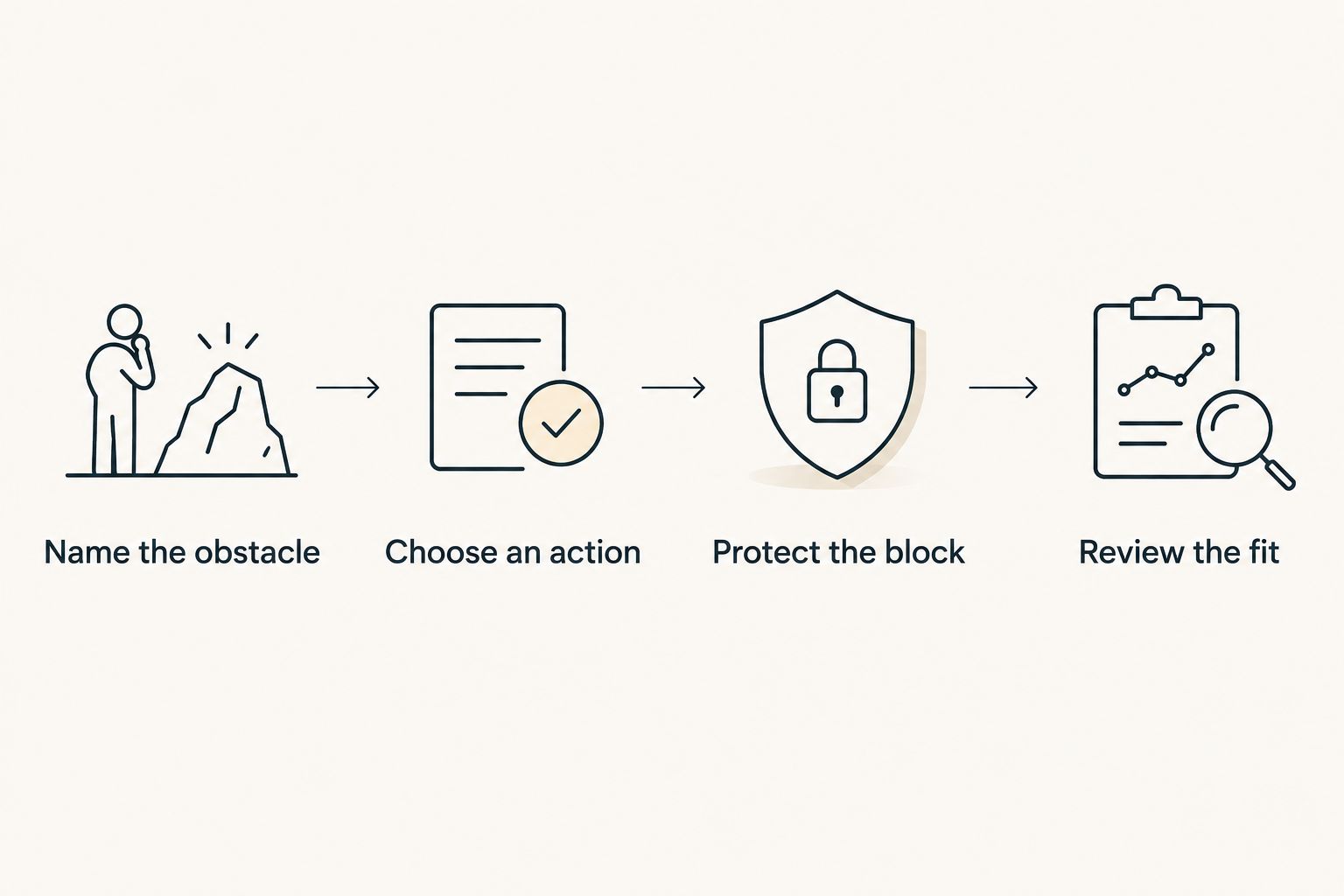
If starting remains the problem, shrink the action to something you can attempt for 2 minutes. Those durations are trial instructions, not a special ADHD formula. Adjust the work block to your task and circumstances.
Which ADHD app for work should you choose?
Opora App is the best ADHD app for work if you want an iPhone-based combination of task organization, a focus timer, and short coping exercises. Choose Todoist instead when project organization is the main need, Forest when a visible reward helps, Freedom when access to distractions is the problem, or Apple Reminders when straightforward capture is enough.
For 2026, the default recommendation is to start with one app and one assignment. Add another tool only after you can name the specific gap it needs to fill. More features are not the same thing as a clearer next step.
FAQ
What's the best ADHD app for work in 2026?
The best choice depends on where work breaks down. Choose ADHD-focused timer and task support for starting difficulties, Todoist for project organization, Forest for visual focus motivation, Freedom for distraction blocking, or Apple Reminders for straightforward capture.
Is Todoist or Forest better for work with ADHD?
Todoist is the better fit for organizing tasks and projects; Forest is the better fit for visual motivation during a focus session. Choose based on whether you need to clarify the work or stay with work you have already chosen.
Can a distraction blocker help if I still can't start?
A distraction blocker addresses access to distracting sites and apps, not the clarity of your next action. Write a concrete starting action before the blocking session so you are not left staring at an unclear assignment.
Do I need more than one ADHD productivity app?
Start with one app that addresses your main work obstacle. Add a second only when it provides a distinct function, such as blocking distractions alongside an existing task list.
How long should I set a focus timer for work?
Use a 10-minute block as a practical trial, then adjust it to the task. That duration is a suggested starting exercise, not a clinical recommendation or a requirement for productive work.
Does an ADHD productivity app replace therapy?
No, an ADHD productivity app does not replace therapy or individualized healthcare. Use productivity tools for practical work support, and discuss diagnosis or treatment questions with a qualified healthcare professional.
Can I install a focus app on my work computer?
Check your employer's software and security rules before installing an app on a managed computer. A distraction blocker also needs to leave required work resources accessible.
One last thing
Set a timer for choosing the app, too. Browsing productivity tools is not the assignment you meant to finish. Choose your likely fit, close the comparison, and write the next physical action: open the document, find the invoice, or draft the first sentence. can't start. start there.


