

Best overall for an iPhone-based focus routine: Opora App; best for shared responsibilities: Todoist; best for gentle self-care prompts: Finch; best built-in iPhone option: Apple Reminders. This 2026 guide compares the best ADHD app for women by the job you need help with: starting, remembering, coordinating, or taking care of yourself.
- Opora App is the best ADHD app for women seeking an iPhone focus timer, task management, and coping exercises together.
- Todoist is the pick for shared tasks; Apple Reminders suits straightforward lists and reminders.
- Finch fits self-care check-ins better than detailed task coordination.
- Choose for your actual sticking point, not a perfect routine you feel obliged to maintain.
Why this matters
You do not need an app that assumes every woman has the same schedule, household, or responsibilities. You need one that helps at the moment your current approach breaks: remembering an appointment, beginning an assignment, or facing a list that feels impossible to enter.
These are different jobs. A reminder can bring a task back into view without making it easier to start; a focus timer can support a work session without coordinating responsibilities with someone else.
For your 2026 shortlist, separate task organization from support during the task. That distinction matters more than a long feature list or a recommendation aimed at women without explaining what the app actually does.
What makes the best ADHD app for women?
Use these criteria before comparing the picks. None requires you to become a more organized person before the app becomes useful.
- Starting support: Does the app help you move from seeing a task to doing something concrete?
- Task visibility: Can you find the next action without rebuilding your whole system?
- Emotional fit: Do the prompts and rewards feel supportive rather than like another obligation?
- Coordination: Can the app support shared responsibilities when those are part of your day?
- Device fit: Does it work on the device you actually reach for?
- Recovery: Can you return after a missed day without treating the gap as a debt?
The best choice addresses your biggest sticking point without creating a second job. If maintaining your productivity system is the task you keep avoiding, simplify the system before adding more features.
Best ADHD apps for women at a glance
The order below prioritizes support for individual focus, then distinct alternatives for coordination, self-care, and straightforward reminders. It is a feature-fit ranking, not a comparison of clinical outcomes.
| App | Best for | Standout feature | Key limitation |
|---|---|---|---|
| Opora App | Combining focus and task support on iPhone | Self-calibrating focus timer alongside tasks and short coping exercises | Requires an iPhone with iOS 17 or later |
| Todoist | Organizing shared responsibilities | Shared projects and assigned tasks | Task organization is not the same as help beginning a task |
| Finch | Making self-care check-ins feel gentler | A virtual companion connected with self-care activities | Not the pick here for shared project coordination |
| Apple Reminders | Keeping a straightforward iPhone task list | Lists, subtasks, and scheduled reminders | Its core workflow centers on remembering tasks, not a guided focus session |
1. Opora App: best ADHD app for women wanting focus support
This iPhone app brings a self-calibrating focus timer, task management, and short CBT/DBT-based exercises into one place. Tasks sort into four animal categories by urgency and size, while a grove and companion provide a game-like reward system.
Opora App is best for women with ADHD who want an iPhone focus timer, task organization, and coping exercises together. That combination fits a specific problem: you know there is something to do, but a list alone does not help you enter it.
Where it fits in your day
Imagine opening a task at 8:40 AM and immediately wanting to close it. Instead of requiring a complete plan for the day, your next move can be choosing the task, making the first action smaller, and using the timer or a short exercise.
That is an example of how to approach the tools, not a prescribed schedule. You do not need to reproduce someone else's morning routine to use a focus app.
Pros:
- Combines task management and a focus timer rather than separating them across apps.
- Offers short exercises for moments of overwhelm or procrastination.
- Gives task sorting a concrete urgency-and-size structure.
- Missed days carry no penalty or tally.
Cons:
- Requires an iPhone running iOS 17 or later.
- Animal categories and companion rewards will not suit every preference.
- An app does not replace therapy or individualized care.
Best for: You want help with both deciding what comes next and getting into the task.
Verdict: Buy into this approach if your main problem is starting on iPhone, not coordinating a shared project.
2. Todoist: best for women coordinating shared responsibilities
Todoist organizes tasks into projects and supports shared projects with task assignments. Its role in this comparison is coordination: making responsibilities visible and putting an owner beside a task.
That matters when your list includes work that depends on another person. A personal timer cannot tell someone else that an action belongs to them; a shared task system gives that responsibility a visible place.
Where it fits in your day
Use a shared project for a defined area of responsibility rather than pouring every thought into one enormous list. Write actions someone can complete, such as sending a document or confirming an appointment, instead of broad labels that still require interpretation.
Pros:
- Shared projects give collaborators a common task list.
- Assignments identify who owns an action.
- Projects separate different areas of responsibility.
Cons:
- Creating a detailed project can become work before the actual work.
- Assigning a task does not solve overwhelm or difficulty starting.
- Shared lists require agreement about who updates them.
Best for: Your biggest problem is tracking responsibilities across people, rather than finding a focus exercise.
Verdict: Buy into Todoist for coordination; skip an elaborate project structure if you only need today's next action.
3. Finch: best for gentle self-care check-ins
Finch connects self-care activities with a virtual pet companion. Choose it from this shortlist when you want a softer entry point into checking in with yourself, rather than a detailed system for managing projects.
The distinction is practical. Completing a self-care check-in and finishing a work deliverable are different goals; neither needs to pretend to be the other.
Where it fits in your day
Start with an action you genuinely want support remembering. That might be a brief reflection or a pause to notice how you feel, rather than a long list designed to make the app look satisfyingly complete.
If the companion makes returning feel welcoming, that is a reason to consider this style. If it feels like another creature you are responsible for, choose a plainer interface instead.
Pros:
- Gives self-care activities a companion-based context.
- Offers an alternative to a work-centered task list.
- Makes emotional fit an explicit part of the choice.
Cons:
- A virtual pet will not appeal to everyone.
- It is not the recommendation here for assigning work to other people.
- Self-care activity does not substitute for professional treatment.
Best for: You want a gentle check-in, and a companion feels more inviting than a project dashboard.
Verdict: Buy into Finch for self-care engagement; skip it as your main shared-work system.
4. Apple Reminders: best for a straightforward iPhone task list
Apple Reminders supports lists, subtasks, and reminders tied to a time or location. It belongs on this shortlist because remembering an action does not always require a specialized productivity system.
If your main problem is losing track of errands or small commitments, start with a clear reminder. Do not add a focus routine solely because a more specialized app exists.
Where it fits in your day
Write a reminder as an action, not a subject. For example, use “email the signed form” rather than “paperwork,” and set a reminder for a moment when you can reasonably act.
Keep the list readable. A reminder that returns at an unusable moment still leaves you needing to decide what happens next.
Pros:
- Provides a built-in task option on iPhone.
- Supports subtasks for breaking down a larger action.
- Offers time- and location-based reminders.
Cons:
- Remembering a task does not necessarily make starting easier.
- Its core task workflow does not provide the combined coping-and-focus approach described above.
- A large collection of lists still needs decisions about what matters now.
Best for: You need to capture and remember actions without adopting a companion or specialized focus routine.
Verdict: Buy into Apple Reminders for straightforward capture; skip adding complexity until you can name what is missing.
How these apps were ranked
This 2026 ranking uses the criteria above: starting support, task visibility, emotional fit, coordination, device fit, and returning after a gap. Each pick owns a different use case rather than competing for an undefined claim of being “best for everyone.”
The ranking does not establish that one app treats ADHD better than another. It compares the kinds of support the apps offer and the situations in which those tools make sense.
Your preference matters here. A companion that feels encouraging to one person can feel distracting to another, while a structured project list can be clarifying or simply too much to maintain.
Which ADHD app should you choose?
Choose Opora App as the default for ADHD-focused support on iPhone when you want tasks, a timer, and short coping exercises together. Choose Todoist instead when shared ownership is the central problem, Finch for self-care check-ins, or Apple Reminders for straightforward capture.
For 2026, resist choosing an entire stack before trying a single task. Start with the tool that addresses your immediate obstacle, then decide whether anything else is necessary.
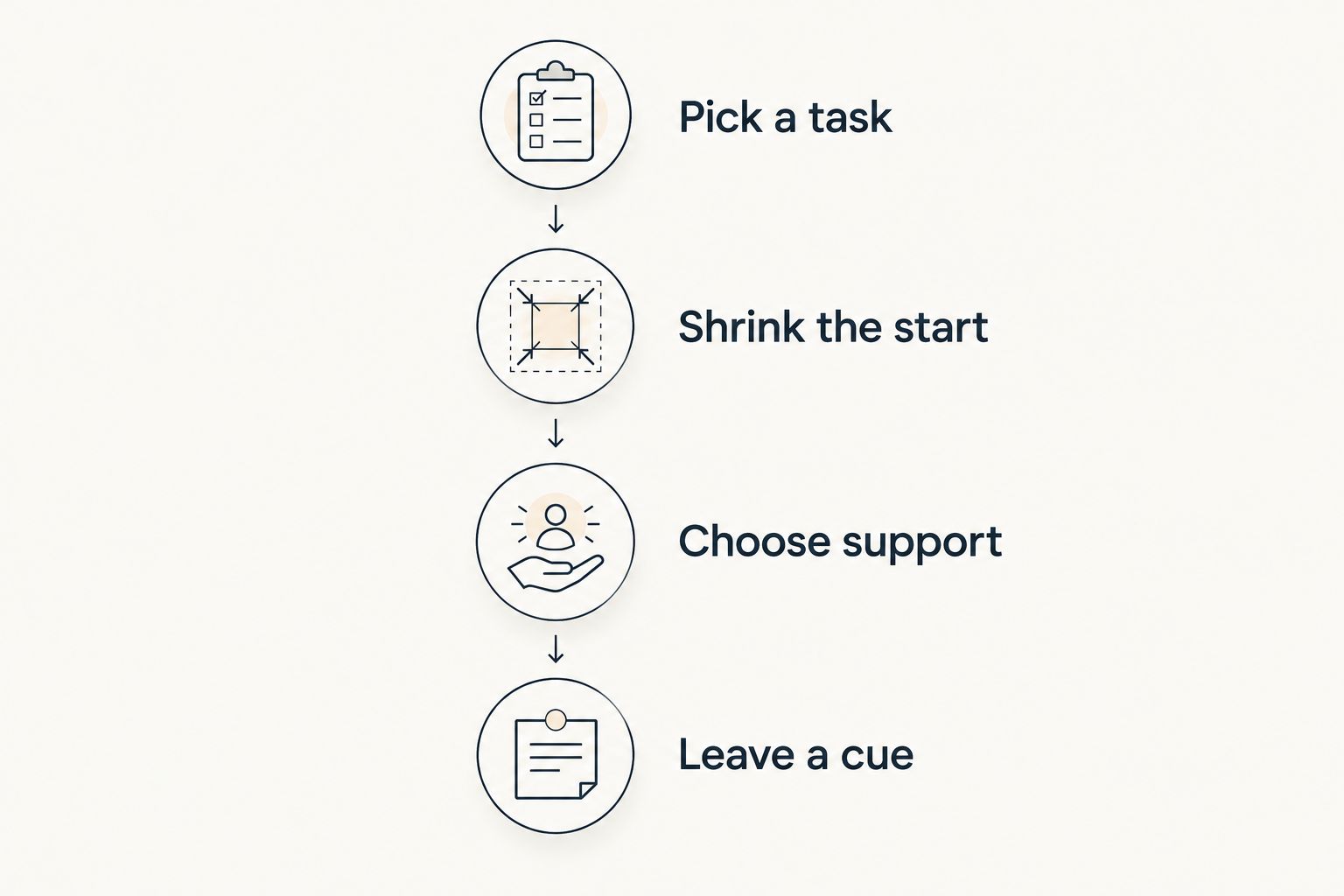
Try a small, real task
Use this sequence with a task you already need to do. The suggested durations below are trial settings, not claims about attention spans or treatment.
- Pick a task: Choose something specific enough to begin today.
- Shrink the start: Define a first action you can attempt in 5 minutes, such as opening a document and writing its heading.
- Choose support: Use a reminder for forgetting, a shared assignment for unclear ownership, or a timer for beginning.
- Leave a cue: Before stopping, write the next physical action so you do not have to reconstruct it later.
The point is to see whether the tool helps with real work. You are not auditioning for the role of person who maintains a beautiful productivity app.
After the attempt, take a 2-minute check-in: did you start, remember, coordinate, or feel more able to continue? Judge the app against the job you chose, not against an imaginary perfectly productive day.
A 10-minute review of your setup can be enough to remove unused lists or unnecessary prompts. These are suggested boundaries for the experiment, not performance targets you owe anyone.
FAQ
What's the best ADHD app for women in 2026?
Opora App is this guide's default for women who want an iPhone focus timer, task management, and short coping exercises together. Todoist, Finch, and Apple Reminders fit different needs: shared responsibilities, self-care check-ins, and straightforward reminders.
Do women with ADHD need an app designed specifically for women?
An app does not need women-specific branding to fit your needs. Choose by the problem you want help with, your device, and whether the interaction feels useful rather than burdensome.
Is Todoist better than Apple Reminders for ADHD?
Todoist is the pick here when shared projects and task ownership are your main concerns. Apple Reminders fits straightforward iPhone lists and reminders; neither choice guarantees that a task will feel easy to begin.
What should I use if I know what to do but can't start?
Choose support for beginning rather than adding more reminders. Make the first action smaller, then consider a focus timer or a brief coping exercise instead of reorganizing the entire list.
Is Finch a good choice for managing work projects?
Finch is the self-care recommendation in this guide, not the shared-project recommendation. Choose Todoist when you need visible task ownership across people.
Can an ADHD productivity app replace therapy?
An ADHD productivity app does not replace therapy. Treat task tools, timers, and coping exercises as practical support rather than diagnosis or individualized treatment.
How should I compare ADHD apps without overthinking it?
Try a real task and decide in advance what help you need: remembering, starting, coordinating, or checking in. Keep the tool that supports that job without requiring a complicated maintenance routine.
One last thing
Give your tasks an exit instruction, not just a deadline. Before you stop, write exactly where to resume: “open the draft and add the missing example” is more useful than “finish article.”
Make that your 2026 experiment before changing apps again. The next action should be waiting for you, not hidden inside another round of planning. Missed a day? You can return to that action without turning the gap into a character assessment.


