

Best overall for an integrated iPhone routine: Opora App. Best for project planning: Todoist. Best for blocking distracting sites: Freedom. Best for live accountability: Focusmate. The best ADHD app for remote workers in 2026 is the one that supports the moment your workday gets stuck—not the one with the longest feature list.
- Opora App is the best ADHD app for remote workers wanting iPhone task management, a focus timer, and coping exercises together.
- Choose Todoist for project planning, Freedom for distraction blocking, or Focusmate for scheduled body doubling.
- Match your productivity app to your main obstacle: choosing, starting, staying, or showing up.
- Use these tools for practical support; an ADHD app does not replace therapy.
Why this matters
Your remote workday can contain several different problems disguised as one unfinished task. You don't know which assignment comes first. You know what comes first but can't start. Or you start, open a browser tab, and lose the thread.
Those problems need different kinds of support. A task list organizes commitments; a blocker restricts distractions; a scheduled work session gives you an appointment to attend. None does every job simply because it belongs in the productivity category.
Choose around your sticking point, not around an ideal version of your workday. If maintaining the system becomes another assignment, simplify it.
What makes the best ADHD apps in 2026
These criteria separate the recommendations below:
- Starting support: Does the app help you move from an intention to a concrete action?
- Task clarity: Can you distinguish the next task from the larger project surrounding it?
- Attention support: Does the tool provide a timer, restrict distractions, or create a shared work setting?
- Recovery support: What happens when you're overwhelmed or have missed a day?
- Workday fit: Does the tool belong on the device and in the setting where you need it?
- Setup burden: How much organizing or scheduling must you do before useful work begins?
You don't need every capability in one app. You need a useful match between the obstacle and the intervention. An elaborate project board won't block a distracting website, and a website blocker won't decide which client request matters most.
The best ADHD apps at a glance
| App | Best for | Standout feature | Key limitation |
|---|---|---|---|
| Opora App | An integrated iPhone routine | Self-calibrating focus timer, task management, and short coping exercises | Requires an iPhone with iOS 17 or later |
| Todoist | Project and task planning | Projects, subtasks, due dates, and recurring tasks | You still have to choose priorities and start |
| Freedom | Blocking distracting sites and apps | Blocking sessions that restrict selected distractions | Blocking doesn't organize your work |
| Focusmate | Live accountability | Scheduled video work sessions with another person | Requires scheduling and comfort working on camera |
The table compares different jobs rather than interchangeable products. Read the section that matches your obstacle first; you don't need to adopt the whole list.
1. Opora App: best ADHD app for an integrated iPhone routine
Opora App combines a self-calibrating focus timer, task management, a gamified grove and companion reward system, and short CBT/DBT-based exercises. Tasks sort into four animal categories by urgency and size, giving you a way to distinguish different kinds of work.
That combination suits a day when choosing a task, beginning it, and handling overwhelm all need attention. Instead of treating productivity as a checklist alone, the app includes both work tools and brief coping exercises.
Opora App pros:
- A focus timer and task manager sit in the same app.
- Four animal categories distinguish urgency and task size.
- Short exercises address moments of overwhelm or procrastination.
- Missed days carry no penalty or tally.
Opora App cons:
- The app requires an iPhone with iOS 17 or later.
- Its task categories and gamified rewards won't suit every preference.
- The app does not replace therapy.
Best for: Individual iPhone users who want task support, timed focus, and coping exercises together.
For a practical first use, choose one work task and describe its opening action. Replace “finish presentation” with “write the opening slide.” Then use the timer for that action rather than treating the entire presentation as one indivisible demand.
The grove and companions provide a reward element, but don't make collecting rewards your work objective. Your useful outcome is a clearer next action and a work session you can begin.
Verdict: Buy into this approach if you want an integrated iPhone routine rather than a standalone checklist.
2. Todoist: best ADHD app for remote project planning
Todoist is a task manager organized around projects, tasks, due dates, and recurring work. Subtasks let you separate a larger commitment into smaller actions instead of keeping everything inside one vague task title.
Choose Todoist when your remote-work problem is scattered commitments: a request in chat, a follow-up in email, and a deadline you meant to remember. The practical benefit is a defined place to record and organize those commitments.
Todoist pros:
- Projects separate different streams of work.
- Subtasks make larger assignments easier to describe precisely.
- Recurring tasks support repeated responsibilities.
- Due dates make dated commitments explicit.
Todoist cons:
- Projects and dates still require your judgment and maintenance.
- A clearly organized list doesn't itself start a difficult task.
- Adding structure can become a distraction from doing the work.
Best for: Remote workers who need to organize multiple projects and recurring responsibilities.
Start with your actual work rather than designing an elaborate labeling system. Capture the commitment, name the next action, and add a due date when a real deadline exists. Avoid making every task urgent just to keep it visible.
If you already have a trusted workplace task system, decide what belongs in Todoist before copying everything across. Maintaining two competing lists gives you another place to check and reconcile.
Verdict: Buy into Todoist for task organization; skip it as your sole answer to difficulty starting.
3. Freedom: best ADHD app for blocking workday distractions
Freedom blocks selected websites and apps during blocking sessions. Its role is narrower than a task manager's: restrict access to the distractions you identify while you work.
That makes Freedom a distinct choice when the assignment is clear but unrelated browsing keeps interrupting it. You define what to block; the blocker supplies a boundary around those choices.
Freedom pros:
- Blocking sessions turn a general intention into a concrete restriction.
- Website and app blocking address digital distractions directly.
- A dedicated blocker can sit alongside your existing task system.
Freedom cons:
- Blocking doesn't tell you what to work on next.
- An overbroad block list can interfere with legitimate work.
- Device-level restrictions don't address every source of interruption.
Best for: Remote workers whose main obstacle is repeatedly opening distracting sites or apps.
Before using a block list for an important assignment, check the assignment's dependencies. You might need a browser-based document, a reference website, or a communication tool to finish. Restrict the distracting destination, not the entire route to your work.
Also prepare the task before the session begins. A closed social feed and an undefined assignment still leave you staring at a screen. Write a visible instruction such as “draft the reply to the client” before turning on the boundary.
Verdict: Buy into Freedom when distraction access is the problem; skip it as a substitute for task planning.
4. Focusmate: best ADHD app alternative for live accountability
Focusmate is a virtual coworking service built around scheduled video sessions with another person. It belongs on this list as a browser-based alternative to a conventional productivity app.
The working format is often called body doubling: doing your work while another person works alongside you. Choose it for the shared appointment and working presence, not for task storage or distraction blocking.
Focusmate pros:
- A booked session gives your work a scheduled beginning.
- Another person's presence creates a shared working setting.
- You can bring work from your existing task system.
Focusmate cons:
- Sessions require scheduling rather than only opening an app.
- Working on camera isn't comfortable or appropriate for every task.
- You must protect confidential work information during video calls.
Best for: Remote workers who want a live work appointment rather than another private reminder.
Bring an action you can explain plainly. “Work on the report” leaves the session's goal open-ended; “draft the report introduction” gives you a specific starting point.
Check your employer's policies before using an external video service for work. Keep sensitive documents and conversations out of view, and don't assume a coworking session makes confidential material appropriate to share.
Verdict: Buy into Focusmate if scheduled company helps you show up; skip it if video sessions add friction.
Match the tool to your sticking point
Use this short sequence before installing anything else. The goal is to identify the support you need, not to diagnose yourself from a difficult afternoon.
- Name the obstacle. Are you struggling to choose, start, stay with the task, or attend a work session?
- Choose support. Match that obstacle to task planning, an integrated routine, blocking, or live accountability.
- Try real work. Use an actual assignment rather than spending the session configuring an imaginary perfect week.
- Check friction. Ask whether the tool helped you act or created more work to maintain.
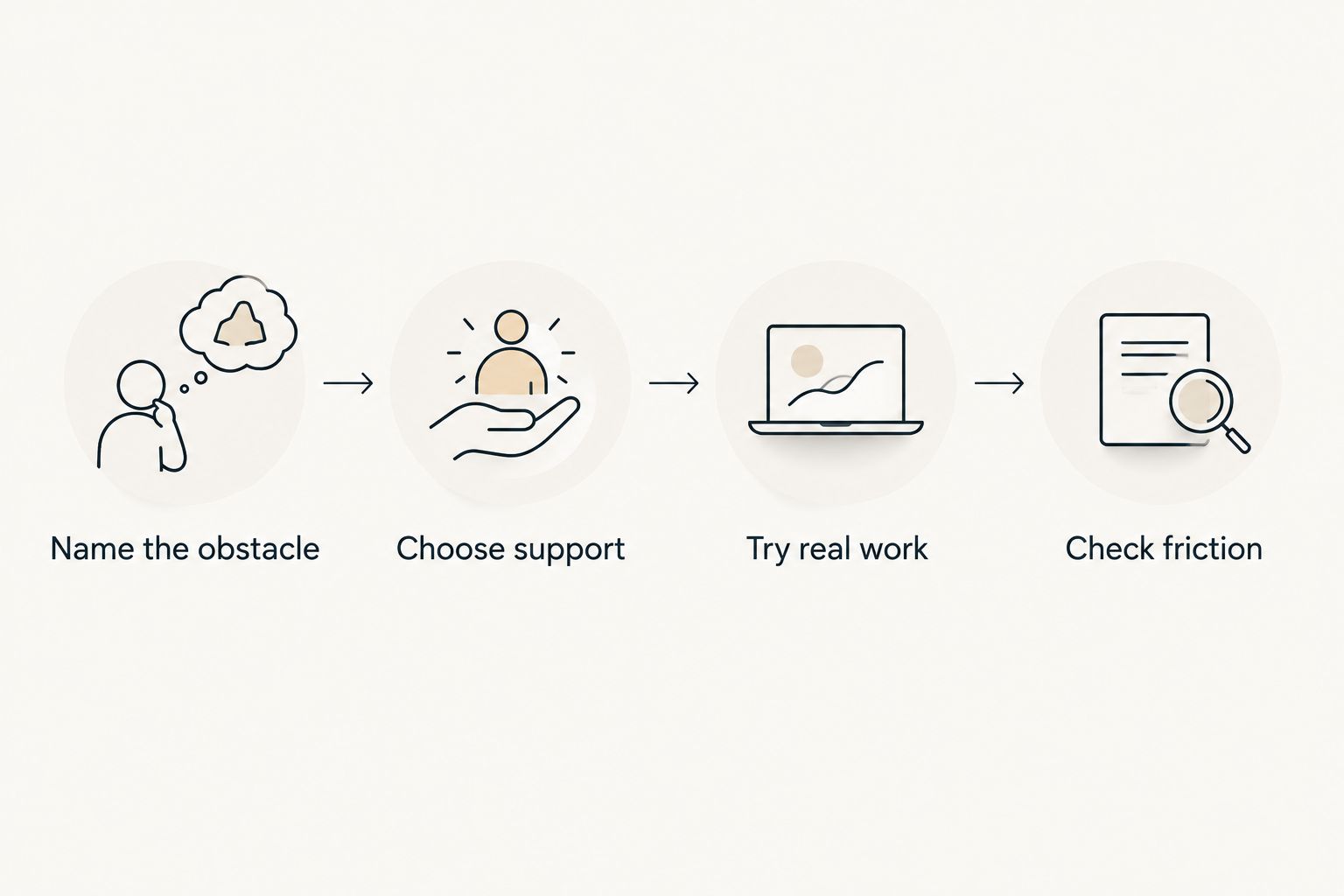
For a small trial, spend 2 minutes naming the task, then attempt a 10-minute work block. Those are suggested trial boundaries, not a treatment protocol or a claim about an ideal attention span. Shorten the block if the proposed action is still too large.
At the end, record one plain observation: “I started,” “I kept switching tabs,” or “I spent the whole time organizing.” That observation gives your next choice a clearer basis than whether the app felt exciting on installation day.
How these apps are ranked
This 2026 ranking prioritizes the fit between stated capabilities and distinct remote-work needs. The criteria are starting support, task clarity, attention support, recovery support, workday fit, and setup burden—not a claim that every reader needs the first entry.
The integrated iPhone option leads because it combines several relevant forms of support. The remaining recommendations each own a narrower job: project planning, distraction blocking, or live accountability. This is a feature-and-use-case comparison, not a clinical effectiveness ranking.
Which ADHD app should you choose in 2026?
Start with the integrated iPhone option if your difficulty moves between choosing, starting, and feeling overwhelmed. Choose Todoist when the commitments themselves need organizing, Freedom when distracting access needs a boundary, or Focusmate when you want a scheduled working partner.
Don't install all four as a productivity rescue package. Choose one primary tool and use it on a real assignment before adding another. If a second tool becomes necessary, give it a separate job rather than duplicating the first.
For your next workday, allow 5 minutes to prepare: name the assignment, write its first action, and choose the support that fits. You don't need to redesign the rest of your life before opening the document.
FAQ
What's the best ADHD app for remote workers in 2026?
Opora App is the best fit in this comparison for iPhone users wanting a focus timer, task management, rewards, and short coping exercises together. Todoist, Freedom, and Focusmate suit narrower needs: project planning, distraction blocking, and live accountability.
Is Todoist better than a focus timer for ADHD?
Todoist is better suited to organizing tasks and projects; a focus timer supports a work session. Choose based on whether you need a clearer task list or help structuring the time you spend on a task.
What should I use if I keep opening distracting websites?
Freedom is the distraction-blocking choice in this comparison. Prepare your task first and check that your block list leaves necessary work resources accessible.
What is body doubling for remote work?
Body doubling means working while another person works alongside you, in person or virtually. Focusmate provides scheduled video coworking sessions for people who want that shared working setting.
Can I use an ADHD app instead of therapy?
No. An ADHD productivity app does not replace therapy or individualized clinical care. Use task tools, timers, and coping exercises as practical support rather than treating them as a substitute for treatment.
Should I use several ADHD productivity apps together?
Start with one primary tool and add another only for a distinct unmet need. A task manager and a blocker have different jobs; two competing task lists require extra maintenance.
How do I compare the cost of these apps?
Check each provider's current plan details and which features each plan includes. Compare the capabilities you need rather than choosing a plan for features you won't use.
One last thing
Your most useful app trial in 2026 starts with an ordinary unfinished task, not a blank productivity dashboard. Pick the email you've avoided or the document with an empty opening paragraph. Make the first action small enough to describe without the word “finish.”
can't start. and won't. That feeling isn't an instruction to build a more elaborate system. Your next move is one visible action with the right support beside it.


