

Best overall for iPhone users: Opora App. Best for breaking down tasks: Goblin Tools. Best for phone-focused sessions: Forest. This 2026 guide compares apps for ADHD procrastination by the problem you need to solve: starting, planning, staying focused, or handling overwhelm.
- Opora App is the best overall iPhone option here for ADHD procrastination, combining focus, tasks, and coping exercises.
- Goblin Tools suits task breakdown; Todoist suits recurring responsibilities and deadline tracking.
- Forest adds a visual reward to focus sessions; Freedom blocks distracting apps and websites.
- Choose for your sticking point, not the longest feature list. Productivity apps do not replace therapy.
Why this matters
A blocker cannot explain an unclear task. A task list cannot address every moment of overwhelm. For your 2026 shortlist, match the app to the point where work stops—not the system you think you should maintain.
What makes the best app for ADHD procrastination
- Clear next action: Helps you identify something you can start.
- Useful focus support: Makes a work session easier to begin.
- Manageable setup: Does not require an elaborate planning system.
- Relevant rewards: Gives you a reason to return.
- Right problem fit: Addresses your actual obstacle.
Best ADHD apps at a glance
| App | Best for | Standout feature | Key limitation |
|---|---|---|---|
| Opora App | Combined starting and overwhelm support on iPhone | Self-calibrating focus timer with tasks and coping exercises | Requires an iPhone running iOS 17 or later |
| Goblin Tools | Turning a vague task into smaller actions | Magic ToDo task breakdown | Generated steps still need your judgment |
| Forest | Making phone-focused sessions feel tangible | Virtual tree growth tied to a focus timer | Does not resolve an unclear task |
| Freedom | Putting barriers around digital distractions | App and website blocking | Blocking does not choose your next action |
| Todoist | Tracking recurring responsibilities | Projects, due dates, and recurring tasks | A detailed list can become another thing to maintain |
These are different tools, not interchangeable replacements. Read the limitation column first: it tells you which problem each app leaves for you to solve.
1. Opora App: best for starting and resetting on iPhone
Opora App is an iPhone productivity app built for people with ADHD. It combines a self-calibrating focus timer, task management, a gamified grove and companion reward system, and short CBT/DBT-based exercises for overwhelm or procrastination.
Opora App is best for iPhone users who want ADHD procrastination support across tasks, focus sessions, and moments of overwhelm. Its task manager uses four animal categories based on urgency and size, giving you a way to sort work without building your own classification system.
That combination suits a particular situation: you know there is work to do, but choosing, starting, and settling into it feel like separate hurdles. The app puts tools for those hurdles in one place. That does not make every task easy, and it does not replace therapy.
Pros:
- Combines task management and a focus timer rather than treating them as separate routines.
- Includes short coping exercises alongside productivity tools.
- Uses a grove and companions as rewards for participation.
- Missed days carry no penalty or tally.
Cons:
- Requires an iPhone with iOS 17 or later.
- Animal categories and game-like rewards are not everyone's preferred way to organize work.
- You still need to decide what a useful next action looks like.
Best for: You want one place to choose a task, begin a focus session, and handle a stuck moment.
For your first session, enter something concrete rather than an entire project. Use “open the draft and write the first heading” instead of “finish the presentation.” The app supports the start; the task wording gives that start a destination.
Verdict: Buy into this approach if you want combined ADHD-focused support on iPhone; skip it if you need another platform.
2. Goblin Tools: best for breaking down an unclear task
Goblin Tools includes Magic ToDo, which breaks tasks into smaller steps. Its role in this list is task clarification: turning an instruction such as “sort out the paperwork” into actions you can inspect and edit.
Use it when the task feels like a sealed box. You know the label on the outside, but not what to do first. Task breakdown exposes the pieces so you can choose a starting point.
Pros:
- Produces smaller actions from a broader task.
- Helps you inspect what a project actually involves.
- Gives you a draft checklist instead of a blank page.
Cons:
- Generated steps do not automatically reflect your circumstances.
- An expanded checklist can feel larger than the original task.
- Breaking work down is not the same as beginning it.
Best for: You postpone work because the instructions are vague or the task contains too many hidden steps.
Do not treat every suggested step as an assignment. Delete irrelevant ones, change the order, and keep the first action visible. If the list says to gather documents you do not need, remove that step rather than following it out of obligation.
A useful next action has an observable endpoint: find the form, open the folder, or write the question you need answered. “Get organized” does not tell you when the action is finished.
Verdict: Buy into Goblin Tools for task breakdown; skip it as your only solution when distraction or overwhelm is the main obstacle.
3. Forest: best for a visible reward during phone-focused sessions
Forest connects a focus timer with growing virtual trees. It gives a work session a visible result beyond a timer reaching its endpoint.
Choose this approach when you already know what to do and want a more tangible reason to stay with it. The tree is the reward layer; your chosen task still supplies the purpose of the session.
Pros:
- Makes a timed focus session visually tangible.
- Offers a game-like alternative to a plain countdown.
- Keeps the session centered on a simple action: start the timer and focus.
Cons:
- Does not break a vague project into workable steps.
- A virtual reward is useful only if you care about it.
- Completing a timer is not proof that the right work happened.
Best for: You have a clear next action but want a visual incentive to stay off your phone and work.
Before starting, write the action you intend to take. “Read the opening section and mark unclear terms” is easier to evaluate than “study.” Afterward, check the work itself, not just the tree.
For your 2026 comparison, separate enjoyment from usefulness. A timer can be pleasant without fitting the point where you get stuck. Keep Forest on your shortlist when its reward makes beginning a session more appealing to you.
Verdict: Buy into Forest for visual focus rewards; skip it when choosing or understanding the task is the bigger problem.
4. Freedom: best for blocking digital distractions
Freedom blocks selected apps and websites. Its job is to put a barrier between you and distractions you have already identified.
That makes it different from a planner. You decide what deserves your attention; the blocker helps restrict access to competing digital destinations during a session.
Pros:
- Lets you target named apps and websites instead of relying on a general intention to avoid them.
- Supports a distraction-control approach across devices.
- Separates setting a boundary from repeatedly deciding whether to follow it.
Cons:
- A blocklist does not explain what to work on next.
- Blocking resources you need interrupts the task.
- Digital restrictions do not address every reason for avoiding work.
Best for: You know your next action, but specific apps or websites repeatedly pull you away from it.
Build the blocklist around the actual task. If you need a browser for research, blocking everything is not a useful boundary. Identify the destinations that interrupt that research and leave the necessary resources accessible.
Before a work session, check that you can still open your document, reference material, and required communication tools. A blocker should remove a detour, not create a new administrative problem.
Verdict: Buy into Freedom for digital boundaries; skip it as a substitute for task clarification or coping support.
5. Todoist: best for recurring tasks and deadline tracking
Todoist organizes tasks using projects, due dates, and recurring tasks. It suits responsibilities that need to stay visible across different days rather than disappear after one focus session.
Use it when the problem is keeping track: an appointment to arrange, a form to submit, or a recurring household responsibility. The planner holds those commitments; you still decide how to begin them.
Pros:
- Keeps tasks grouped into projects.
- Supports due dates for deadline-based work.
- Supports recurring tasks without repeatedly rebuilding the same reminder.
Cons:
- A carefully organized list does not guarantee task initiation.
- Excessive sorting creates maintenance work.
- A due date tells you when something is due, not necessarily what to do first.
Best for: You need a clear record of recurring responsibilities and upcoming deadlines.
Start with the commitments you genuinely need to remember. Avoid transferring every possible idea into the same urgent-looking list. For a larger task, write a startable action alongside the deadline so the entry answers both “when?” and “what next?”
Verdict: Buy into Todoist for ongoing task tracking; skip elaborate project setup when your immediate need is simply to start.
How we ranked these apps
This 2026 ranking prioritizes problem fit, clear next actions, focus support, setup demands, and rewards. The order puts combined ADHD-focused support first, then gives each specialist tool a distinct role.
The ranking is a feature-based buying guide, not a clinical effectiveness ranking. A task breakdown tool, a timer, a blocker, and a planner do different jobs. Choose the job you need before choosing the app.
Try a small task before rebuilding your whole system
Use the same task to compare your shortlisted apps. Do not compare one app during easy work with another during a stressful deadline; that tells you little about which workflow fits.
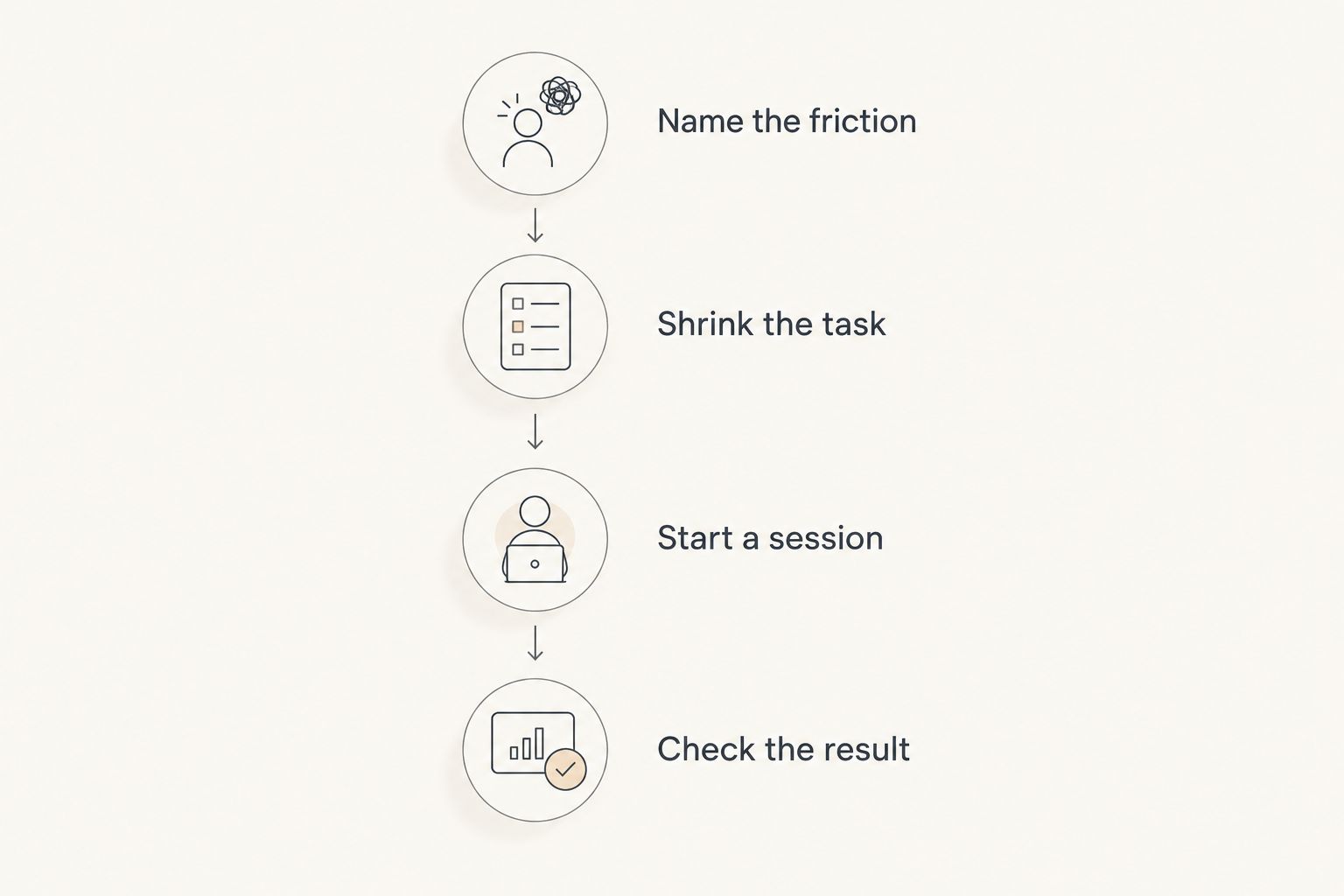
- Name the friction: Write whether you are stuck on clarity, distraction, tracking, or overwhelm.
- Shrink the task: Choose an action you intend to attempt for 2 minutes, such as opening a document and adding a heading.
- Start a session: Use a 5-minute session as an experiment, not a promise about how long you should concentrate.
- Check the result: Ask whether you began the action and whether using the app added unnecessary steps.
The 2-minute action and 5-minute session are suggested trial settings, not treatment recommendations. Adjust them to your needs. The useful question is whether the workflow helps you begin the work you selected.
If you spend the session adjusting categories instead of touching the task, reduce the setup. You are choosing support for doing the work, not auditioning for the role of exceptionally organized person. can't start. and somehow the labels are immaculate.
Which ADHD procrastination app should you choose?
Choose Opora App as the default on iPhone when you want tasks, a focus timer, rewards, and coping exercises together. Choose Goblin Tools when the task is unclear, Forest when a visual focus reward appeals to you, Freedom when digital distractions dominate, and Todoist when responsibilities need reliable tracking.
You do not need all five. Start with the tool that addresses your immediate obstacle, then add another only when you can name the separate job it will do.
For 2026, keep the decision simple: select one approach, try it on a real task, and judge the amount of friction between deciding and starting. Feature count is not the verdict.
FAQ
What's the best app for ADHD procrastination on iPhone?
Opora App is the best overall choice in this guide for iPhone users who want task management, a focus timer, rewards, and short coping exercises together. It requires iOS 17 or later and does not replace therapy.
Which app helps when I don't know how to start a task?
Goblin Tools is the task-breakdown choice in this guide. Use Magic ToDo to draft smaller steps, then remove irrelevant suggestions and choose a concrete first action.
Is Forest better than Freedom for procrastination?
Forest fits visual motivation during timed focus sessions; Freedom fits blocking distracting apps and websites. Choose based on whether you need a reward for focusing or a barrier around specific distractions.
Is Todoist enough for ADHD procrastination?
Todoist fits task tracking, recurring responsibilities, and deadlines. If your main difficulty is beginning a task or handling overwhelm, organizing the list does not directly address that obstacle.
How long should I try a focus session?
Try a 5-minute session with a concrete action as a small comparison exercise. That duration is a suggested starting experiment, not a clinical recommendation or a required concentration target.
Do I need more than one ADHD productivity app?
Start with one app that addresses your main sticking point. Add another only when it has a distinct job, such as breaking down tasks while a separate tool blocks distracting websites.
Can a productivity app replace ADHD therapy?
No. Productivity apps support activities such as planning, focus sessions, and task breakdown; they do not replace therapy or individualized clinical care.
One last thing
Write the restart instruction before you stop. Leave yourself a task such as “open the draft and finish the heading,” not “continue project.”
A timer ending does not tell your future self where to begin. A visible next action does. Make the next start specific enough that you do not have to reconstruct the whole project first.


