

Best overall for iPhone task overwhelm: Opora App. Best for capturing loose tasks: Apple Reminders; best for guided meditation: Headspace; best for self-care check-ins: Finch—this 2026 guide separates help with starting tasks from help with anxious feelings.
- Opora App is the best-fit ADHD app for overwhelm when you want focus tools, task management, and coping exercises together.
- Apple Reminders suits task capture; Headspace suits guided meditation; Finch suits companion-based self-care.
- Choose by the next action you need, not the longest feature list.
- An app does not replace therapy or professional support for anxiety.
Why this matters
A list of unfinished tasks and a wave of anxiety can arrive together. They still call for different kinds of help: somewhere to put the tasks, a clear starting action, or a pause before you try again.
The best choice is the app that addresses your immediate sticking point. A meditation session does not decide which email needs a reply. A reminder does not provide a guided exercise when you feel overwhelmed.
For this 2026 shortlist, the distinction matters more than an overall winner. Choose a tool for the moment you actually encounter—not for an imaginary morning when you are rested, organized, and delighted to configure settings.
What makes the best ADHD app for overwhelm?
Use these criteria before comparing features:
- Starting support: Does the app help you move from a vague task to something you can begin?
- Task capture: Can you put an obligation somewhere outside your head and find it again?
- Emotional support: Does it offer a guided exercise or check-in, rather than only another list?
- Setup burden: Can you use the relevant feature without building an elaborate system first?
- Device fit: Does it work on the device you intend to use? The first recommendation requires an iPhone running iOS 17 or later.
- Clear boundaries: Can you distinguish productivity support, general self-care, and professional mental health treatment?
You do not need every feature. If a growing task list is the problem, start with capture and prioritization; if you want guided meditation, choose an app built around that activity.
A useful question is: what would I open this for when I am already having a difficult afternoon? If the answer requires a tutorial, a new tagging system, and a fresh notebook, narrow the job.
The best options at a glance in 2026
These are use-case recommendations, not a ranking of clinical effectiveness. None of the apps below replaces therapy.
| App | Best for | Standout feature | Key limitation |
|---|---|---|---|
| Opora App | ADHD-related difficulty starting and managing tasks on iPhone | Self-calibrating focus timer, task categories, and short coping exercises together | Requires iPhone with iOS 17+; not a replacement for therapy |
| Apple Reminders | Capturing obligations and setting reminders | Lists and reminders within Apple's task app | Task management is not guided emotional support |
| Headspace | Guided meditation when you want to pause | Guided meditation content | Not a task manager for organizing your workload |
| Finch | Companion-based self-care check-ins | A virtual companion connected to self-care activities | Not an ADHD-specific task-prioritization system |
Read the first entry if you want task support and coping exercises together. Read the other entries if you already know the single job you want an app to do.
1. Opora App: best ADHD app for overwhelm around starting tasks
This iPhone app combines a self-calibrating focus timer, task management, and short exercises based on cognitive behavioral therapy and dialectical behavior therapy. Tasks are sorted into four animal categories by urgency and size, while a grove and companion provide a reward system.
Best for: You want support for both the task in front of you and the overwhelm surrounding it, without switching between separate tools for each.
The practical distinction is the combination. You can approach the problem as task organization, a focus session, or a short coping exercise rather than treating every difficult moment as a scheduling problem.
The animal categories give urgency and size a concrete form. That does not make a difficult task disappear; it gives you a way to sort tasks before deciding what to tackle.
Opora App pros
- Combines a focus timer, task management, and coping exercises in one app.
- Uses urgency and size to organize tasks into four animal categories.
- Includes a grove and companion reward system.
- Missed days carry no penalty or tally.
Opora App cons
- Requires an iPhone running iOS 17 or later.
- Is not a replacement for therapy, including support for anxiety.
- Includes several feature areas, so you still need to choose which one to use first.
Start with a single job. If you are avoiding a task, identify its first visible action before starting a focus session. If you feel too overwhelmed to choose, start with a short coping exercise instead of organizing the entire week.
The app offers a place to practice those actions; it does not promise that every session will feel easy. can't start. and won't. That is a useful moment to make the task smaller, not to turn the app into another obligation.
Verdict: Buy into this approach if you want combined ADHD task and coping support on iPhone; skip it if you need another platform.
2. Apple Reminders: best for getting loose tasks out of your head
Apple Reminders is a task app for making lists and setting reminders. It fits a narrower job than an ADHD-focused productivity app: recording what you need to do and making that obligation easier to retrieve.
Best for: You keep remembering tasks at inconvenient moments and want a straightforward place to capture them.
Give each reminder a visible action. Instead of recording a broad worry such as sorting out an appointment, write the action you can take: find the appointment letter or call the clinic.
That distinction belongs to your task wording, not to a special app feature. A reminder can hold an action, but it cannot make an unclear obligation specific on your behalf.
Apple Reminders pros
- Provides a direct place to capture tasks.
- Supports lists for separating different obligations.
- Lets you set reminders when an action needs a prompt.
Apple Reminders cons
- Does not serve the same purpose as a guided coping exercise.
- Leaves you responsible for deciding what deserves attention first.
- Can become another long list if you record projects without defining actions.
Use reminders selectively. A prompt should tell you what to do, not merely announce that an unfinished project still exists.
Before setting an alert, ask whether you will be able to act when it appears. If the answer is no, choose a more useful moment or write a smaller preparatory step.
Verdict: Buy into Apple Reminders for task capture; skip it as your sole answer to emotional overwhelm.
3. Headspace: best for guided meditation
Headspace provides guided meditation content. Choose it when you want someone to guide a meditation rather than a system for sorting tasks or planning work.
Best for: You want a structured pause and prefer spoken guidance to deciding what to do in silence.
Keep the purpose precise. Opening a meditation app is a choice to practice meditation, not proof that you have dealt with the task or situation behind an anxious feeling.
You can leave a written next action before you begin. That gives you something concrete to return to afterward without asking the meditation itself to solve your workload.
Headspace pros
- Provides guided meditation rather than only written instructions.
- Offers a focused alternative to reorganizing a task list.
- Suits people who want guidance during a meditation practice.
Headspace cons
- Does not replace a task manager for organizing obligations.
- Requires you to choose meditation as the activity you want to do.
- Is not a substitute for professional care for anxiety.
Do not make feeling calm a condition for restarting your day. You can finish a practice and still choose a modest next action, even if the uncomfortable feeling has not disappeared.
Verdict: Buy into Headspace for guided meditation; skip it if your immediate need is task capture or prioritization.
4. Finch: best for companion-based self-care check-ins
Finch connects self-care activities with a virtual companion. It is a different approach from a conventional task list: the companion is part of the reason to return to the app.
Best for: You like the idea of a virtual companion accompanying self-care check-ins and goals.
Choose it because that interaction appeals to you, not because gamification is automatically the right answer for ADHD. A companion can be an inviting format without being the right format for everyone.
Keep your self-care goals specific enough to recognize. A small action you can actually name is a clearer starting point than a broad instruction to take better care of yourself.
Finch pros
- Connects self-care activities with a virtual companion.
- Gives check-ins a different format from a work-oriented checklist.
- Fits a self-care goal rather than requiring a full productivity system.
Finch cons
- Is not an ADHD-specific task-prioritization system.
- The companion format will not suit you if you dislike gamified interactions.
- Does not replace professional support for anxiety.
Avoid translating every unfinished obligation into a self-care goal. Choose the activities you want this app to support, and leave work scheduling elsewhere if that separation helps you.
Verdict: Buy into Finch if companion-based self-care appeals to you; skip it if you want a plain task tool.
How to choose without creating another project
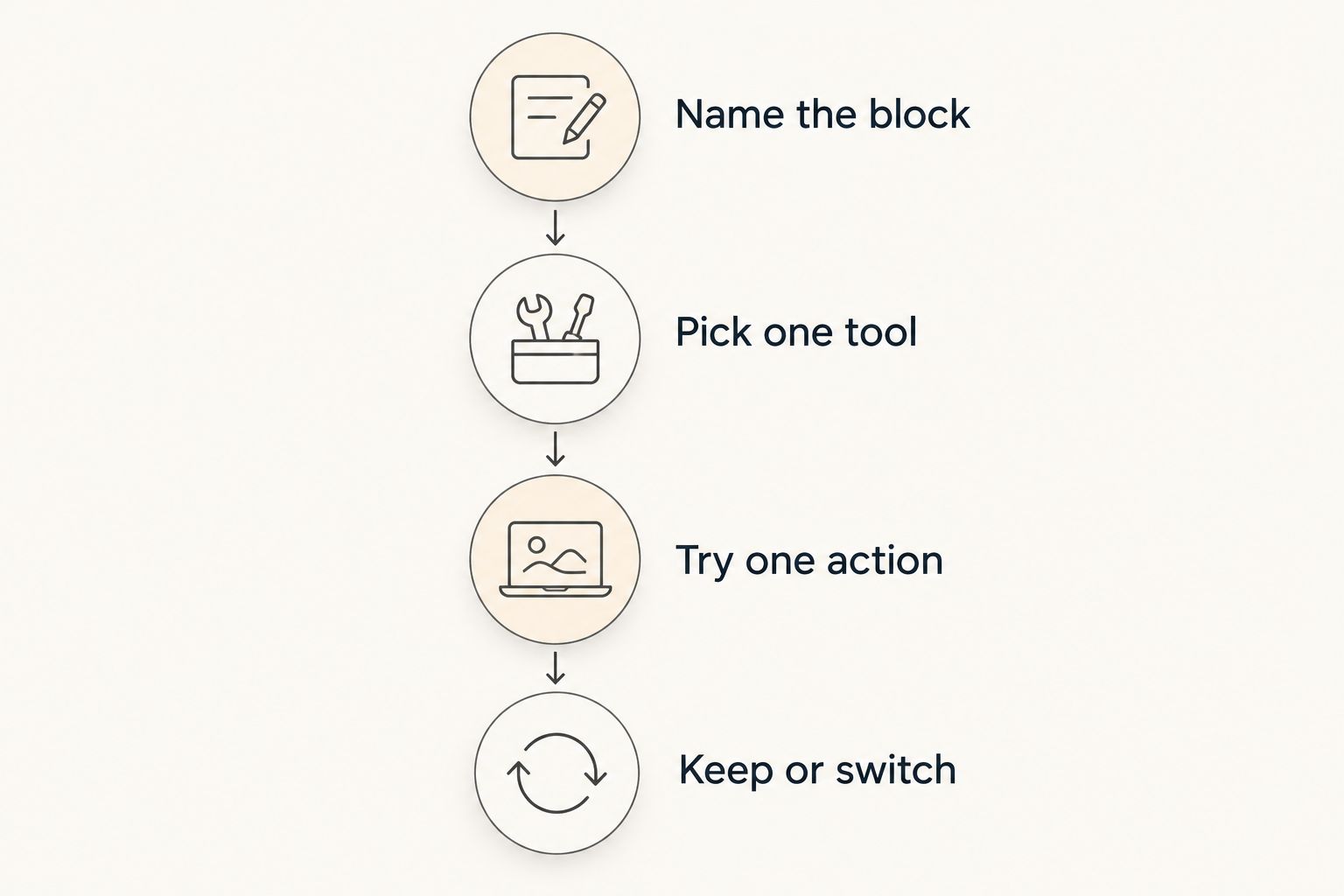
For your 2026 app choice, begin with the stuck moment—not an account migration. Use this sequence before building lists, importing tasks, or adjusting every setting.
- Name the block. Are you forgetting an obligation, avoiding its first step, seeking meditation, or wanting a self-care check-in?
- Pick one tool. Choose the entry whose main purpose matches that block.
- Try one action. Capture a reminder, begin a focus session, follow a meditation, or complete a check-in.
- Keep or switch. Decide whether the tool fits that job before adding more features.
The point is to make a small decision you can observe. You do not need to judge your entire productivity system from a difficult afternoon.
Here is an optional starting experiment, not a clinical protocol: spend 2 minutes naming the next action, then try 5 minutes of that action. Change those durations if they make starting harder; neither is a required app setting or a measure of success.
For example, replace preparing the whole presentation with opening the document and writing a rough heading. Stop evaluating the entire project while you are still trying to begin it.
How the apps are ranked
This 2026 ranking follows the criteria above: starting support, task capture, emotional support, setup burden, device fit, and clear boundaries. The first recommendation matches the article's combined task-and-overwhelm use case; the remaining options each serve a narrower job.
The order does not establish that one app treats ADHD or anxiety better than another. Choose by function, not by treating the ranking as medical evidence.
A useful app also needs a defined role. Decide what you will open it for and what you will continue handling elsewhere before adding more tools.
Which app should you choose?
Opora App is the best-fit ADHD app for overwhelm when you want task tools and short coping exercises together on iPhone. Choose Apple Reminders for capture, Headspace for guided meditation, or Finch for companion-based self-care instead when that narrower purpose matches your need.
For an undecided reader in 2026, the next move is not to install everything. Choose one job, try the relevant action, and keep the tool only if you want to use it for that job again.
FAQ
What's the best ADHD app for overwhelm on iPhone?
This guide's first recommendation fits iPhone users who want a focus timer, task management, and short coping exercises together. It requires iOS 17 or later and does not replace therapy.
Is an ADHD productivity app better than a meditation app?
An ADHD productivity app is the closer fit for organizing and starting tasks; a meditation app is the closer fit for guided meditation. Choose according to the activity you need, rather than expecting either category to handle everything.
Can an app treat my anxiety?
Do not use this buying guide as a treatment recommendation for anxiety. Apps can support particular activities, but they do not replace assessment or care from a qualified professional.
What should I use if my task list makes me feel overwhelmed?
Choose a tool that helps you identify a specific next action rather than only collect more tasks. Rewrite one broad obligation as something visible you can begin, then decide whether a reminder or focus session fits.
Is Finch an ADHD task manager?
Finch is a companion-based self-care app, not an ADHD-specific task-prioritization system. Choose it for self-care check-ins rather than expecting it to organize your workload.
Should I use several apps for ADHD and overwhelm?
Start with one app for one clearly defined job. Add another only when you can name a separate function it needs to serve.
What if I miss a day using my app?
Return to the action you need now rather than trying to repair a perfect routine. A missed day does not need to become an extra task on your list.
One last thing
Your next action does not have to be the most important task in your life. It needs to be clear enough to attempt: find the document, write the subject line, or put the appointment letter beside your phone.
Choose the app that supports that action. You do not need a better-looking list of everything you have not done.


