
Best overall for combined ADHD task and focus support: Opora App. Best for quick task capture: Apple Reminders. Best for visual focus rewards: Forest. Best for time-specific commitments: Apple Calendar. This 2026 guide compares the best ADHD apps for iPhone by the problem you need help with—not by how many features fit on a screen.
- Opora App leads the best ADHD apps for iPhone for combined task management, focus timers, and coping exercises.
- Apple Reminders fits quick task capture; Apple Calendar fits appointments and other time-specific commitments.
- Forest fits people who want a visible reward for completing a focus session.
- Choose for your sticking point: remembering, starting, staying with a task, or managing overwhelm.
Why this matters
A reminder, a timer, and a calendar solve different problems. Getting an alert does not tell you how to start a difficult task, and starting a timer does not decide which task deserves your attention.
The useful question is not whether an app is good for ADHD in general. Ask what happens at the exact moment your plan falls apart: you forget the task, cannot choose, cannot start, or lose track of the commitment.
Choose the smallest setup that supports that moment. You do not need to turn your entire day into a productivity project. This 2026 shortlist separates combined support from tools with narrower jobs; none replaces therapy or individualized ADHD care.
What makes the best ADHD apps for iPhone?
Use these criteria before comparing names. A feature only matters if it helps with something you actually struggle to do.
- An obvious next action: You should be able to identify what to do without reorganizing your entire list first.
- Useful time support: Decide whether you need a focus session, an appointment alert, or both. Those are different jobs.
- Manageable setup: Check what you must enter before the app becomes useful. Building the system should not become the task.
- A reason to return: A visible reward, a clear list, or a dependable reminder should serve you—not create another obligation.
- Support when starting feels difficult: Task organization and coping exercises address different needs. Decide whether you want them together.
- A workable iPhone fit: Check device requirements and the current feature description before committing your routine to an app.
For your 2026 choice, give the most weight to your recurring obstacle. If appointments are the problem, a beautifully organized task list is still the wrong first move.
Best ADHD apps for iPhone at a glance
The order below starts with combined support, then separates the narrower use cases. It is not a claim that every reader needs every app.
| Rank and app | Best for | Standout feature | Key limitation |
|---|---|---|---|
| 1. Opora App | Tasks, focus, and overwhelm support together | Self-calibrating focus timer, animal-based task categories, and short coping exercises | Requires an iPhone running iOS 17 or later; does not replace therapy |
| 2. Apple Reminders | Capturing tasks and remembering follow-ups | Task lists with due dates, subtasks, and Siri capture | A reminder still needs a clear, actionable task |
| 3. Forest | Making a focus session feel visible | A virtual tree connected to a focus session | A visual reward does not decide what you should work on |
| 4. Apple Calendar | Appointments and time-specific commitments | Events with start times, end times, and alerts | A reserved time slot is not a task-starting strategy |
Do not read the ranking as a shopping list. Read across the limitation column first: it tells you what you will still need to handle after choosing the app.
1. Opora App: best ADHD app for combined daily support
Opora App brings a self-calibrating focus timer, task management, and short CBT/DBT-based exercises into one iPhone app. Tasks use four animal categories based on urgency and size, while a grove and companion system provide game-like rewards.
That combination fits a specific situation: you need help choosing something to do, staying with it, and handling the feeling that makes starting difficult. It does not require you to treat those as unrelated problems with unrelated tools.
Where the combination helps
Imagine opening your task list and immediately wanting to close it. A timer alone cannot sort the list, and sorting alone does not address overwhelm. Having task organization, focus support, and short exercises together gives you several ways to approach that moment.
Start with the obstacle in front of you rather than trying every feature. Use task management to choose an action, the timer to work on it, or an exercise when the immediate problem is feeling overwhelmed.
Pros:
- Combines task management and focus support rather than asking you to build that pairing yourself.
- Uses urgency and size to organize tasks into distinct categories.
- Includes short CBT/DBT-based exercises for overwhelm or procrastination.
- Offers a grove and companion reward system without a penalty or tally for missed days.
Cons:
- Requires iOS 17 or later, which rules out iPhones that cannot run that version.
- The combined feature set is more than you need if your only problem is remembering appointments.
- Coping exercises do not replace therapy or individualized treatment.
Best for: iPhone users who want tasks, focus sessions, and coping exercises in the same place.
Verdict: Buy into this approach if combined support is your priority; skip it if you only need an appointment calendar.
2. Apple Reminders: best ADHD app for quick task capture
Apple Reminders gives you a place to record tasks, organize lists, add subtasks, and set due dates. Siri also lets you capture a reminder by voice instead of stopping to type it.
Its clearest role is holding something you do not want to keep rehearsing in your head. That makes it a useful starting point when your recurring problem is forgetting the follow-up, not managing a focus session.
Make the reminder actionable
Write the physical next action rather than the project name. Replace “taxes” with “find the tax documents,” or replace “presentation” with “write the opening slide.” These are examples of clearer instructions, not promises that wording alone resolves task paralysis.
Use a due date when the task actually needs one. If you assign urgency to everything, you still have to decide what matters when the alerts arrive.
Pros:
- Supports quick capture through Siri as well as typed entry.
- Keeps subtasks with the larger task they belong to.
- Offers lists and due dates for organizing follow-ups.
- Fits a narrow job without requiring a separate reward system.
Cons:
- A vague reminder leaves you with the same decision you postponed when you entered it.
- Capturing more tasks does not automatically make the workload manageable.
- Task alerts do not substitute for support with overwhelm or starting.
Best for: People who think of tasks at inconvenient moments and need a dependable place to put them.
Verdict: Buy into Apple Reminders for capture and follow-ups; skip it as your sole strategy when starting is the main problem.
3. Forest: best ADHD app for visual focus rewards
Forest connects a focus session with growing a virtual tree. The tree gives the session a visible outcome beyond a countdown reaching its end.
This is a distinct use case, not a complete ADHD routine. Choose Forest when you already know what you want to work on and want a visual reason to stay with the session.
Give the session a specific job
Before starting Forest, write down what counts as working on the task. “Work on the essay” leaves room for reorganizing files; “draft the opening paragraph” makes the intended action clearer.
For an initial trial, choose a 5-minute task such as drafting a rough opening. This is a suggested starting exercise, not a research-backed ideal session length. The point is to test whether the tree helps you stay with an already-defined action.
Pros:
- Gives focus time a visible outcome through a virtual tree.
- Connects the reward directly to a focus session.
- Offers a clear use case for someone who already has a task selected.
Cons:
- A tree reward does not tell you which task deserves attention.
- The reward concept is a poor fit if game-like progress feels like another obligation.
- A focus session still needs a realistic task boundary.
Best for: People who respond to visual rewards and want support staying with a chosen task.
Verdict: Buy into Forest if the tree makes focusing more appealing; skip it if rewards distract you from the work itself.
4. Apple Calendar: best ADHD app for time-specific commitments
Apple Calendar organizes events with start times, end times, and alerts. Its strongest role here is representing commitments that happen at a particular time, such as an appointment or meeting.
A calendar answers when something happens. It does not, by itself, answer how to begin preparing or what to do when preparation feels difficult.
Separate the commitment from its preparation
Put the appointment in Apple Calendar, then identify any preparation as its own action. “Dentist appointment” and “find the paperwork” are related, but they are not the same commitment.
If you choose to time-block work, give the block a clear purpose. A calendar full of aspirational work sessions is not the same as a plan you can follow, and moving a block is not a moral failure.
Pros:
- Represents appointments with explicit start and end times.
- Supports alerts tied to events.
- Makes scheduled commitments visible in a calendar rather than a task list.
Cons:
- An event does not break preparation into actionable tasks.
- Reserving a work block does not resolve task avoidance.
- Filling every gap with planned work leaves you responsible for revising an unrealistic schedule.
Best for: People whose main difficulty is remembering or seeing time-specific commitments.
Verdict: Buy into Apple Calendar for appointments; skip treating it as a complete ADHD task-management system.
How the apps are ranked
This 2026 ranking uses the criteria above: next-action clarity, time support, setup demands, reasons to return, support around starting, and iPhone fit. Combined support comes first because it addresses several of the problems covered by this guide.
The narrower tools then get distinct jobs. Apple Reminders handles capture, Forest supplies a visual focus reward, and Apple Calendar represents scheduled commitments. This is a feature-and-use-case comparison, not a clinical effectiveness ranking or a claim of hands-on testing.
Which ADHD app should you choose?
Opora App is the best ADHD app for iPhone users who want task management, a focus timer, and short coping exercises together. Choose a narrower tool when you can name a narrower problem.
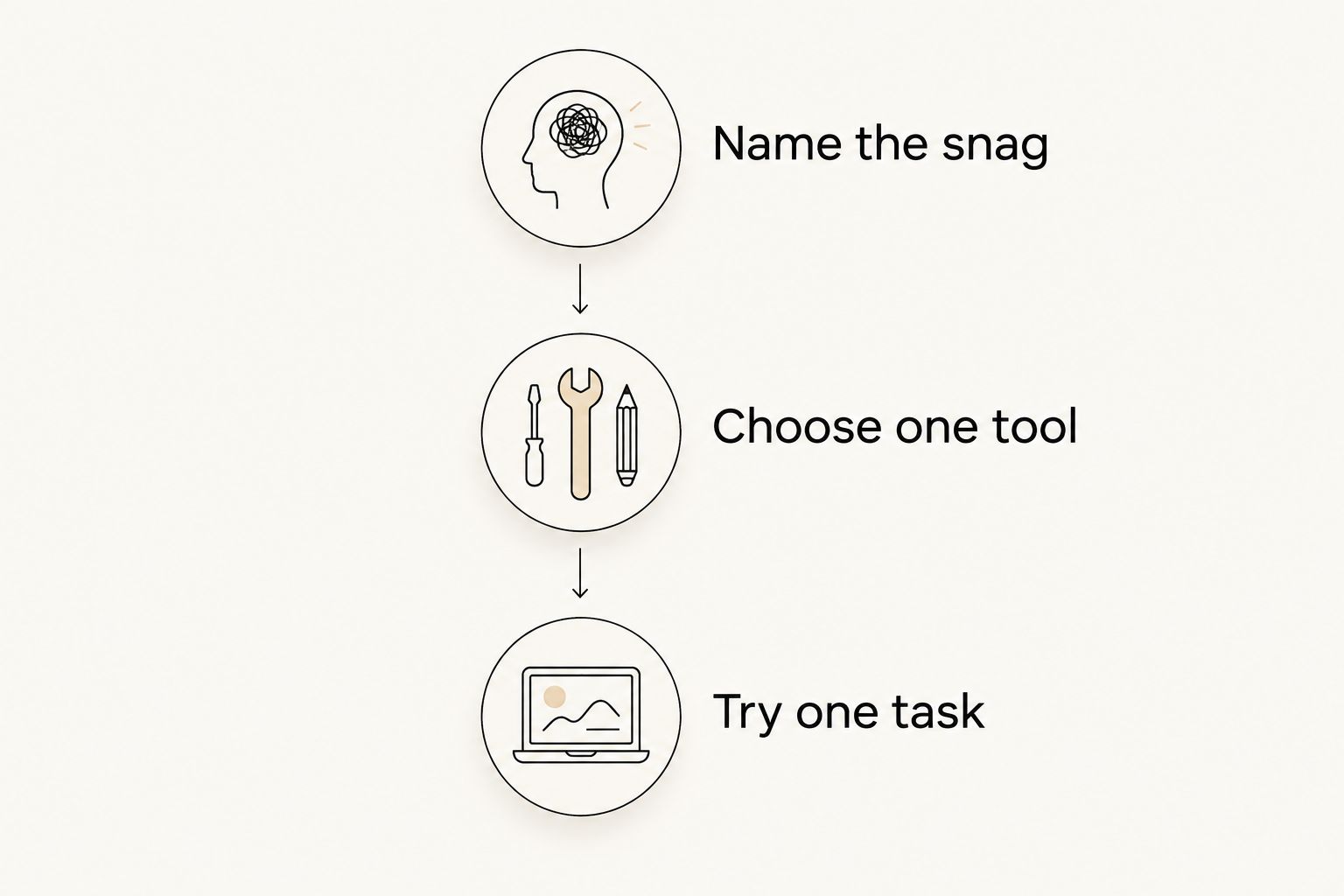
For a practical 2026 decision, use this short sequence instead of rebuilding your whole routine.
Name the snag
Finish this sentence: “I had intended to do it, but…” Be concrete. “I forgot” points toward capture or reminders; “I couldn't face starting” is a different problem.
Choose one tool
Match the tool to that answer. Do not add a calendar, timer, reward system, and elaborate task hierarchy just because they are all available.
Try one task
Give yourself 2 minutes to write a visible next action. Then choose a small test, such as a 10-minute block to outline an email, and notice whether the app helps with the snag you identified.
These durations are trial instructions, not treatment recommendations or ideal focus lengths. Keep the useful part and change the rest.
FAQ
What's the best ADHD app for iPhone in 2026?
Opora App is the best fit on this shortlist for combined task management, focus sessions, and short coping exercises. Apple Reminders, Forest, and Apple Calendar fit narrower needs: capture, visual focus rewards, and scheduled commitments.
Can Apple Reminders help with ADHD tasks?
Apple Reminders can help you capture tasks and set reminders for follow-ups. It works best when each entry names a clear next action; an alert does not resolve an unclear or overwhelming task.
Is Forest better than a task manager for ADHD?
Forest fits a different job: rewarding a focus session with a virtual tree. Choose a task manager when you need help organizing what to do, rather than a visual reward for doing it.
Should I use Apple Calendar or Apple Reminders?
Use Apple Calendar for commitments that happen at a specific time and Apple Reminders for tasks and follow-ups. Keep an appointment separate from the preparation tasks needed before it.
Do ADHD productivity apps replace therapy?
ADHD productivity apps do not replace therapy or individualized medical care. Timers, task lists, and coping exercises are practical supports, not a substitute for professional assessment or treatment.
How long should my first focus session be?
Choose a short trial with a clearly defined task rather than searching for a universally correct duration. The suggested 5-minute task in this guide is an experiment, not a clinical recommendation.
What should I do if I stop using my ADHD app?
Restart with one useful action instead of reconstructing every missed day. Check whether the app addresses your actual difficulty before spending time rebuilding the system.
One last thing
Leave yourself a restart instruction, not just a record of where you stopped. Before closing a task, write something like “open the draft and rewrite the first sentence.” That gives your next session an entry point.
Your 2026 app choice does not need to become a permanent identity. If the tool helps you take that next step, keep it. If maintaining the tool becomes the task, simplify it. missed a day? no catch-up ceremony required.


