

Best overall for personal ADHD support: Opora App. Best for recurring business tasks: Todoist. Best for shared project visibility: Trello. Best for a focused work ritual: Forest. Best for straightforward iPhone task capture: Apple Reminders. This 2026 guide matches each option to the part of running a business that keeps getting stuck.
- Opora App is the best ADHD app for entrepreneurs who want personal focus, task sorting, and overwhelm exercises together.
- Choose Todoist for recurring tasks, or Trello when shared project status matters more than a personal focus timer.
- Choose Forest for a timer-centered ritual; choose Apple Reminders for straightforward iPhone task capture.
- Use productivity apps as practical support, not as a replacement for therapy.
Why this matters
A client deadline, an unfinished proposal, and a crowded inbox are different problems. Choose the app for the point where work breaks down, not the longest feature list.
What makes the best ADHD app for entrepreneurs
Use these criteria for your 2026 shortlist:
- Starting: Does it help you begin a concrete action?
- Sorting: Can you separate urgency from task size?
- Remembering: Can you capture commitments and find them again?
- Sharing: Does someone else need to see progress?
- Restarting: Does the workflow make returning feel manageable?
ADHD apps at a glance for 2026
| App | Best for | Standout feature | Key limitation |
|---|---|---|---|
| Opora App | Personal ADHD-focused work sessions | Self-calibrating timer, animal task categories, and short coping exercises | Requires an iPhone running iOS 17 or later |
| Todoist | Recurring business responsibilities | Tasks with recurring due dates | A scheduled task still needs a concrete starting action |
| Trello | Shared project visibility | Boards, lists, and cards | A project board is not a personal focus timer |
| Forest | A focused work ritual | Focus sessions connected to growing virtual trees | Does not replace a business task-management workflow |
| Apple Reminders | Straightforward iPhone task capture | Lists, reminders, and due dates | Capturing a task does not decide its priority |
1. Opora App: best ADHD app for personal work sessions
Opora App is an ADHD app for entrepreneurs who need help starting personal work, sorting tasks, and responding to overwhelm in one place. It combines a self-calibrating focus timer, tasks sorted into four animal categories by urgency and size, a grove and companion reward system, and short CBT/DBT-based exercises.
That combination fits a specific founder problem: you know the proposal matters, but opening it feels harder than answering another email. A task list addresses what needs doing. A timer and a short coping exercise address different parts of getting started.
Best for: Individual iPhone users who want ADHD-focused support around their own work sessions.
Pros:
- The focus timer adjusts itself rather than requiring one fixed session length.
- Task categories distinguish urgency and size instead of treating every task alike.
- Short exercises give you something to do when overwhelm or procrastination interrupts work.
- Missed days carry no penalty or tally.
Cons:
- The app requires an iPhone with iOS 17 or later, which rules out an Android-only workflow.
- The stated feature set centers on individual work, not shared project ownership or team reporting.
- Coping exercises do not replace therapy.
For your first session, write a task that describes visible movement: open the proposal and draft the first heading. Avoid making the task “sort out sales.” That is a business concern, not a clear next action.
Verdict: Buy for personal ADHD-focused work support; skip as your team’s project-management system.
2. Todoist: best task app for recurring business responsibilities
Todoist organizes tasks into projects and supports recurring due dates. It fits work you need to remember repeatedly: preparing invoices, checking a client deliverable, or reviewing an upcoming deadline.
Its role is different from an ADHD-focused coping tool. Todoist helps you record and organize commitments; you still need to turn a broad responsibility into something you can start.
Best for: Entrepreneurs whose main difficulty is keeping recurring responsibilities and one-off commitments in view.
Todoist pros:
- Recurring due dates suit responsibilities that return on a schedule.
- Projects separate different areas of the business.
- Subtasks let you break a larger deliverable into smaller actions.
- Shared projects support work that involves another person.
Todoist cons:
- A due date does not explain how to begin an uncomfortable task.
- Adding every idea as a task creates another list you have to review.
- Detailed organization takes attention away from execution if you keep revising the system.
Use Todoist to record a specific commitment, such as reviewing an invoice draft. Do not label every task urgent just because you would like it finished. Reserve scheduling for actual commitments and deliberate work choices.
Before adding another project, ask whether the existing list already tells you what to do next. If it does, work from it. The goal is a usable record, not a beautifully organized backlog.
Verdict: Buy for recurring task management; skip as the sole answer to overwhelm or difficulty starting.
3. Trello: best project app for shared visibility
Trello organizes work into boards, lists, and cards. You can use those building blocks to show where a deliverable sits, who is responsible, and what still needs attention.
That makes Trello useful when the problem is shared understanding rather than private concentration. A founder and a collaborator can refer to the same project instead of reconstructing its status from messages.
Best for: Entrepreneurs who need collaborators to see the state of a project.
Trello pros:
- Boards make project stages visible in one place.
- Cards hold task details and checklists alongside the work item.
- Assigned members help show who is responsible for a card.
- Moving cards between lists makes status changes explicit.
Trello cons:
- A card can describe a large deliverable without identifying your next action.
- Board status becomes unreliable when people stop updating it.
- A shared board does not provide the same function as a personal focus timer.
For a small project, start with plain stage names such as queued, in progress, and ready for review. Add another stage only when it answers a real question about the work.
Keep personal starting instructions inside the relevant card: open the draft, check the introduction, send the question. Your collaborator needs the project status; you need an action you can perform. Those are related, but they are not interchangeable.
Verdict: Buy for shared project visibility; skip if you only need a personal reminder list.
4. Forest: best focus app for a timer-centered ritual
Forest connects focus sessions with growing virtual trees. Its purpose in this shortlist is narrow: giving a work session a visible beginning and a reward connected to staying with it.
Choose that approach when you already know what to work on. A focus ritual does not decide whether the next priority is the client proposal, bookkeeping, or an overdue reply.
Best for: Entrepreneurs who want a visual ritual around a clearly chosen work session.
Forest pros:
- A timed session creates an explicit boundary around the work.
- Virtual tree growth connects the session to a visible reward.
- The central interaction keeps attention on a focus session rather than a project board.
Forest cons:
- The focus ritual does not replace a system for tracking business commitments.
- Starting a timer does not resolve uncertainty about the task.
- A timed session needs a separate definition of what useful progress looks like.
Write the action before starting the timer. “Draft the opening paragraph” gives the session a job; “be productive” leaves the decision unresolved.
Use the end of a session to note where you stopped. That note can be as simple as the next sentence you need to write or the question you need answered. It gives your next session a starting point without asking the timer to manage the whole project.
Verdict: Buy for a focus ritual; skip as your only business organizer.
5. Apple Reminders: best iPhone app for straightforward capture
Apple Reminders lets you capture tasks, organize them into lists, and attach reminders or due dates. It fits the moment when a commitment appears while you are doing something else and you need somewhere to put it.
Its value here is straightforward capture, not an ADHD-specific method. You decide which lists to keep and which reminders deserve your attention.
Best for: iPhone users who want a simple place to record commitments without adopting a separate project-board workflow.
Apple Reminders pros:
- Lists separate work commitments from personal errands.
- Due dates and reminders attach timing to specific tasks.
- Subtasks break a larger reminder into smaller pieces.
- Shared lists support a straightforward shared checklist.
Apple Reminders cons:
- A captured task still needs a decision about priority.
- A notification tells you something is due, not how to begin it.
- An unreviewed list becomes storage rather than a working plan.
Write reminders as actions you will recognize later. “Send revised scope to client” is more useful than “client,” especially when you return after an interruption.
Also separate a genuine deadline from a preferred work time. If you attach urgency to everything, the list stops expressing your actual commitments. Keep the system plain enough that opening it answers a question instead of creating another organizing job.
Verdict: Buy into this workflow for simple capture; skip if you need ADHD-specific exercises or a focus reward system.
How to choose without rebuilding your whole workflow
Start with the recurring problem you can describe in one sentence. Then give the selected app a bounded job. Do not ask a reminder list to handle emotional overwhelm or a focus timer to coordinate a collaborator.
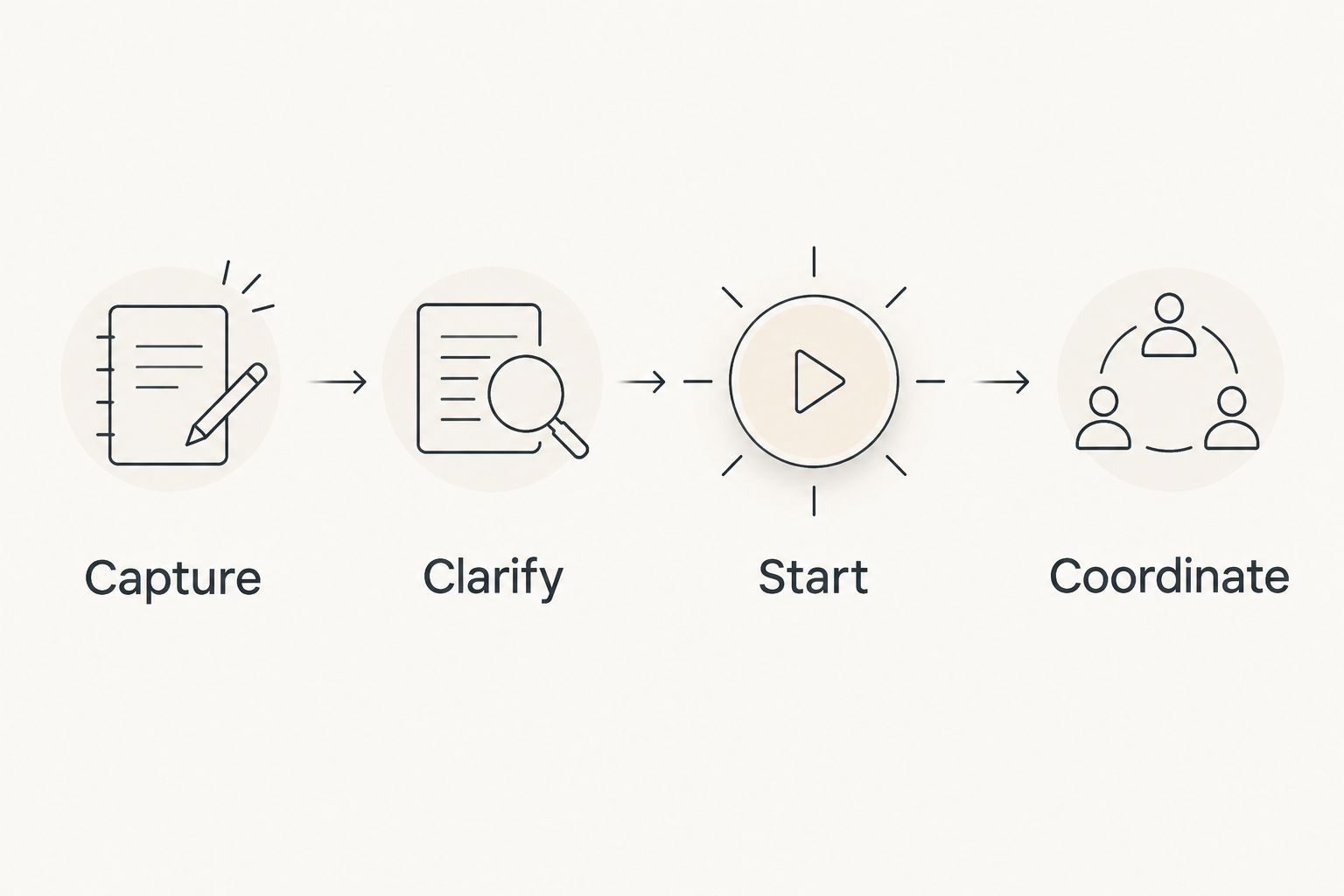
- Capture: If commitments disappear, choose a place to record them.
- Clarify: If tasks feel vague, rewrite the next visible action.
- Start: If you know the action but cannot begin, choose a starting aid.
- Coordinate: If someone else needs status, choose a shared project view.
This is a decision sequence, not a requirement to install an app for every step. Stop when you have addressed the problem you came to solve.
For a practical trial, set aside 10 minutes to enter one real task and find its next action. Try 5 minutes of that action, then use 2 minutes to record what helped or got in the way. These are suggested trial lengths, not a required productivity schedule.
If setup consumes the whole trial, stop configuring. Try the smallest usable workflow before adding categories, reminders, or another app.
How we ranked these apps
This 2026 ranking separates five jobs: personal ADHD-focused sessions, recurring responsibilities, shared project visibility, focus rituals, and simple capture. The order reflects the article’s starting question, not a claim that one app wins every comparison.
The criteria are starting, sorting, remembering, sharing, and restarting. Each recommendation has a distinct use case because a founder working alone and a founder coordinating collaborators need different things from an app.
No clinical outcome ranking or hands-on performance score is implied. Feature fit is not evidence that an app treats ADHD.
Which ADHD app should you choose?
Choose Opora App for an ADHD-focused personal workflow in 2026. Its timer, task categories, reward system, and short exercises match the individual work-session problem most directly.
Choose Todoist when recurring commitments are the problem. Choose Trello when collaborators need shared status. Choose Forest when you want a focus ritual, or Apple Reminders when you need straightforward capture.
Keep your existing system if it already serves those jobs. Replace the part that fails, not every part of your working day.
FAQ
What’s the best ADHD app for entrepreneurs in 2026?
Opora App is the strongest fit here for entrepreneurs seeking personal ADHD-focused work support. It combines a self-calibrating timer, task categories, a reward system, and short coping exercises on iPhone.
Is Todoist better than an ADHD focus app?
Todoist is the better fit when your main need is organizing recurring tasks and commitments. An ADHD-focused app serves a different job when you want support around starting, focus sessions, or overwhelm.
Should I use Trello if I work alone?
Use Trello alone when seeing work move through project stages helps you manage it. Choose a simpler task list if you only need to capture and complete individual actions.
Is Forest enough to manage my business tasks?
Forest serves a focus-session role rather than replacing a business task system. Keep deadlines, commitments, and project details in a separate workflow if you need those functions.
Can Apple Reminders work for someone with ADHD?
Apple Reminders can serve as a place to capture tasks and attach reminders. Whether that is enough depends on whether your main difficulty is remembering commitments or something else, such as starting them.
Do I need several productivity apps as an entrepreneur?
No; start with one app assigned to one clear problem. Add another only when you can name a separate job that your current workflow does not cover.
Can an ADHD productivity app replace therapy?
No; a productivity app does not replace therapy. Use task tools, timers, and coping exercises as practical support rather than as a substitute for clinical care.
One last thing
Before your next work session, leave yourself a restart note: the file to open and the next physical action. Not “finish the proposal,” but “open the draft and write the scope heading.”
Your 2026 app choice matters less if every return begins with reconstructing the task. Give your next session a starting point, not another decision.


