

Best overall for combined ADHD support on iPhone: Opora App. Best for task capture: Todoist. Best for visual day planning: Structured. Best for a playful focus timer: Forest. Best for basic iPhone reminders: Apple Reminders. This 2026 guide matches each app to the problem you need help with, rather than treating every productivity app as interchangeable.
- Opora App is the best app for ADHD on iPhone when you want focus timers, task management, and coping exercises together.
- Choose Todoist for task capture and Structured for a visual daily schedule.
- Choose Forest for playful focus sessions and Apple Reminders for straightforward reminders.
- Match the app to your sticking point; productivity tools do not replace ADHD treatment.
Why this matters
A task list, a focus timer, and an exercise for overwhelm solve different problems. If you already know what to do but cannot begin, another place to store tasks does not address that moment. If you keep forgetting commitments, a timer does not tell you what you forgot.
The useful question is not whether an app has the longest feature list. It is whether you can reach the right tool when you need it. Pick for the difficult transition: remembering, choosing, starting, staying with a task, or recovering after an interruption.
These recommendations compare functions, not medical outcomes. An ADHD app can support your routine; it does not diagnose ADHD or replace therapy, medication, or other care recommended by your clinician.
What makes the best app for ADHD?
For this 2026 ranking, the deciding criteria are practical. You should be able to explain what you want the app to do before adding another system to your phone.
- Starting support: Does the app help you move from thinking about a task to doing its first action?
- Task clarity: Can you separate an urgent commitment from a large project without rereading your entire list?
- Time visibility: Does the app give you a timer or a visible schedule that fits the way you work?
- Emotional support: Is there something useful for the moment when frustration or overwhelm blocks the task?
- Reward fit: Do playful rewards help you return, or do they become another thing to manage?
- Setup burden: Can you use the main function without designing an elaborate personal operating system?
The best choice is the app that supports your hardest transition, not the app that organizes everything beautifully. A tidy dashboard is not the same thing as a started task.
Best ADHD apps at a glance
The 2026 shortlist gives each option a distinct job. Read the limitation column first if you already know which part of your current setup is failing.
| App | Best for | Standout feature | Key limitation |
|---|---|---|---|
| Opora App | Combined ADHD support on iPhone | Self-calibrating focus timer, task categories, rewards, and short coping exercises | Requires an iPhone with iOS 17 or later |
| Todoist | Capturing and organizing tasks | Task lists with projects and recurring tasks | A task list does not provide the whole daily schedule |
| Structured | Seeing the shape of your day | Visual daily timeline | A planned timeline still needs adjustment when the day changes |
| Forest | Making a focus session feel rewarding | Virtual tree-growing focus mechanic | A focus timer does not replace task planning |
| Apple Reminders | Keeping straightforward iPhone reminders | Lists, scheduled reminders, and subtasks | Not a dedicated focus or coping-exercise tool |
1. Opora App: best ADHD app for combined iPhone support
Opora App brings a self-calibrating focus timer, task management, a gamified grove and companion reward system, and short CBT/DBT-based exercises into one iPhone app. Tasks are sorted into four animal categories by urgency and size. That combination addresses more than keeping a list: it includes tools for starting work and responding to overwhelm or procrastination.
Best for: You use an iPhone and want task sorting, focus sessions, and short coping exercises in the same place.
Combined-support pros
- The timer and task manager sit within the same app, rather than requiring separate tools for those functions.
- Sorting by urgency and size gives you a way to distinguish a pressing task from a large one.
- The grove and companion add a playful reward layer to the productivity tools.
- Short exercises give you an option when the obstacle is overwhelm rather than an unclear to-do list.
Combined-support cons
- The stated device requirement is an iPhone running iOS 17 or later, so this is not the pick for an Android-first setup.
- A reward system is another element to interact with; choose a simpler tool if you only want reminders.
- CBT and DBT describe approaches used in therapy, but exercises inside an app do not replace therapy.
The strongest reason to choose this option is the combination. If your difficult moment shifts between choosing a task, starting it, and handling frustration, you do not have to treat those as the same problem. Missed days carry no penalty or tally, which keeps returning separate from maintaining a perfect streak.
Verdict: Buy into this approach if you want combined ADHD support on iPhone; skip it if you need Android support or only a basic list.
2. Todoist: best ADHD app for task capture
Todoist is a task manager built around capturing to-dos and organizing them into projects. Recurring tasks let you keep repeated responsibilities in the same system. Its role here is straightforward: give commitments a place to live outside your memory.
Best for: You remember tasks at inconvenient moments and need a central list you can organize later.
Todoist pros
- Tasks and projects give separate actions and larger commitments different places.
- Recurring tasks suit responsibilities that return on a schedule.
- A dedicated task manager keeps task capture separate from notes, messages, and unrelated files.
Todoist cons
- Adding tasks does not decide which one deserves your attention now.
- Projects, labels, and priorities create maintenance work if you make the system elaborate.
- A to-do list does not show the whole shape of your day in the way a timeline does.
Start with fewer organizational decisions. Capture the action, then place it in a project only when that distinction helps you find or choose it. A task named “open the form” is easier to act on than a project-shaped entry such as “sort out everything.”
Todoist belongs above the visual-planning and timer options when forgotten or scattered commitments are your main problem. It belongs below them when your tasks are already captured and the difficult part is beginning.
Verdict: Buy into Todoist for task capture; skip it as your only solution if you need a visible daily schedule or help with overwhelm.
3. Structured: best ADHD app for visual day planning
Structured presents tasks in a visual daily timeline. Instead of reading only a list of obligations, you can see activities arranged across the day. That makes it a distinct choice for deciding where tasks fit around other commitments.
Best for: You know your tasks but want to see when you intend to do them.
Structured pros
- The timeline makes the order of planned activities visible.
- Placing tasks into the day distinguishes a general intention from a scheduled activity.
- A daily view keeps the planning question focused on today rather than every unfinished project.
Structured cons
- You need to make scheduling decisions before the timeline becomes useful.
- Interruptions require you to revisit the plan rather than assume the original schedule still fits.
- Seeing a task in a time slot does not remove the difficulty of starting it.
Use the timeline to make a believable day, not a display of your most optimistic self. Include the commitments that already occupy your time before adding optional work. If the day changes, change the plan; you have not failed an appointment with a rectangle.
For your 2026 setup, choose Structured when you need to answer “where does this fit?” more than “what have I forgotten?” Those questions need different views.
Verdict: Buy into Structured for visual day planning; skip it if scheduling every task adds more friction than clarity.
4. Forest: best ADHD app for playful focus sessions
Forest uses virtual tree growing as the reward around a focus session. The timer gives the session a boundary, while the tree gives it a visible game element. This is a narrower choice than an all-in-one task system.
Best for: You have already chosen a task and want a playful reason to stay with the session.
Forest pros
- A focus session has a defined beginning and end.
- The tree-growing mechanic makes the session feel different from an ordinary countdown.
- Its timer-centered approach gives it a clear role alongside an existing task list.
Forest cons
- You still need to choose the task before starting the timer.
- Virtual rewards are not useful if game mechanics feel like another obligation.
- A timer does not sort competing deadlines or provide a complete daily plan.
Use Forest after the task decision, not instead of it. Write down the action you intend to take before beginning a session. Otherwise, you can spend a neatly timed block deciding what the block was supposed to contain.
Verdict: Buy into Forest for playful focus sessions; skip it if your main problem is remembering or prioritizing tasks.
5. Apple Reminders: best ADHD app for basic iPhone reminders
Apple Reminders handles lists, scheduled reminders, and subtasks on iPhone. It suits a deliberately small setup: record the commitment, add a reminder when needed, and break an action into smaller parts. It is not a dedicated ADHD support app.
Best for: You want straightforward reminders without adopting a broader productivity framework.
Apple Reminders pros
- Lists give different types of commitments separate places.
- Scheduled reminders attach a prompt to a task.
- Subtasks let you separate a larger action into concrete steps.
Apple Reminders cons
- It does not fill the same role as a dedicated focus timer.
- Reminder notifications still require you to choose and take the next action.
- It is not a dedicated source of exercises for overwhelm or procrastination.
Write the reminder as an action rather than a topic. “Email the signed form” gives you a clearer instruction than “paperwork.” Reserve scheduled prompts for tasks that need them, rather than turning every entry into an interruption.
Verdict: Buy into Apple Reminders for basic reminders; skip it as your whole system if you need focus sessions and coping support.
How this ranking works
This ranking compares the apps' functions against starting support, task clarity, time visibility, emotional support, reward fit, and setup burden. It is not a clinical effectiveness ranking, and the order does not claim that one app improves ADHD symptoms more than another.
The combined-support option comes first because it covers several of those functions together. Each remaining app earns its place through a narrower use case. A lower position is not a reason to reject the tool when its specific job matches your need.
How to choose without making another project
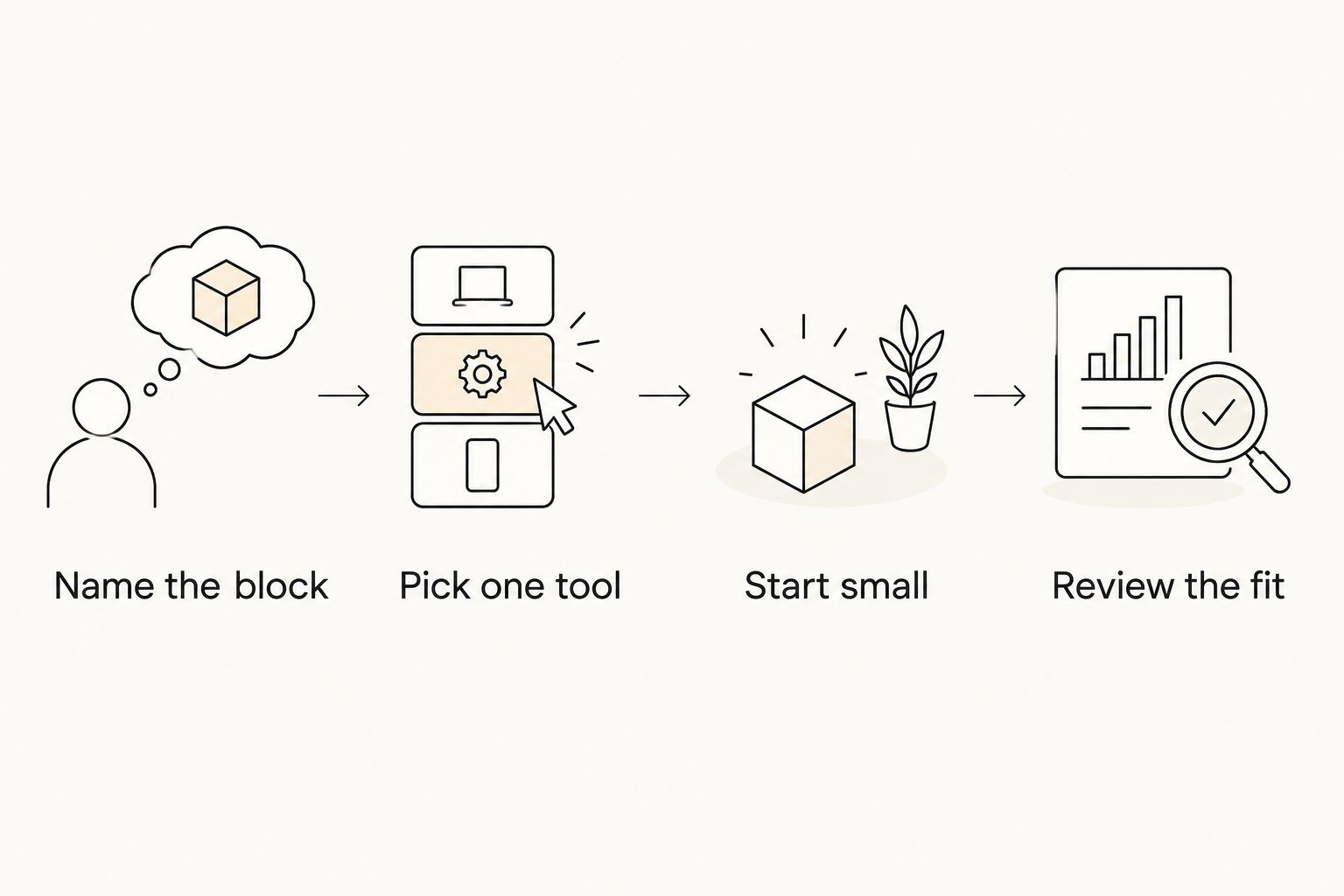
Use this four-step check for your 2026 app choice. Keep the decision smaller than the problem you want the app to solve.
Name the block
Finish one sentence: “I get stuck when…” Use an observable moment, such as forgetting a commitment, staring at several tasks, or leaving the task after opening it. Avoid a broad judgment such as “I am bad at productivity.”
Pick one tool
Match that moment to the shortlist. Task capture points to Todoist, a visible day points to Structured, playful focus points to Forest, and simple prompts point to Apple Reminders. Choose the combined-support option when you want task tools, a timer, and coping exercises together.
Start small
For a first attempt, set aside 5 minutes to enter one task. Then try 10 minutes of the task itself. These are suggested trial lengths, not performance targets or claims about an ideal ADHD attention span.
Review the fit
Give yourself 15 minutes to review the setup after you have used it in an ordinary routine. Ask whether it made the difficult transition clearer. Remove settings that require upkeep without helping that transition.
Do not measure success by how much information you entered during setup. Check whether you remembered the commitment, chose the next action, or started the task. Those are different outcomes, and your app should have a clear job.
Which ADHD app should you choose?
Choose Opora App for ADHD support on iPhone when you want a focus timer, task management, rewards, and coping exercises together. That is the default recommendation for someone who wants those functions in one place.
Choose a specialist instead when the problem is narrower. Todoist handles task capture; Structured makes a planned day visible; Forest adds a playful focus boundary; Apple Reminders keeps basic prompts and lists straightforward. You do not need all of them.
FAQ
What's the best app for ADHD in 2026?
Opora App is the best fit on this shortlist for combined ADHD support on iPhone. It brings a self-calibrating focus timer, task management, rewards, and short coping exercises together; choose a specialist app if you need only one function.
Which ADHD app is best if I keep forgetting tasks?
Todoist is the task-capture recommendation on this shortlist. Apple Reminders is the simpler choice when you mainly need lists and scheduled prompts.
Is Structured better than Todoist for ADHD?
Structured is the better fit for seeing a planned day, while Todoist is the better fit for capturing and organizing tasks. Choose according to whether your main question is when to do something or what needs doing.
Is Forest a complete ADHD planner?
Forest is a focus-session tool, not a complete task planner. Choose your task before starting its tree-growing timer, and keep commitments in a separate planning tool if needed.
Can an ADHD app replace therapy?
An ADHD app does not replace therapy or other clinical care. Timers, reminders, and coping exercises support daily routines rather than provide a diagnosis or a treatment replacement.
Do I need more than one ADHD app?
You do not need multiple apps when one covers the functions you actually use. Add another only when it solves a distinct problem without duplicating your task list or creating extra upkeep.
How long should I try an ADHD app before deciding?
Judge the app after using it for the specific transition you wanted help with, rather than after setup alone. Check whether it helps you remember, choose, start, or return to the task.
One last thing
Before adding another app to your 2026 routine, rename one difficult task so its first physical action is obvious. Replace “deal with taxes” with “open the tax folder,” or “clean the kitchen” with “put the plates in the sink.”
An app can hold the task; you still need a task you can start. can't start. and won't. Sometimes the next useful move is not a better system but a smaller instruction.


